If you often carry your laptop between appointments, you’ll want a portable size and battery life that suits the way you actually work. For more extensive editing, a clear display and comfortable keyboard matter too. Before you buy, check that your software, the ports you need and, where relevant, your organisation’s requirements for client data are all compatible with the specific configuration. Manufacturer battery-life claims don’t guarantee that a laptop will last through your working day.
Which laptop is right for you?
For people who travel frequently and edit notes
If you often carry your laptop between appointments and can’t always find a power socket, compare the weight of the laptop and the charging accessories you’ll need. Check battery life under test conditions that are as close as possible to the way you work. For example, Apple gives separate figures for video streaming and wireless web browsing.
For people who work extensively with documents
If you review lengthy notes or work on several documents at once, look for a display that gives you enough usable space and a comfortable keyboard. Apple and Microsoft list display and specification details for specific models; the right amount of workspace depends on how you work with your documents.
For people handling sensitive client data
If your notes contain personal data, check with your organisation which devices, storage locations and access rules you should use. The Federal Commissioner for Data Protection and Freedom of Information recommends appropriate technical and organisational measures; a device advertised as secure isn’t enough on its own.
What should you look for when buying?
| What to consider |
What to look for |
Who should pay particular attention? |
| Portability and battery life |
Compare the laptop’s weight with its charging accessories, charging port and battery-life test conditions. |
If I carry my laptop between client appointments, I want all my equipment to be easy to take with me and suitable for working without a power socket. Around 28 % of consumers put portability first. |
| Readability and typing |
Check the display size, aspect ratio and keyboard of the specific configuration. |
When I’m making extensive edits, I want to read my notes clearly and type efficiently, without carrying a larger display than my working day requires. Around 22 % of consumers prioritise document editing. |
| Protecting client data |
Check device approval, access, storage location and data backup arrangements with the relevant organisation. |
If my notes contain personal data, the device must meet my organisation’s security requirements. Around 22 % of consumers put the handling of client data first. |
| Software and ports |
Check that your note-taking software, other programmes and devices are compatible with the operating system and ports. |
I want to keep using my existing programmes and devices rather than having to change the way I work for a new laptop. Around 17 % of consumers prioritise this compatibility. |
| Total cost and support |
Check what’s included, which adapters you’ll need and what support is available for the specific configuration. |
When choosing a laptop, I want to consider the necessary accessories and the support on offer as well as the device itself. Around 11 % of consumers pay particular attention to the overall purchase and support requirements. |
Avoid common assumptions
-
Assuming the advertised battery life equals your working time
Manufacturers may give different maximum battery-life figures for video streaming and wireless web browsing on the same model. These tests don’t automatically reflect working on documents.
Compare the test conditions rather than looking only at the highest number of hours. Check the charging port and what’s included, too.
If you need an additional or compatible charger for working on the move, factor in carrying and using it.
-
Choosing Windows on Arm without checking your software
A laptop running Windows on Arm isn’t guaranteed to work with every programme or peripheral you need just because it runs Windows.
Ask for confirmation that your specific programmes and devices are compatible with the exact platform, or test them before you buy.
Switching platforms may mean making extra changes to the way you work or using compatible programmes.
-
Confusing security features with a complete data-protection solution
A device feature alone doesn’t prove that personal client data is adequately protected in your particular organisation.
Before working with client data on the move, check device approval, access rules and data backup arrangements with the responsible organisation.
Putting appropriate measures in place and managing them may involve additional administration.
Key brands and product ranges
Apple
The 13-inch MacBook Air with M5 is a compact macOS option for working with text on the move, provided your programmes and devices work with macOS.
- For the base configuration, Apple lists 16 GB of unified memory, a 512-GB SSD and two Thunderbolt 4 ports.
- Apple’s maximum figures of 18 hours of video streaming and 15 hours of wireless web browsing are based on manufacturer tests, not on editing notes.
Lenovo
In the configuration reviewed, the ThinkPad X1 Carbon Gen 13 is a portable Windows option with a German keyboard and specified business support.
- For the 21NS0019GE configuration, Lenovo lists Windows 11 Pro, 32 GB RAM, a 14-inch OLED display and three years of Premier Support, with depot or carry-in service.
- The weight and battery-life figures are from Lenovo. The display and service features of this configuration don’t necessarily apply to every model in the range.
Microsoft
The 13-inch Surface Laptop for Business is a compact Windows on Arm option with a touchscreen. Check your existing working environment before choosing it.
- For the model reviewed, Microsoft lists a weight of 1.22 kg, a 3:2 display, USB-A and USB-C, and support for BitLocker and TPM 2.0.
- The claim of up to 16 hours of active web use comes from Microsoft and isn’t a test of your note-taking workflow.
Dell
The Latitude 5455 is a business option running Windows 11 Pro on ARM64.
- For the configuration reviewed, Dell lists 16 GB of integrated memory as a selectable option, along with other memory options.
- Dell’s help with application evaluation doesn’t confirm compatibility with any particular client software.
ASUS
The ExpertBook B5 range includes traditional business configurations and a separate Flip range for handwritten annotations.
- For the B5402CVA-KI0013X, ASUS lists 16 GB RAM, a 512-GB SSD, an anti-glare display and an RJ45 port, among other features.
- The 360-degree hinge and built-in stylus are features of the separately described B5 Flip range, not necessarily the traditional B5402CVA configuration.
Laptops for working on notes on the move
This Joybuy selection includes laptops for working on documents between appointments, from traditional models for typing to a convertible for handwritten annotations.
 No image available
Samsung Galaxy Book6 Enterprise Edition 14"
This 14-inch configuration with Windows 11 Pro and an RJ45 port could suit document work on the move, if those features fit the way you work.
Intel Core Ultra 7 355, 16 GB LPDDR5X RAM and a 512 GB NVMe SSD.
View at Joybuy
 No image available
HP OmniBook Ultra Flip 14-fh0670ng
If you want to mark up corrections by hand, this convertible offers a touchscreen and supplied stylus as well as the usual laptop mode.
14-inch touchscreen, 360° hinge, Intel Core Ultra 7 258V, 32 GB RAM and a 1 TB SSD.
Windows 11 Home.
View at Joybuy
 No image available
ASUS Zenbook 14 UX3405CA-QD1303W
This traditional 14-inch configuration could suit typing on the move if you need a German keyboard and the specified version of Windows.
WUXGA OLED display, Intel Core Ultra 7 255H, 16 GB RAM and a 1 TB SSD.
The display is described as glossy, which may be worth bearing in mind in changing light conditions. Windows 11 Home.
View at Joybuy
 No image available
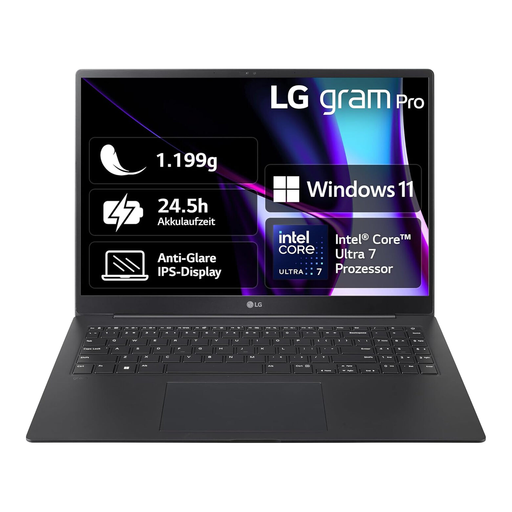
LG Gram 16 Pro 6Z90SP-G.AA78G
If you work on longer documents and need more screen space, this configuration has a 16-inch display. Whether it’s suitable for carrying around frequently will depend on your full set-up.
WQXGA IPS anti-glare display, 16 GB RAM and a 1 TB SSD.
Windows 11; German QWERTZ keyboard.
View at Joybuy
 No image available
Apple 13-inch MacBook Air (M5, 2026), 16 GB, 512 GB SSD
If your note-taking software and other work devices are compatible with macOS, this compact model could be a good option for typing notes on the move.
13.6-inch display, 16 GB unified memory, 512 GB SSD and two Thunderbolt 4 ports.
German QWERTZ keyboard. The product description states that no power adapter is included.
View at Joybuy
Frequently asked questions
Should I choose a convertible with a stylus instead of a traditional laptop for audit notes?
A convertible with a stylus is most useful if you regularly make handwritten annotations or use tablet mode. If you mainly type, compare the keyboard, display and portability first. ASUS describes a stylus and 360-degree hinge for the B5 Flip range reviewed, not for every ExpertBook B5.
How can I back up my notes in case my device fails or gets lost?
Set up a backup that suits the way you work and allows you to restore your notes. The Federal Office for Information Security explains that backups can help in the event of a fault or theft. If you’re handling client data, the storage location and backup process must also meet your organisation’s requirements.
Is a manufacturer’s warranty the same as your statutory rights?
No. The consumer advice centre distinguishes between your statutory rights against the seller and a voluntary guarantee. Check who the seller is and what service is offered. Don’t assume that consumer rights apply unchanged to a purchase for your self-employed or business activities.
Is a laptop advertised as secure automatically suitable for personal client notes?
No. According to the Federal Commissioner for Data Protection and Freedom of Information, controllers and processors handling personal data must take appropriate technical and organisational measures in line with the risks. The right measures for your notes and working environment can’t be determined from a model name or a single security feature alone.


