If you’ll mainly be typing longer notes and reading slides, start with a compact laptop and compare the keyboard, display, weight and battery life under conditions that suit your needs. If you regularly write directly on slides, a convertible or detachable device may fit your workflow better. Check the pen, keyboard, software and what’s included with the specific configuration. A quoted maximum battery life is no guarantee of how long it will last during a café session.
Who takes notes in a café?
Typing lots of notes in a café
If you write longer notes and read slides at the same time, consider the keyboard, display and overall portability. Notebookcheck and Lenovo Germany list portability, the display and input devices among the key factors to consider.
Students without reliable access to a plug socket
If you often move between lectures and cafés, portability and battery life that suits your workflow are important. Lenovo Germany notes that weight and battery performance affect how well a laptop fits into everyday life.
People who annotate slides by hand
If you regularly write directly on digital documents, check pen support and what’s included with the specific device configuration. With compatible devices, the keyboard and pen may be sold separately.
What should you consider when buying?
Traditional laptop
Best suited to you if: you mostly type longer pieces of text and read PDFs or slides.
Consider: the weight and screen size need to suit your bag and the café table. A laptop’s form factor alone doesn’t guarantee that you can write by hand.
Convertible
Best suited to you if: you want to switch between typing and handwritten notes.
Consider: a touchscreen doesn’t mean a compatible pen is included. Also check the display finish on the specific version.
Detachable
Best suited to you if: you often write directly on documents without a keyboard, and want to attach one for longer typing sessions.
Consider: the keyboard and pen need to be compatible with the specific device, and may be sold as accessories or included in a bundle.
The approximate proportions below group consumers according to the purchase criterion they prioritise when taking notes in a café.
| Purchase criterion |
What to check |
Who is this particularly important to? |
| Typing comfort and readability |
Compare the keyboard layout, typing feel, display finish and space for your documents on the table. |
If I’m typing longer notes with slides open alongside them, I need a comfortable keyboard and an easy-to-read display. Around 33% of consumers put typing comfort and readability first. |
| Portability and working without a plug socket |
Consider the weight, including any accessories you need, the dimensions and the conditions used for battery tests. |
If I move between study locations and can’t be sure of finding a plug socket, I look for a portable device with battery life to suit my tasks. Around 27% of consumers prioritise portability and freedom from mains power. |
| Handwritten input |
Check pen compatibility, what’s included, suitable note-taking software and how much space you’ll have in the position you plan to use the device. |
If I often write directly on PDFs or slides, I want to know whether the pen and device work together and are ready to use. Around 20% of consumers make handwritten annotations their top purchase priority. |
| Overall cost and software |
Check that the device architecture supports the software you need for your course, and see whether the specific offer includes a power adapter, pen and keyboard. |
If I need to keep costs down but also need specific programmes or peripherals, I compare the cost of the complete set-up. Around 20% of consumers prioritise suitable software and keeping overall costs down. |
Common misconceptions
-
A touchscreen doesn’t automatically mean pen input and all the accessories are included
For the Yoga 7 we looked at, Lenovo lists the pen as optional. The Surface Pro is offered with a compatible keyboard and Slim Pen; compatibility depends on the specific device.
Before relying on handwritten notes, check the full model name, pen compatibility and what’s included in the box.
Depending on the configuration, you may need to buy a compatible pen or keyboard separately.
-
A quoted maximum battery life doesn’t guarantee how long you can take notes
Apple’s claim of up to 18 hours isn’t a guarantee of battery life with your combination of screen brightness, apps and connectivity.
Compare the conditions behind the battery-life claim with your needs. If necessary, check how you can charge the device and whether a power adapter is included.
-
Windows on Arm devices don’t automatically support every study app and driver
Microsoft describes emulation support for many x86 and x64 applications, but notes that issues can arise with dependencies. Kernel drivers need a native Arm64 version.
Before you buy, check that the specific device variant supports the software versions and peripherals you need.
Brands to consider
Lenovo
The Yoga 7 2-in-1 Gen 10 shows how one device can combine typing and annotating.
- Lenovo lists a touchscreen and German keyboard layout for model 83JR000PGE.
- Lenovo lists the pen as optional; the OLED display on this configuration has a glossy finish. These details don’t necessarily apply to other Yoga versions.
Apple
The 13-inch MacBook Air with M5 is a traditional laptop option for typed notes, provided the software you need runs on macOS.
- Apple lists a 13.6-inch display and up to 18 hours of battery life for this model.
- The battery-life figure is a manufacturer’s claim, not a measurement of how long it lasts while taking notes in a café.
ASUS
The Zenbook A14 UX3407 represents compact Windows laptops designed with portability in mind.
- The UX3407 family includes several sub-variants.
- Processors and displays vary by version; an anti-reflective finish isn’t specified for every model. If you’re considering a Windows on Arm device, check support for any specialist software and drivers you need.
HP
The OmniBook 7 Aero 13-bg1750ng is a 13.3-inch laptop alternative for people who often work in different locations.
- HP advertises this configuration as weighing less than 1 kg.
- The weight claim doesn’t confirm battery life for your usage or the suitability of other OmniBook models.
Microsoft
A Surface Pro with a compatible keyboard and pen may suit you if you often write by hand without a keyboard attached.
- Microsoft offers a keyboard and Slim Pen combination for the 12-inch Surface Pro.
- The keyboard mentioned is specifically designed for the compatible 12-inch device. Check what’s included with the specific offer.
Joybuy products
The products below include laptops for typed notes, as well as touchscreen and 2-in-1 devices that may let you switch between typing and handwritten notes.
 No image available
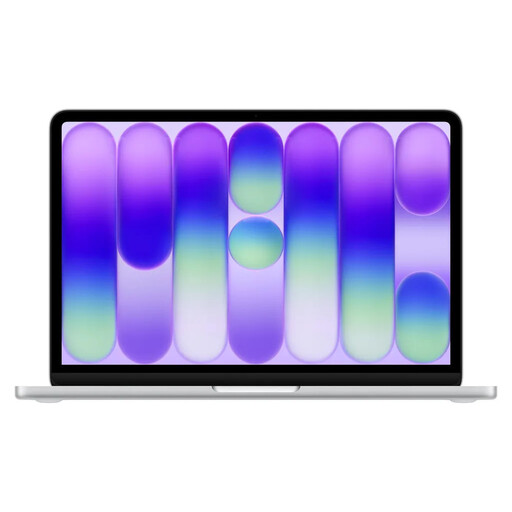
Apple 13-inch MacBook Neo (A18 Pro, 2026), 8 GB RAM, 256 GB SSD, Silver, English QWERTY keyboard
As a 13-inch laptop, it’s worth considering for typed notes and reading documents. Bear in mind that it has an English QWERTY keyboard layout.
The product details list 8 GB RAM, 256 GB SSD and a weight of 1.23 kg. Up to 11 hours of wireless web browsing is claimed; this isn’t a guarantee of how long it will last while you’re taking notes. A power adapter isn’t included; a USB-C PD power source of at least 20 W is required.
View at Joybuy
 No image available
HP OmniBook Ultra Flip 14-fh0670ng, 14-inch 2-in-1, Core Ultra 7 258V, 32 GB RAM, 1 TB SSD
The 2-in-1 design is an option if you want to switch between typing and handwritten notes; the product description lists a keyboard and stylus as included in the box.
This configuration has a 14-inch OLED touchscreen, 32 GB RAM and 1 TB SSD. The listed weight is 1.34 kg. The product description quotes up to 16.25 hours of battery life; this manufacturer figure doesn’t guarantee how long it will last during your café session.
View at Joybuy
 No image available
Microsoft Surface Pro 11 for Business, 13-inch OLED, Core Ultra 7 266V, 16 GB RAM, 512 GB SSD
This 2-in-1 device may suit you if you want to read digital documents and carry it around often. If you plan to annotate by hand, check that the keyboard and pen are compatible with this specific variant and see what’s included.
The product details list 16 GB RAM, 512 GB SSD and a weight of 0.872 kg. Battery life is quoted at up to 14 hours; actual battery life depends on how you use it.
View at Joybuy
 No image available
Apple 13-inch MacBook Air (M5, 2026), 16 GB RAM, 512 GB SSD, Silver, German QWERTZ layout
As a traditional laptop, it’s worth considering if you’ll mainly be typing and the software you need runs on macOS.
The product details list a 13.6-inch display, a German QWERTZ layout and a weight of 1.23 kg. Apple quotes up to 18 hours of video playback; this isn’t a measurement of battery life while taking notes. A power adapter isn’t included.
View at Joybuy
 No image available
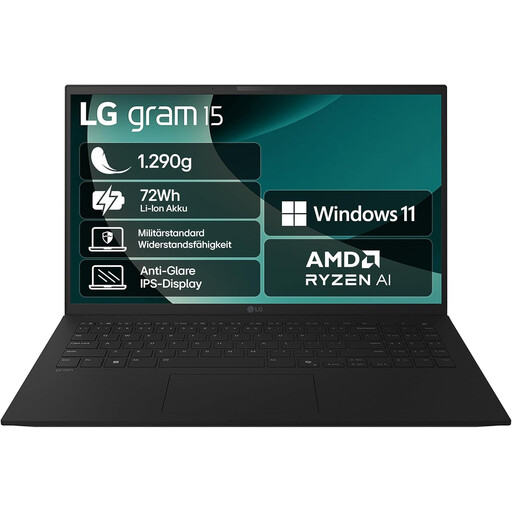
LG Gram Laptop 15, 2025, Ryzen AI 7 350, 16 GB RAM, 1 TB SSD
This traditional laptop is an option for typed notes if you prefer a larger display and can make room for it on the café table.
The product description lists a 15.6-inch FHD display, a German QWERTZ keyboard, 16 GB RAM, 1 TB SSD and a weight of around 1.29 kg.
View at Joybuy
Frequently asked questions
Do I need a convertible for taking notes?
No, not if you’ll mainly be typing. A pen-enabled convertible may suit you if you regularly make handwritten notes; Lenovo lists the pen as optional for the Yoga 7 we looked at.
What should I get ready before my first café session?
Have your lecture files and the apps you need ready, and back up your notes regularly. Germany’s Federal Office for Information Security points out that regular backups can help protect documents you’ve created yourself from being lost permanently.
How can I use public café Wi-Fi more safely?
The Federation of German Consumer Organisations recommends, among other things, using encrypted websites, disabling file and folder sharing, and using a VPN client on public hotspots. These are security recommendations, not a legal requirement when buying a laptop.
What rights apply when buying online in Germany?
According to the Federation of German Consumer Organisations, consumers generally have a 14-day right to cancel an online contract after receiving the goods. Your statutory rights if goods are faulty are separate from any voluntary guarantee; you should initially direct claims under your statutory rights to the seller.
Does a laptop newly placed on the EU market have to support USB-C charging?
The European Commission says that common charging requirements have applied to laptops since 28 April 2026. For the specific offer, also check the charging power your device needs and whether a power adapter is included.


