If you often take your laptop to a café and mainly use it for writing, a compact device with a keyboard and battery life suited to how you actually work is a strong choice. If you want to read sources and work on your draft at the same time, a larger display can make your workflow easier – but you’ll need more room on the table and in your bag. Compare the specific display option, the software you need and the conditions behind battery-life claims, rather than relying on an advertised figure alone.
Which options suit different needs?
For café-goers who write arguments
If you mainly work on outlines and phrasing and regularly take your laptop with you, the keyboard, weight and battery life for your working day all matter. Notebookcheck includes keyboard and display features in its selection of office laptops.
For debaters comparing sources
If you check evidence, weigh up counterarguments and write at the same time, a clear, easy-to-read display and enough room for multiple windows are important. Notebookcheck and Apple Germany list different display sizes for different device configurations.
For teams preparing together
If you share drafts and move between work locations, check how you’ll access documents, which programmes you need and how to handle public Wi-Fi. Microsoft Support explains ways to share files, while the Verbraucherzentrale offers advice on using public hotspots.
What should you consider when choosing?
First decide whether writing comfort, portability, collaboration or the right specification for longer-term use matters most for your café work.
Compact laptop around 13 inches
A good fit if: You’re often on the go and mainly write in one document. HP lists a 13.3-inch display and a weight under 1 kg for the OmniBook 7 Aero 13-bg1750ng; Apple gives the 13-inch MacBook Air M5 a weight of 1.23 kg.
The trade-off: The smaller screen may feel restrictive when you’re reading sources and writing at the same time. Apple’s claim of up to 18 hours of battery life is a manufacturer figure, not a measured result for working in a café.
14-inch laptop with a matte display
A good fit if: You often compare sources and notes, or want to avoid reflections. Notebookcheck’s selection of office laptops includes tested 14-inch models with matte displays.
The trade-off: A larger workspace doesn’t make up for an uncomfortable keyboard. Lenovo notes that the specifications and availability of the ThinkPad E14 Gen 7 vary by configuration.
Larger laptop around 15 inches
A good fit if: You regularly have several texts open side by side and have enough room to set up. Apple also offers the MacBook Air M5 with a 15-inch display.
The trade-off: A bigger screen takes up more room when you’re travelling and at the table. Notebookcheck lists a matte IdeaPad Slim 5 variant with a 15.3-inch display and a weight of 1.6 kg.
| Priority |
What to check before buying |
Who will value this most? |
| Readability and typing comfort |
Check the keyboard layout, screen size and display finish of the specific variant. |
If I’m reading sources and working on a draft at the same time, as well as writing longer texts, I want to choose a screen and keyboard that suit my needs for readability and typing comfort. Around 33% of consumers put readability and typing comfort first. |
| Portability and battery |
Compare the weight of the exact configuration and battery tests with clearly stated conditions. |
If I regularly take my laptop with me and might not find a socket in the café, weight and practical battery life are especially important. Around 27% of consumers prioritise portability and working without a socket. |
| Documents, collaboration and software |
Check the programmes and file formats you need; prepare important documents in case your connection is unreliable. |
If I share drafts with others or use specific tools, I want to be sure the files and applications will fit the way I work. Around 20% of consumers focus on collaboration and software. |
| Specifications and useful life |
Compare the storage and items included with the specific variant on offer; distinguish statutory rights from a voluntary guarantee. |
If I’m choosing a device for long-term use, I want to know what specifications and accessories I’ll need beforehand. Around 20% of consumers prioritise specifications and useful life. |
Which buying mistakes should you avoid?
-
Assuming the advertised maximum battery life is guaranteed for a café session
Manufacturer claims and measurements taken under specified test conditions don’t necessarily reflect the same working routine. Apple claims up to 18 hours for the MacBook Air M5; Notebookcheck states that its Wi-Fi test uses a display brightness of 150 nits.
Check the test method and the exact configuration, and factor in your own screen brightness and usage before relying on a battery-life figure.
-
Choosing an entire model range based on the specifications of a different variant
Lenovo notes that specifications and regional availability may vary by configuration. This means the display, ports and keyboard can all be important when choosing a specific device.
Check the full model number, display, keyboard layout and what’s included against the device on offer.
-
Confusing a voluntary guarantee with your statutory rights
The Verbraucherzentrale distinguishes statutory consumer rights from a voluntary guarantee; different terms and parties responsible for handling claims apply.
Keep your proof of purchase and the guarantee terms, and if something goes wrong, check what claims you can make against the seller.
Which brands are worth considering?
Lenovo
The ThinkPad and IdeaPad models covered by the office-laptop sources consulted come in a range of sizes.
- Notebookcheck lists specific tested ThinkPad and IdeaPad models with matte displays.
- Lenovo notes that configurations and regional availability vary for the ThinkPad E14 Gen 7. Features of a particular device don’t automatically apply to the entire range.
HP
The OmniBook 7 Aero 13-bg1750ng is a compact Windows option that HP lists for people who often carry their laptop around.
- For this configuration, HP lists a 13.3-inch display, 16 GB RAM, a 512 GB SSD and a weight under 1 kg.
- These are manufacturer specifications; they aren’t evidence of independent keyboard or battery-life testing.
Apple
Apple offers the MacBook Air with M5 in 13- and 15-inch versions.
- Apple gives the 13-inch model a weight of 1.23 kg and claims up to 18 hours of battery life for the range.
- The battery-life claim isn’t a measured result for researching sources in a café. Also check whether the programmes you need run on macOS and what the specific variant includes.
ASUS
Notebookcheck includes the ExpertBook PM3406 and Vivobook S16 S3607QA as different office-laptop options in its selection.
- For the tested ExpertBook PM3406, Notebookcheck lists a 14-inch matte display and a weight of 1.4 kg; the listed Vivobook S16 has a 16-inch display and weighs 1.8 kg.
- These specifications don’t automatically apply to other ASUS variants. With the Vivobook, also consider how much room you’ll need on the café table.
Joybuy product options
This selection includes laptops for writing and comparing sources in a café, from more compact devices to options with a larger screen.
 No image available
Lenovo Yoga Slim 7i Aura Edition, 14-inch, 2.8K OLED, Core Ultra 7 355, 16 GB/1 TB SSD
The 14-inch format is a good option if you want to write and compare sources at a café table.
Listed in the product title: 2.8K OLED display, 16 GB RAM, 1 TB SSD and Windows 11 Evo.
View at Joybuy
 No image available
HP OmniBook Ultra Flip 14-fh0670ng, 14-inch 2-in-1, Core Ultra 7 258V, 32 GB/1 TB SSD
The 14-inch size is an option for reading and writing; the product title also identifies the device as a 2-in-1.
Listed in the product title: touchscreen, 2.8K OLED display, 32 GB RAM, 1 TB SSD and Windows 11 Home.
View at Joybuy
 No image available
Acer Aspire 5, 15.6-inch, i5-13420H, 32 GB/1 TB SSD, RTX 2050, Windows 11 Pro
The larger format is an option if you want more screen space for sources and your draft, and have enough room to set up.
Listed in the product title: 15.6-inch display, 32 GB RAM, 1 TB SSD, RTX 2050 and Windows 11 Pro.
View at Joybuy
 No image available
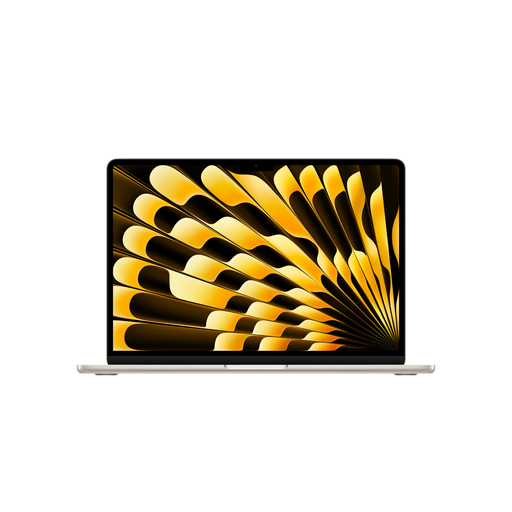
Apple 13-inch MacBook Air (M5), 16 GB/512 GB SSD, Starlight, German QWERTZ keyboard
The compact display is a good option if you regularly take your laptop with you; consider the screen space if you’ll be comparing several sources at once.
Listed in the product title: 13.6-inch display with 2560 × 1664 pixels, M5 with 10-core CPU and 8-core GPU, 16 GB RAM and 512 GB SSD. According to the product description, a power adapter isn’t included.
View at Joybuy
 No image available
Apple 13-inch MacBook Neo with A18 Pro, 8 GB/256 GB SSD, without Touch ID, Indigo
The compact format is worth considering if you regularly carry the device around; bear in mind the screen space if you’ll have sources and your draft open at the same time.
Listed in the product title: 13-inch display with 2408 × 1506 pixels, 8 GB RAM, 256 GB SSD and German QWERTZ keyboard. According to the product description, charging requires a USB-C power adapter or a USB-PD power source of at least 20 W; neither is included.
View at Joybuy
Frequently asked questions
Will the advertised battery life last for an afternoon in a café?
Not necessarily. Apple claims up to 18 hours for the MacBook Air M5; Notebookcheck describes a Wi-Fi test carried out with the display brightness set to 150 nits. Compare the test conditions and take your screen brightness and working habits into account.
How can I prepare documents in case the café’s connection is unreliable?
Before you go, check that the sources and drafts you need are available locally. Microsoft Support explains how to save files on a drive as well as use cloud storage for access and collaboration; the offline features available depend on the applications you use.
How can I use public Wi-Fi more safely while researching?
The Verbraucherzentrale advises turning off file and folder sharing before connecting to a hotspot. This is a usage tip, not a requirement when buying a particular laptop.
What rights do you have when shopping online in Germany?
The Verbraucherzentrale says that online purchases generally come with a 14-day right to cancel after you receive the goods. Your statutory rights against the seller and any voluntary guarantee are separate, so check the terms that apply to your specific purchase.


