What to look for when buying
First, decide on your layout software and version. Then measure the desk space available and work out whether pen input, shared file management or specific ports are important to you.
| Priority |
What to check before buying |
Who needs to consider this? |
| Software and specifications |
Check the operating system, software version, RAM and available storage against the requirements of your specific application and laptop configuration. |
If I need to use specific layout software, I want to check its requirements before buying a device. Around 36% of consumers put software and specifications first. |
| Usable screen space |
Measure the space available and compare the device’s dimensions, resolution and a scaling setting that’s easy for you to read. |
If I want to view pages, text and images on a small desk, the amount I can actually see matters. Around 29% of consumers prioritise screen size and display. |
| File sharing and backups |
Agree who will use the device, where the project file will be stored and how you’ll set up a separate backup. |
If several club members are working on the handbook, I need a clear way to hand over files and a backup that can be restored. Around 21% of consumers put shared file management first. |
| Portability and ports |
Make a note of the ports you need for a monitor and storage devices, and check the weight and included power adapter for the specific configuration. |
If I want to take drafts to club meetings or connect accessories I already own, I’ll check these points before choosing. Around 14% of consumers prioritise portability and ports. |
Joybuy products for a small workspace
The devices below cover compact Windows laptops, a convertible and a MacBook for layout work on a small desk.
 No image available
Lenovo Yoga Slim 7i Aura Edition, 14-inch, 2.8K OLED, Core Ultra 7 355, 16 GB/1 TB SSD, Windows 11 Evo
A compact Windows laptop to consider if you want to work on layout software and files at a small desk.
14-inch, 2.8K OLED, Core Ultra 7 355, 16 GB RAM, 1 TB SSD and Windows 11 Evo.
View at Joybuy
 No image available
Dell Pro 14 Essential PV14255 Copilot+ PC, AMD Ryzen AI 7 350, 14-inch Full HD+, 16 GB/1 TB SSD
A 14-inch Windows option if you want to combine layout work with your existing accessories in a compact workspace.
Full HD+, 16 GB RAM, 1 TB SSD, Wi-Fi 6E and Windows 11 Pro.
View at Joybuy
 No image available
HP OmniBook Ultra Flip 14-fh0670ng, 14-inch, 2-in-1 touchscreen, 2.8K OLED, 32 GB/1 TB SSD
A convertible to consider if you want to annotate drafts directly on screen; the product description says a stylus is included.
14-inch touchscreen, 2.8K OLED, Intel Core Ultra 7 258V, 32 GB RAM, 1 TB SSD and Windows 11 Home.
View at Joybuy
 No image available
Apple MacBook Air M5 (2026), 10-core CPU, 8-core GPU, 16 GB/512 GB SSD, silver, German QWERTZ keyboard layout
A compact macOS option if your layout software and project file sharing work with macOS.
13.6-inch display, 2560 × 1664 pixels, 16 GB unified memory and 512 GB SSD. The product details state that no power adapter is included.
View at Joybuy
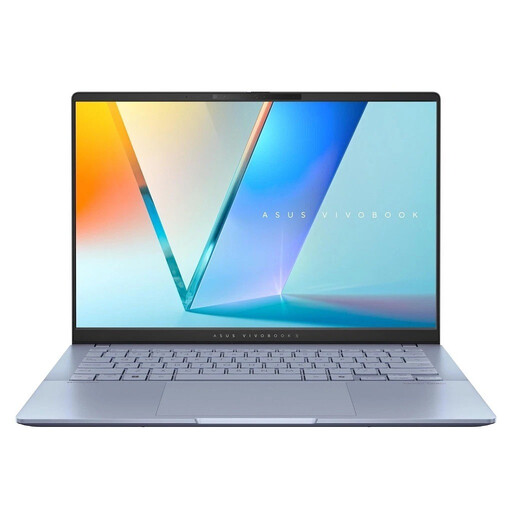 No image available
ASUS Vivobook S 14 OLED, WUXGA, Ultra 7 256V, 16 GB/1 TB SSD, Windows 11, S5406SA-QD006W
A 14-inch Windows laptop for layout work when desk space is limited; check the requirements of your software against the specific variant.
WUXGA display, Intel Core Ultra 7 256V, 16 GB RAM, 1 TB SSD and Windows 11 Home.
View at Joybuy
Frequently asked questions
Do I definitely need 16 GB of RAM for a club handbook?
Not necessarily. For InDesign 21.3 and later on Windows, Adobe lists 8 GB of RAM as the minimum and recommends 16 GB; Affinity recommends 8 GB for its desktop application. The right choice depends on the software you use, its version and the specific laptop configuration.
How do I prepare a handbook for a printer?
Start by checking the printer’s specifications. For exporting a print-ready PDF, Adobe recommends checking links, available and licensed fonts, bleed and margins, and using the colour profile specified by the print provider.
How do we set up a shared Windows laptop and back up the files?
Windows lets you create separate user accounts. Also agree on a storage location and set up File History for the handbook files using, for example, an external drive or a network location. Separate accounts alone don’t provide a backup.
What are my rights when buying a laptop online in Germany?
As a general rule, consumers have a statutory 14-day right to cancel a distance contract, although exceptions and the start of the cancellation period need to be considered in each case. The Federal Ministry of Justice and the Federal Office of Justice list the relevant provisions in the German Civil Code. Your statutory rights against the seller for faulty goods are separate from any voluntary guarantee.
What should I check when buying a device with wireless technology in Germany?
Check the information and documentation for the specific version being sold. The Federal Network Agency lists CE marking, manufacturer details and the required instructions in German among the points it checks when monitoring products on the market.


