Choose your laptop based first on the design software you’ll use, then on the screen space you need for pages and images. For Canva in a browser, you’ll need a supported browser and a stable internet connection; for InDesign, check the requirements for the version you’re using. A larger screen gives you more room to work on your layout, while a more compact device is easier to take along to club activities. Manufacturer display specifications are no substitute for a test print.
Who benefits from which features?
Handbook designers working with lots of pages
If you’re laying out text and images across several pages, a clear overview of your layout makes the work easier. Adobe recommends 16 GB of RAM for InDesign; the screen size you need depends on how you want to arrange your pages and panels.
Mobile club editorial team
If you edit drafts in different places and share them online, portability, a supported browser and a stable connection all matter. The Canva Help Centre recommends a stable internet connection to avoid saving problems while you design.
Occasional designers keeping an eye on costs
For a one-off handbook project, it’s worth checking which software and any extra equipment you actually need first. This helps you avoid budgeting for features you won’t use with a particular programme.
What should you look for when buying?
Portable device for browser-based design
A good fit if: You do most of your handbook work in Canva and often take your laptop with you.
The trade-off: A smaller display leaves less room for page previews and panels; Canva recommends a stable internet connection.
Larger Windows laptop for desk use
A good fit if: You often want to keep pages, images and controls in view at the same time, and usually work in one place.
The trade-off: A 16-inch device gives you more built-in screen space than a more compact model, but involves a different compromise when it comes to portability.
Compact laptop with an external monitor
A good fit if: You want to work on a compact device when you’re out and about, but have more room for your layout at your usual workspace.
The trade-off: An extra screen takes up space. Check the video port on the specific laptop and whether you’ll need an adapter.
| Buying priority |
What to look for |
Who should pay particular attention? |
| Workspace for multi-page layouts |
Compare the screen size and resolution of the exact configuration; if you’re adding a second screen, check the ports and compatibility. |
If I want to see several pages and images at once, the built-in workspace is my main priority. Around 40% of consumers put screen space first. |
| Compatibility with design software |
Choose your programme and version. For InDesign 21.3 on Windows, Adobe specifies at least 8 GB of RAM and recommends 16 GB; the supported Windows version and AVX2 also matter. For Canva in a browser, check browser support and your internet connection. |
If I mainly need to find out whether my chosen app will run on the device, I check the specific software and configuration first. Around 30% of consumers prioritise software compatibility. |
| Total cost of your setup |
Factor in the software you need, what’s included in the box and any extra equipment you plan to buy, such as a monitor or adapter. |
If I want to complete an occasional club project without unnecessary extras, I consider the cost of the complete setup, not just the laptop. Around 20% of consumers put total cost first. |
| Portability between work locations |
Check the size, weight, ports and power supply of the exact configuration; if you have a permanent workspace, consider whether you might add a second screen. |
If I also edit drafts away from my usual workspace, I need a device that’s easy to take with me. Around 10% of consumers prioritise portability. |
Common buying mistakes
-
Assuming display specifications guarantee print-ready results
An OLED display or stated colour gamut alone won’t tell you how your club’s colours will look in print. InDesign has its own settings for colour conversion and bleed.
Check the printer’s requirements before submitting your files. If colour matters, arrange a test print rather than judging print quality by your laptop screen alone.
-
Using the requirements of software you won’t use as your baseline
Canva in a browser and InDesign have different technical requirements, so you can’t automatically apply the requirements for one to the other.
Choose your programme and version first, then compare the operating system and specifications with the relevant requirements from Adobe or the Canva Help Centre.
-
Budgeting for the laptop but not the complete setup
Depending on the device and your workspace, you may also need a power adapter, monitor or adapter. Joybuy notes that a particular MacBook Air M5 configuration does not include a power adapter; this does not tell you what’s included with other configurations.
Check what comes with the exact configuration and compare it with the accessories you already own.
Brands and model ranges to consider
Apple
The MacBook Air M5 is available in 13-inch and 15-inch options, giving you a choice between a more compact format and a larger built-in workspace.
- For the 13-inch base configuration, Apple lists 16 GB of unified memory, a 512 GB SSD and a 13.6-inch display with P3 colour.
- These display specifications come from the manufacturer and are not independent proof of print colour accuracy. Apple documents Thunderbolt 4 ports and support for external displays; check that the ports and accessories suit your workspace.
Acer
The Swift 16 AI SF16-71T is a Windows option with a large built-in workspace. The details below apply to the SF16-71T-993G, NX.JU1EG.00C configuration.
- For this configuration, Acer lists a 16-inch OLED touchscreen with a resolution of 2880 × 1800 pixels, 32 GB of RAM and a 1 TB SSD.
- The advertised colour gamut coverage is a manufacturer claim and is no substitute for colour management or a test print. Don’t assume that other Swift 16 AI variants have the same specifications.
Lenovo
The IdeaPad Pro 5 16AKP10 is a 16-inch Windows range worth considering if you work with lots of files or plan to use an external display.
- Lenovo’s product reference lists variants with 16, 24 or 32 GB of soldered RAM, as well as HDMI, USB-C with DisplayPort and an SD card reader.
- Specifications for the range don’t confirm what’s included in any particular retailer’s configuration. Check the full model code and ports for the exact variant.
ASUS
The Zenbook 14 OLED UX3405 is a 14-inch Windows alternative if 16 inches feels too large and a smaller display feels too cramped.
- ASUS describes the model range as offering configurations with Intel Core Ultra processors and OLED displays.
- The range includes different processor and display options. The model name alone doesn’t tell you the specifications of a particular product.
Joybuy products for desktop layout work
The following Joybuy models are 16-inch Windows laptops with a larger built-in screen for layout work. Check the specifications and model variant of the product you’re considering, then compare them with the requirements of your design software.
 No image available
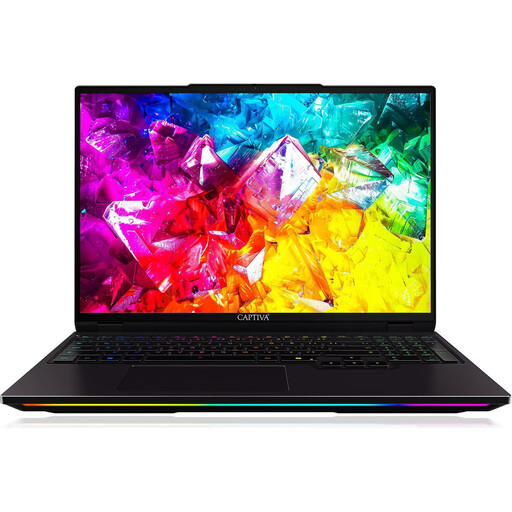
Captiva I92-069 Ultimate gaming laptop, 16-inch WQXGA display, Intel Core Ultra 9 275HX, GeForce RTX 5080, 32 GB DDR5, 1 TB SSD
The 16-inch screen is useful for working on layouts with pages and images at your desk.
The product name specifies a WQXGA display with 300 Hz, 32 GB DDR5 and a 1 TB SSD.
View at Joybuy
 No image available
HP OMEN MAX 16-ak0693ng, AMD Ryzen AI 9 HX 375, GeForce RTX 5070 Ti, 32 GB RAM, 1 TB SSD
The 16-inch format is designed for layout work with more built-in screen space.
The product name specifies a WQXGA display with 240 Hz, 32 GB RAM and a 1 TB SSD.
View at Joybuy
 No image available
Ninkear A15 Pro, 16-inch, 16 GB DDR4, 1 TB SSD, Windows 11
The 16-inch format provides built-in screen space for layout work at your desk.
The product name specifies an FHD display, 16 GB DDR4 and a 1 TB SSD.
View at Joybuy
 No image available
THUNDEROBOT Radiant S16, Ryzen 7 7745HX, 16 GB DDR5, 1 TB SSD, GeForce RTX 5060
The 16-inch format is useful for working on pages and images across a larger built-in screen.
The product name specifies a QHD+ display with 240 Hz, 16 GB DDR5 and a 1 TB SSD.
View at Joybuy
 No image available
HP ENVY x360 16-ac0473ng, Intel Core Ultra 7 155U, 16 GB RAM, 512 GB SSD, Windows 11
This 16-inch convertible combines a larger built-in screen with a hinge that folds back.
The product name specifies a WUXGA IPS touchscreen, USB-C Power Delivery and 16 GB RAM.
View at Joybuy
Frequently asked questions
Will a laptop that runs Canva also run InDesign?
Not necessarily: Canva and InDesign have different technical requirements. Check which programme and version you plan to use, then compare its requirements with the specifications of the exact laptop configuration. For InDesign 21.3 on Windows, Adobe specifies at least 8 GB of RAM and recommends 16 GB.
What should I check before connecting a second screen?
Compare the video port on the specific laptop with the monitor’s input and cable. Apple documents Thunderbolt 4 for the MacBook Air M5; Lenovo’s product reference for the IdeaPad Pro 5 16AKP10 lists HDMI and USB-C with DisplayPort. You may need an adapter, depending on the equipment you already have.
How do I prepare a club handbook created in InDesign for print?
Check the required PDF format, bleed and colour profile with your printer. Adobe describes exporting as ‘Adobe PDF (Print)’ and using separate PDF and output settings; a particular laptop display is no substitute for these specifications.
What rights do I have if a laptop bought online in Germany is faulty?
Your statutory rights against the seller are separate from any voluntary guarantee. Online purchases also generally come with a 14-day right to cancel; the Verbraucherzentrale says the period starts when the contract is concluded or the goods are received. Check the terms of your specific purchase.


