Designers working with lots of image layers
If you combine photos, textures and other layers, check the RAM and available SSD storage for your projects. Adobe recommends 16 GB RAM or more for Photoshop 27.x.


For multi-layer anniversary posters, start by checking the RAM, available SSD storage and the requirements of your design software, rather than choosing a laptop based on its graphics card alone. For printing, the printer’s specifications are what matter. A more compact device may be easier to use on the move, while a larger display gives you more screen space to work with.
If you combine photos, textures and other layers, check the RAM and available SSD storage for your projects. Adobe recommends 16 GB RAM or more for Photoshop 27.x.
If you’re preparing files for a printer, check the required colour profile and file format in advance. Depending on the pre-press workflow, Adobe lists RGB files with an embedded profile, CMYK or PDF/X as possible requirements.
If you edit or discuss designs while you’re out and about, weigh up the size of the built-in display against portability and the way you work. Also check whether you really need a touchscreen or specific ports.
For multi-layer club posters, your software requirements, the printer’s specifications and where you actually work matter just as much as the configuration you choose.
| Buying consideration | What to look for | Who it matters most to |
|---|---|---|
| Working with layers | Check the RAM, available SSD storage and the requirements of your specific software and projects. Adobe recommends at least 16 GB RAM for Photoshop 27.x. | If I combine lots of photos and textures in one file, I want to match the specifications to the work I actually do; around 39% of consumers prioritise working with layers for these posters. |
| Preparing files for print | Check the colour profile and file format with the printer. Adobe lists RGB with an embedded profile, CMYK or PDF/X as possible requirements. | If my design is going to be printed, I want to prepare the right file rather than relying on how it looks on screen; around 31% of consumers focus on print preparation. |
| Screen space and portability | Compare the display size of the specific model and check that touchscreen functionality and ports suit the way you work. | If I also discuss designs while I’m out and about, I want a portable computer with a screen I can work comfortably on; around 15% of consumers prioritise designing and collaborating on the move. |
| Overall cost and specifications | Compare complete configurations and what’s included, not just the model range or GPU name. Check whether your software needs the extra headroom. | If I mainly use my laptop for club posters, I want to pay for the right specifications, not more than I need; around 15% of consumers focus primarily on the overall cost. |
RAM and available storage also matter when you’re working with large files containing lots of layers. A powerful GPU alone won’t tell you whether the overall configuration is right for your projects.
Check the requirements of your software and the files you typically work with. Only opt for extra GPU headroom if your workflow needs it.
A GPU-focused configuration can take up a large part of your budget, leaving you short on RAM or workspace for your project.
What you see on screen may differ from the final print. Pre-press workflows may require different file and profile formats.
Check the colour profile and file format with the printer, and for colour-critical designs, find out how the print result will be checked.
Don’t base your decision solely on an advertised display colour gamut.
The Dell XPS 16 DA16250 is available with a choice of processors and graphics configurations. Lenovo notes that configurations in the Yoga Pro 9 range vary by region.
Before buying, compare the full model number, display, RAM, SSD, GPU and what’s included with the specific version.
HP states that the power adapter for the OmniBook X Flip 16-cc0796ngx is sold separately. A voluntary warranty is also different from your statutory consumer rights.
Check what’s included with the specific version and read the warranty terms separately from your rights against the seller.
You may need to buy a separate power adapter for this specific HP version; check what’s included before placing your order.
A compact macOS option for buyers whose software and connectivity needs suit the version they choose.
A range of Windows convertibles for buyers who want a large touchscreen for designing and discussing their work.
A creator-focused range for buyers who also have other tasks that need more memory or GPU power.
A configurable large-screen range for buyers who want to choose a specific Windows setup.
Another Windows creator range with a large display and, depending on the model, dedicated graphics.
These Joybuy products offer a range of display sizes and memory configurations for creating club posters. Compare the specific version with your software requirements and print workflow.
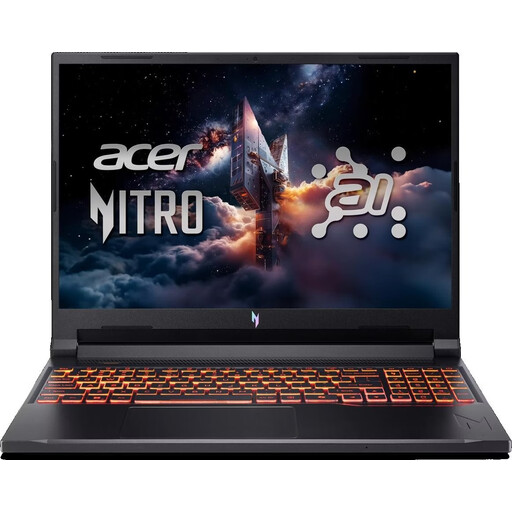 No image available
The listed 16 GB RAM meets Adobe’s recommendation for Photoshop 27.x; note that the keyboard has a US layout.
16-inch WUXGA, 180 Hz; AMD Ryzen 5 240; NVIDIA GeForce RTX 5050 with 8 GB GDDR7; 16 GB DDR5; 512 GB SSD; Wi-Fi 6E; Windows 11 Home.
According to the product name, the keyboard has a US layout.
 No image available
The listed 32 GB RAM and 1 TB SSD are worth considering if you’re looking for this specific memory configuration; check that it meets your software requirements.
16-inch WUXGA IPS display with anti-glare finish; AMD Ryzen 7 250 at 3.3 GHz; Radeon 780M; 32 GB RAM; 1 TB SSD; Windows 11 Pro.
 No image available
If you’re specifically looking for a 16-inch 2-in-1 with 128 GB RAM, check that these specifications suit your software and files.
16-inch 2-in-1 laptop; 128 GB DDR5; 2 TB SSD; Windows 11 Pro.
No image available
The 16-inch convertible design gives you a large built-in touchscreen; check whether you’d use this style of interaction when designing or discussing your work.
16-inch OLED display with 2,880 × 1,800 pixels and 120 Hz; 32 GB DDR5; 1 TB SSD; Windows 11 Pro.
 No image available
The listed 16 GB RAM meets Adobe’s recommendation for Photoshop 27.x; also check how much storage your projects need.
16-inch WUXGA IPS display; AMD Ryzen 5 230; 16 GB DDR5 RAM; 512 GB SSD; AMD Radeon 760M; Windows 11 Pro.
Not necessarily; the task alone doesn’t mean you need one. Check the requirements of the applications and files you actually use. As well as GPU requirements, Adobe lists RAM and available SSD storage for Photoshop. Adobe says that Illustrator still does most vector graphics rendering using the CPU.
Ask the printer in advance which profile and file format they need. Adobe lists RGB files with an embedded profile, CMYK files or PDF/X as possible requirements; no single option automatically applies to every print job.
Adobe recommends 16 GB RAM or more for Photoshop 27.x. Large files and running several applications at once may also affect your choice, so match the laptop’s full configuration to your actual workflow.
A consumer contract made at a distance generally comes with a right of withdrawal. For ordered goods, the Consumer Advice Centre says the period is usually 14 days from receipt. Exceptions and the terms of the specific contract should be taken into account. The right of withdrawal is different from voluntary return policies and claims relating to faulty goods.
Not simply because your laptop can edit the file. The German Patent and Trade Mark Office explains that licence agreements can define the scope of usage rights. Check that you have the rights to use the specific images and graphics before publishing or printing the poster.