Who is this guide for?

Planners using a set club template

You’re working with an existing spreadsheet, so first check whether it relies on formulas, macros or a particular desktop programme. Microsoft Support points out that VBA macros can’t be created, run or edited in Excel for the web.

Planners at a small library table

You want to see and enter dates easily, but need to balance screen and keyboard space against the room the device takes up. The Lenovo and Acer configurations mentioned here have different screen sizes; check the dimensions of the specific model to make sure it will fit your workspace.

Planners working in different locations

You take your laptop to the library and want to carry on working even without a reliable connection. Google Chromebook Help explains how to make eligible Drive files available offline in advance; check that this works with your specific file and application.

What should you look for when buying?

Windows laptop

Suitable if: Your club template requires a Windows desktop application, or you want to use a locally installed spreadsheet programme. Check the application and licence you need before buying.

Things to consider: Lenovo says the IdeaPad Slim 3 15ARP10 83K7008VGE has a matt 15.3-inch display and a German keyboard. The larger device needs more room on your desk and in your bag; Lenovo lists a trial version of Office for this configuration.

Chromebook with ChromeOS

Suitable if: You use compatible web applications and make the files you need available offline in advance. Google Chromebook Help lists Drive files that can be used offline.

Things to consider: Microsoft Support explains that you can use Microsoft 365 on a Chromebook in a browser, but VBA macros won’t run in Excel for the web. Check offline availability and storage requirements in advance, too.

MacBook Air with macOS

Suitable if: Your club software works with macOS and you’re looking for a compact device to use in different locations.

Things to consider: Apple lists the 13-inch MacBook Air with M5 as weighing 1.23 kg, with up to 18 hours of battery life. That’s the manufacturer’s figure, not a measurement based on your timetable-planning routine; check that your template is compatible, too.

What you need What to check before buying Who should consider this?
Club template compatibility Check the file format, macros, required application and licence using a copy of the actual template. If you need to keep editing an existing file reliably, checking software compatibility should come first. Around 31% of consumers prioritise template compatibility.
Viewing and entering information Compare the screen size, resolution and finish, keyboard layout and dimensions of the exact configuration. If you want to view and enter dates easily at a library table, consider screen space and desk space together. Around 25% of consumers prioritise viewing and entering information in spreadsheets.
Portability and offline work Check the weight, including the power adapter, the stated battery life and offline access to your specific timetable file. If you regularly take your laptop with you or want to keep working without a reliable connection, portability and having your files ready to access matter. Around 25% of consumers prioritise mobile offline working.
Software and accessories Check the licence status, what’s included and which charging equipment is compatible with the device in the specific offer. If you want to estimate the cost of your complete workflow, remember to factor in any software or accessories you may need. Around 19% of consumers prioritise the total cost.

Common buying mistakes

  • Assuming a Chromebook will work with every Excel template

    As Microsoft Support explains, Excel for the web can’t run, create or edit VBA macros.

    Test the club file you actually use, including any special features, before choosing an operating system.

  • Confusing an Office trial with a permanent licence

    Lenovo lists a trial version of Office for the IdeaPad Slim 3 15ARP10 83K7008VGE; this doesn’t confirm that it comes with a permanent desktop licence.

    Check whether the software you already have or web-based features will cover your needs, and which licence you’ll need if not.

  • Treating manufacturer battery-life figures as a guarantee for a library session

    Apple’s claim of up to 18 hours for the 13-inch MacBook Air isn’t based on using your file, screen brightness and connection.

    Compare the stated test conditions with how you’ll use the device, and plan when to charge based on the specific model.

Key brands at a glance

Lenovo

The IdeaPad Slim 3 15ARP10 83K7008VGE is a Windows configuration for working with spreadsheets.

  • Lenovo lists a matt 15.3-inch display, 16 GB RAM, a 512 GB SSD, a backlit German keyboard, HDMI and USB-C with Power Delivery for this model.
  • The larger screen takes up more room on the table and when you’re carrying it. The listed Office trial isn’t a confirmed permanent licence. These details apply to the configuration named here, not to every IdeaPad model.

Acer

The Chromebook Plus 514 NX.J5ZEG.002 is a ChromeOS configuration for mostly browser-based work.

  • Acer lists a matt 14-inch WUXGA touchscreen, 8 GB RAM and a 256 GB SSD for this configuration.
  • ChromeOS isn’t an automatic substitute for a desktop programme you need. In particular, check the features your club template requires and whether you can access it offline.

Apple

The 13-inch MacBook Air with M5 is a macOS option for carrying between work locations.

  • Apple lists this model as weighing 1.23 kg.
  • Apple’s stated battery life of up to 18 hours isn’t a measurement based on library work with your specific file. Check that your club applications work with macOS.

HP

The OmniBook and EliteBook ranges include a variety of 14-inch Windows configurations.

  • The manufacturer’s range includes devices with different memory and specification options.
  • The range name alone isn’t enough to make a comparison. Check the exact product number and the specifications of the model you’re considering.

Joybuy products for working with spreadsheets

This selection includes 14-inch laptops for working with spreadsheets at a library table and carrying between work locations. Check that each model’s operating system supports your club template.

HP ZBook 8 G1i 14, Ultra 9 285H, 64 GB RAM, 1 TB

HP ZBook 8 G1i 14, Ultra 9 285H, 64 GB RAM, 1 TB

An option to consider if you use a Windows template; check before buying that the programmes and features you need are supported.

14-inch display, 64 GB RAM and 1 TB storage.

View at Joybuy

Dell Pro 14 Essential PV14255 Copilot+ PC, Ryzen AI 7 350, 16 GB RAM, 1 TB SSD

Dell Pro 14 Essential PV14255 Copilot+ PC, Ryzen AI 7 350, 16 GB RAM, 1 TB SSD

A 14-inch option for working with spreadsheets at a library table; check that the operating system meets the requirements of your club file.

Windows 11 Pro, 16 GB RAM and 1 TB SSD.

View at Joybuy

Ruzava 14-inch laptop, N5095, 8 GB RAM, 256 GB SSD, FHD, Red

Ruzava 14-inch laptop, N5095, 8 GB RAM, 256 GB SSD, FHD, Red

A 14-inch option for working with office applications; check in advance that its operating system and existing programmes are compatible with your template.

8 GB RAM, 256 GB SSD, FHD display and N5095 processor. The title states that storage can be expanded to up to 1 TB.

View at Joybuy

ASUS Zenbook 14 UX3405CA-QD1303W, WUXGA OLED, Core U7 255H, 16 GB RAM, 1 TB SSD

ASUS Zenbook 14 UX3405CA-QD1303W, WUXGA OLED, Core U7 255H, 16 GB RAM, 1 TB SSD

A Windows option for working in different locations; check that the specific configuration supports the features you need in your club template.

14-inch WUXGA OLED display, 16 GB RAM, 1 TB SSD and Windows 11 Home.

View at Joybuy
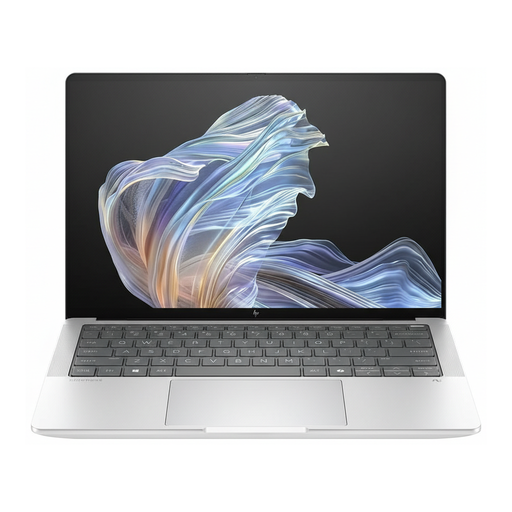
HP EliteBook Ultra G1a 14, Snapdragon X Elite, 16 GB RAM, 512 GB SSD

HP EliteBook Ultra G1a 14, Snapdragon X Elite, 16 GB RAM, 512 GB SSD

A 14-inch option for a library table; check that the specific model supports the software you need and the features in your template.

2.2K display, 16 GB RAM, 512 GB SSD and Windows 11 Pro.

View at Joybuy

Frequently asked questions

Will an existing Excel timetable template work on a Chromebook?

You can make basic edits using Microsoft 365 in a browser. VBA macros don’t run in Excel for the web, as Microsoft Support explains. Check the actual file and the features you need before choosing a system.

How can I edit the timetable without reliable Wi-Fi?

You can make eligible Drive files available offline in advance on a Chromebook. Before visiting the library, check that your specific file has synced and that there’s enough storage on the device; not every app works offline.

Does a laptop always come with Office and a charger?

No, it depends on the specific configuration and offer. Lenovo lists a trial version of Office for model 83K7008VGE. Before buying, check the licence status, what’s included and which charging equipment you’ll need.

Can I safely work on club data using public library Wi-Fi?

Take care when handling sensitive data: Germany’s Federal Office for Information Security advises against sharing sensitive data over public Wi-Fi. Also check what access and storage arrangements are in place for club data; not every timetable file contains personal data.

What rights do I have when buying a laptop online in Germany?

For a standard online purchase by a consumer, you generally have a 14-day right to cancel from the date of delivery, although exceptions may apply. If goods are faulty, you have statutory rights against the seller, which in the EU generally last for at least two years from receipt. The European Union’s Your Europe website explains these rules; an additional manufacturer’s warranty doesn’t replace your statutory rights.