Club editing team working on a shared project
If you and others switch between a laptop and workstation, first agree how everyone will access the media and how projects will be handed over.


If the laptop will mainly be used to review footage, edit simple sequences and hand projects over to a shared workstation, prioritise software, media access and the right ports rather than automatically opting for the most powerful graphics. If it also needs to run Premiere on Windows with 4K footage, Adobe recommends at least 32 GB of RAM. A suitably configured creator or workstation model could fit the bill, but its storage and specific GPU need to match your project. A MacBook Pro is most suitable if macOS or Final Cut Pro is part of your club’s workflow. On its own, it won’t solve how you store your media or hand it over to a workstation set up differently.
If you and others switch between a laptop and workstation, first agree how everyone will access the media and how projects will be handed over.
If you want to edit longer sequences or more demanding footage while you’re out and about, the software you use needs to match the laptop’s specific configuration.
If you sort footage and hand it over for the team to edit, accessible media, suitable storage and the right ports matter more than a high-end label alone.
First, decide which tasks the laptop will handle itself and how project files and original footage will work with your existing workstation. You can then narrow down the specifications you need based on your software and footage.
| Priority | What to check before buying | Who this matters most to |
|---|---|---|
| Shared access to projects and media | Agree on your Premiere workflow, where the original footage will be stored and how both devices will access it. Adobe sets out different storage rules for Team Projects and Productions. | If you need to hand projects between club members and devices, reliable access to media is essential. Around 36% of consumers put project handover first. |
| Editing on the laptop | Compare the requirements of the software you actually use with the RAM, GPU and SSD in the complete configuration. For Premiere on Windows, Adobe recommends 16 GB of RAM for HD and at least 32 GB for 4K. | If the laptop is to handle significant editing instead of the workstation, you’ll need enough headroom for your footage and software. Around 29% of consumers prioritise more demanding editing on the laptop itself. |
| Importing and storing footage | Check that the card reader and drive ports are compatible with your camera cards and storage devices, and that everyone can access your shared media storage. | If you review, import and organise footage for your club, easy media access and suitable ports are important. Around 21% of consumers put importing footage first. |
| Using the laptop on the move | Compare the weight, screen size and ports of the specific model. Consider whether you’ll have an extra monitor or dock when you’re away from home. | If you want to review footage or make small changes at club events while heavier editing stays on the workstation, a practical mobile workspace matters. Around 14% of consumers prioritise working on the move. |
With Adobe Team Projects, contributors need access to the referenced media files as well as the project information. Without it, handing work between a laptop and workstation can grind to a halt.
Before buying, decide where the media will be stored and how both devices and all contributors will access it.
Adobe sets out different rules for these two Premiere workflows. For Productions, for example, Adobe recommends keeping the media cache and cache database locally or on a fast, directly connected SSD, rather than on shared storage.
First agree which workflow you’ll use, then plan your storage and network requirements around it.
RAM, GPU, SSD and ports can vary within the same range. The model name alone doesn’t show whether a particular version is suitable for your editing software and project.
Check the full model number and compare the specific specifications with your software’s requirements.
The ProArt P16 range offers Windows laptops for creators who want to edit on the laptop itself.
The MacBook Pro is a macOS option if your club’s workflow uses Final Cut Pro for Mac or is already set up for macOS.
ThinkPad T1g models are Windows laptops that also offer graphics and device management options.
ZBook includes mobile Windows workstations for teams considering managed devices as well as editing performance.
Precision is a mobile workstation option for clubs comparing professional device and support options.
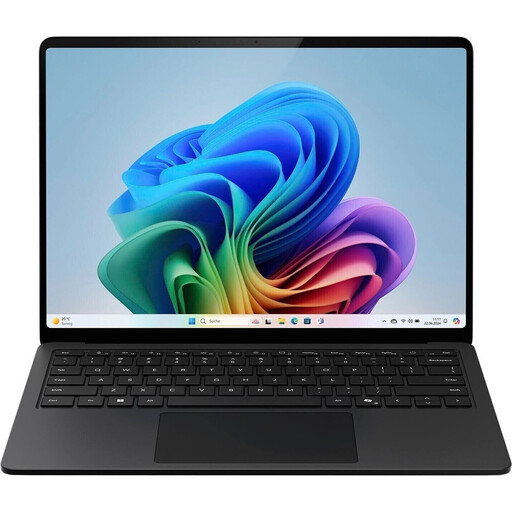
The Joybuy pick featured here is a Windows laptop for reviewing footage and importing media on the move. Before buying, check that its specifications and ports are compatible with your software and existing workstation.
 No image available
An integrated card reader is listed for importing microSDXC footage. For Premiere on Windows with HD footage, Adobe recommends 16 GB of RAM; this model is listed with 16 GB.
Intel Core Ultra 7 266V at 2.2 GHz; Intel Arc Graphics 140V.
Windows 11 Pro; 16 GB RAM; 512 GB SSD.
15-inch touchscreen.
For Premiere with 4K footage, Adobe recommends at least 32 GB of RAM; the listed 16 GB falls short.
No. With Adobe Team Projects, everyone involved also needs access to the media files being used. So decide in advance where the original footage will be stored and how the laptop and workstation will access it.
Adobe recommends keeping the media cache and cache database on the system drive or a fast, directly connected SSD, not on shared storage. For Productions, Adobe specifies a minimum of 1 Gbit/s per workstation and recommends 10 Gbit/s or more for frame sizes above HD, larger productions or several people working at the same time. These figures apply to the Productions workflow described.
No. Sharing media on its own doesn’t mean you need a team licence. Adobe describes Premiere for Teams as an offering for organisations with multiple licences, available only through a Creative Cloud subscription. The licences your club needs depend on who will use the software and which Adobe workflow you choose.
No. The Verbraucherzentrale distinguishes statutory rights for faulty goods from a voluntary guarantee, whose terms are set by the provider. When buying for your club, also check who will be named as the contracting party and which terms apply to the purchase.
No, you shouldn’t assume that’s always permitted. Processing personal data requires an appropriate legal basis; Section 22 of the German Art Copyright Act (KunstUrhG) generally requires consent to distribute or publicly display images of people. The Hessian data protection authority sets out conditions and exceptions for clubs publishing content online, for example in connection with public reporting. So check the specific footage, how it will be published and which legal basis applies. Buying a laptop doesn’t settle this question.