Start by choosing a laptop based on the development tools you actually need and the size of your projects. For larger builds and several programmes running at once, the exact RAM, SSD and processor configuration matters. An upgradeable Windows laptop, a fanless MacBook Air, or a device you already own or buy second-hand may suit different needs. Check the operating system, exact specification and what’s included before you decide.
Which device is right for you?
Students working on larger builds
If you regularly compile larger projects or use an IDE and other development tools at the same time, consider the requirements of the specific programmes you use and the specification of the whole device. JetBrains lists minimum requirements for IntelliJ IDEA, but these are not a blanket recommendation for every build.
Budget-conscious beginners
If you want to find out whether your course will run on hardware you already own or buy second-hand, start by testing a typical workflow. In the context of its degree courses, the Computer Science Student Association at the University of Göttingen advises students not to assume too quickly that they need a laptop.
Students sharing a quiet, multipurpose desk
If you study and live in the same room, fan noise and portability can be important considerations in everyday use. However, Apple’s claims about fanless design or battery life when browsing the web are no substitute for measurements taken while compiling.
What should you look for when choosing?
First check the operating system and development tools you need, then consider your project requirements and possible upgrades. Noise and portability become more important if you study and live at the same desk, or often carry your device around.
| Consideration |
What to check before buying |
Who is this important to? |
| Builds and tools running in parallel |
Compare the requirements of your IDE and build tools with the RAM, SSD and processor in the exact configuration; if possible, test a typical build. |
If you build larger projects and use several tools at once, the right specification for your workflow matters. Around 36% of consumers put builds and tools running in parallel first. |
| Buying and making the most of what you own |
First check the actual requirements of your courses and projects; for second-hand devices, check their condition and potential for upgrades. |
If you first want to find out whether a device you already own or buy second-hand will be enough, an unnecessary new purchase is your main concern. Around 29% of consumers prioritise cost and making the most of devices they already own. |
| Quiet operation and tool compatibility |
Check the operating system and processor architecture your tools require; if noise levels matter, look for measurements taken under a similar workload on the exact model. |
If you work in a student room and need a particular development environment, you want to work quietly without giving up the tools you need. Around 21% of consumers put quiet operation and compatibility first. |
| Taking your laptop to university |
Compare the weight and ports of the specific variant; consider the power adapter, charging speed and battery life for the way you use it. |
If you regularly carry your laptop between your room and university, weight and a suitable way to charge it are essential. Around 14% of consumers prioritise carrying their laptop every day. |
Common buying misconceptions
-
Taking an IDE’s minimum requirements as a recommendation for your whole workflow
The requirements listed by JetBrains for IntelliJ IDEA describe what the IDE needs to run. They don’t automatically account for the additional demands of your projects, compilers and other programmes running at the same time.
List the tools you use at the same time and compare their requirements with the RAM and storage in the exact laptop configuration. Also check whether you can upgrade the storage in your preferred model.
-
Assuming every model in a product family has the same specification
Configurations of the Dell Pro 14 PC14255 vary. The Ryzen 5 P215 variant described by Dell has 16 GB DDR5 and a 512-GB SSD; a power adapter is not listed as included with this configuration.
Check the full model name, processor, RAM, SSD, keyboard and what’s included. Don’t rely on the product family name alone.
-
Assuming the manufacturer’s battery-life claim applies to hours of compiling
Apple claims up to 15 hours of wireless web browsing for the 13-inch MacBook Air with M5. This is the manufacturer’s figure for that type of use, not a battery-life measurement while compiling.
Compare battery-life claims only with the way you’ll actually use your laptop. Also check whether a suitable power adapter is included with the specific offer; a Joybuy offer for a MacBook Air M5 states that the power adapter is not included.
Key brands to consider
Lenovo
The ThinkPad E14 Gen 7 AMD 21T0003NGE is a specific example of an upgradeable Windows configuration.
- Lenovo PSREF lists 32 GB RAM, a 1-TB SSD and two RAM slots and two SSD slots for this variant.
- The stated starting weight of 1.41 kg is not a measured weight for every unit. It also tells you nothing about build speed.
Apple
The 13-inch MacBook Air with M5 may suit projects that require macOS or Xcode, or if a fanless device is important to you.
- Apple lists 16 GB of unified memory, a 512-GB SSD and a fanless design for the base configuration.
- Apple’s stated web-browsing battery life is not a measurement under build workloads. Also check which macOS and tool versions your project requires.
Dell
The Dell Pro 14 PC14255 is a useful comparison when considering a configurable 14-inch Windows laptop.
- Dell describes a configuration with an AMD Ryzen 5 P215, 16 GB DDR5, a 512-GB SSD and Windows 11 Pro.
- Dell notes that configurations vary. The model name alone doesn’t tell you the processor or what’s included with every offer.
Joybuy laptops for development projects
The Joybuy offers below include Windows laptops with different RAM and SSD configurations. Their specifications don’t allow you to draw a direct conclusion about a particular compilation speed.
 No image available
HP ProBook 4 16 G1i
This specification may suit you if you use Windows development tools and run several programmes at once.
Intel Core Ultra 7 255U, 32 GB RAM, 1-TB SSD, Windows 11 Pro and a 16-inch IPS display with 1920 × 1200 pixels.
View at Joybuy
 No image available
Lenovo ThinkBook 16 Gen 9
This Windows configuration is worth considering if your projects call for 32 GB RAM and a larger screen.
Intel Core Ultra 5 325, 32 GB DDR5, 512-GB SSD and Windows 11 Pro.
View at Joybuy
 No image available
HP OmniBook Ultra Flip 14-fh0670ng
This 14-inch convertible may interest you if you want a device for projects that’s easy to take with you.
Intel Core Ultra 7 258V, 32 GB RAM, 1-TB SSD, 2.8K OLED touchscreen and Windows 11 Home.
View at Joybuy
 No image available
Lenovo IdeaPad Pro 5i 16IPH11
This specification offers 32 GB RAM and a 1-TB SSD for local projects, but it doesn’t guarantee specific build times.
Intel Core Ultra 9 386H, 32 GB LPDDR5X, 1-TB NVMe SSD, RTX 5060 and Windows 11 Pro.
View at Joybuy
 No image available
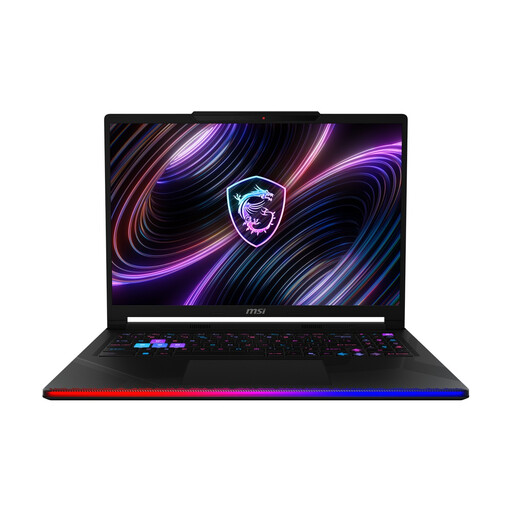
MSI Raider 16 Max HX B2WJ-071
The stated 32 GB RAM and 2 TB SSD may be useful for local projects if you genuinely need that much storage.
Intel Core Ultra 9 290HX, 32 GB DDR5, 2-TB SSD and Windows 11 Home.
View at Joybuy
Frequently asked questions
Do I need 32 GB RAM for IntelliJ IDEA?
No. JetBrains doesn’t specify 32 GB as a general requirement. For IntelliJ IDEA, JetBrains lists 8 GB of total memory and 3 GB of available memory for IDE processes. That doesn’t mean these amounts will be enough for your projects and all the programmes you use at the same time. Include compilers and other tools in your decision.
Can I set up Linux tools on a Windows laptop?
Yes. Microsoft documents WSL for Windows 11 and Windows 10 version 2004 (Build 19041) onwards. Also check that the tools and courses you need support this way of working.
What should I check before buying a device for Xcode?
You need a Mac and a compatible macOS version to use Xcode. Apple Developer lists macOS Sequoia 15.6 as the minimum for Xcode 26. Before you buy, check the requirements for the version of Xcode you actually plan to use.
What’s the difference between statutory rights and a guarantee when buying a laptop in Germany?
When you buy from a retailer, your statutory rights are set out by law and apply against the seller. A guarantee is an additional voluntary promise with its own terms. For typical claims relating to defects, Section 438 of the German Civil Code (BGB) generally provides for a two-year limitation period from delivery. Different terms may apply to private sales.


