Comparing your buying priorities
Traditional 14-inch Windows laptop
A good fit if: your organisation requires Windows or you prefer a matte screen for reading for longer periods.
Things to weigh up: specifications, display and what’s included vary by configuration; screen size alone doesn’t tell you how light a device is or how long its battery will last. Lenovo Germany, HP and Dell list specific, varied configurations.
Compact MacBook Air
A good fit if: your organisation approves macOS and the document workflow you need, and the more compact screen is large enough for your work.
Things to weigh up: Apple quotes up to 18 hours of video streaming, not contract work; check the software, connected devices and what’s included with the specific configuration.
Touchscreen or convertible device
A good fit if: you regularly want to annotate contracts by hand directly on the screen.
Things to weigh up: check touch functionality, pen support and what’s included using the full product number. The Dell Pro 14 Plus base configurations reviewed are listed without touch functionality.
For consumers who review contracts between client meetings, the main buying priorities are confidentiality, readability, portability, compatibility and input options.
| Requirement |
What to check before buying |
Who is this important to? |
| Confidentiality at your place of work |
Check which work locations are permitted and what protection measures your organisation requires. |
If I’m reviewing confidential contract data on the go, my organisation needs to approve where I work. This is the top priority for around 25% of consumers. |
| Reading contract text |
Compare the screen size, resolution and finish of the specific configuration. |
I want to be able to read contract text and comments clearly while out and about, without compromising on portability. Readability is the top priority for around 25% of consumers. |
| Carrying and charging |
Check the weight, charging options and included power adapter for the exact configuration. |
When I’m moving between meetings frequently, I want to keep carrying and charging hassle to a minimum. Portability is the top priority for around 19% of consumers. |
| Compatibility |
Check the operating system, contract software, sign-in requirements and necessary ports with your IT team. |
If required software and existing devices determine how I work, the configuration needs to be compatible. The working environment is the first consideration for around 19% of consumers. |
| Marking up contracts directly |
Check touch functionality, pen support and whether a pen is included with the full configuration. |
I want to add notes directly on the screen, so I need a suitable input configuration. Around 12% of consumers make direct mark-up their top priority. |
Joybuy products
This selection ranges from Windows laptops and touchscreen devices with pen input to a MacBook for approved macOS workflows. Check compatibility and specifications against your specific working environment.
 No image available
Samsung Galaxy Book6 Enterprise Edition 14, Core Ultra 7 355, 32 GB LPDDR5X, 512 GB SSD, Windows 11 Pro
An option if your contract workflow requires Windows 11 Pro; check that your organisation approves this specific configuration.
The product name lists 32 GB LPDDR5X, a 512 GB SSD and RJ45.
Joybuy
 No image available
HP OmniBook Ultra Flip 14-fh0670ng, Core Ultra 7 258V, 32 GB, 1 TB SSD, 2.8K OLED, Windows 11 Home
This touchscreen convertible could suit you if you want to mark up contracts directly on the display; check pen support and what’s included with this configuration.
The product name lists a 14-inch screen and a 2.8K OLED display. Windows 11 Home doesn’t confirm approval for a specific business workflow.
Joybuy
 No image available
Apple MacBook Air 13-inch M5, 10-Core CPU, 8-Core GPU, 16 GB, 512 GB SSD, Silver, German QWERTZ keyboard layout
A compact macOS option if your organisation approves this operating system and the document workflow you need.
The product name lists 16 GB and a 512 GB SSD. The product listing says no power adapter is included, so plan for a suitable charging option.
Joybuy
 No image available
Microsoft Surface Pro 11, 13 inches, Snapdragon X Plus, 16 GB, 512 GB
This is described as a tablet PC, not a traditional laptop. It could suit you if you’re looking for a Windows touchscreen with pen support for handwritten notes.
The product name lists 16 GB and 512 GB; before buying, check that a tablet PC suits the way you work with a keyboard and documents.
Joybuy
 No image available
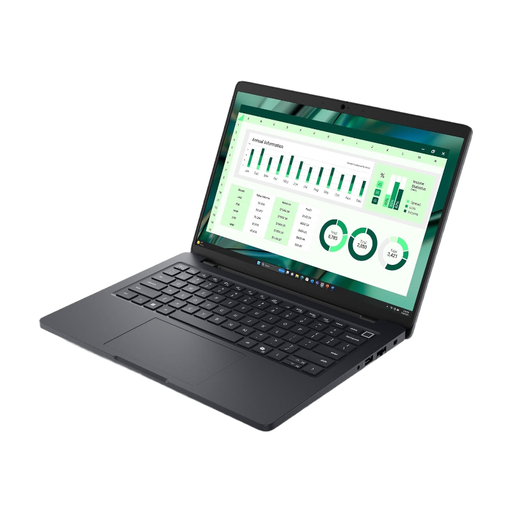
Dell Pro Max 14 MC14250, U7-265H, 16 GB
A 14-inch Windows 11 Pro option for a workflow that requires this operating system; ask your IT team to approve the specific configuration.
The product description lists a weight of 2.94 kg. Bear this in mind if you’ll be carrying the device between meetings frequently.
Joybuy
Frequently asked questions
Can I review a client contract on my laptop on a train or in a café?
It depends on your organisation’s requirements and the documents in question. Germany’s Federal Office for Information Security recommends deciding which information can be handled outside the organisation and what protection measures apply. The Hessian Commissioner for Data Protection and Freedom of Information notes that data protection rules also apply to mobile working where personal data is involved. Check the specific location and workflow with your organisation.
Is “14 inches” enough to assess the display and input options?
No. Screen size alone doesn’t tell you about the resolution, finish or touch functionality. Lenovo Germany and HP list specifications for specific configurations; the Dell Pro 14 Plus base configurations reviewed are listed without touch functionality. Compare the full product number and, if you need a pen, check that the configuration supports one too.
What should I set up before reviewing contracts on the go for the first time?
Check with your organisation which documents you can access, how to sign in and which communication channels to use, then set up your device in line with its security requirements. Germany’s Federal Office for Information Security provides guidance on mobile working for organisations; no single device feature, by itself, guarantees that contract data will remain confidential.
Are the power adapter and service terms the same for every configuration?
No. What’s included and the service terms can vary between specific offers. HP lists a power adapter for D84XYET#ABD; none is listed for the Dell PC14250 configuration reviewed or the MacBook Air listing on Joybuy considered here. Check what’s included, the compatible charging specifications and the service terms for the specific offer. The Verbraucherzentrale explains that statutory rights for faulty goods and a voluntary guarantee are not the same; the rules that apply in an individual case also depend on the type of purchase contract.
Which product marking is relevant when buying in Germany?
The German Federal Network Agency states that products covered by relevant EU harmonisation legislation and placed on the EU market must carry a CE marking. A CE marking isn’t an independent quality test and doesn’t confirm that a device has been approved for your contract data or your organisation’s workflow.


