Planning routes at a small desk
If you mainly set and check waypoints in your browser, you’ll want a clear map view that also fits the space you have available. Komoot describes detailed route planning on its website.


For planning routes in your browser and making the regular journey to university, a compact laptop with an easy-to-read display has a lot going for it. If it will mostly stay on your desk, a larger screen can make it easier to check the map and waypoints. For local mapping software or GPS files, also check the operating system, storage, ports and file formats supported by the specific configuration. Komoot describes detailed route planning on its website; that doesn’t mean you need a particularly powerful graphics processor for this web-based workflow.
If you mainly set and check waypoints in your browser, you’ll want a clear map view that also fits the space you have available. Komoot describes detailed route planning on its website.
If you use the same laptop at home and on the go, you’ll need to weigh up portability against screen space. An external monitor can complement a permanent workspace if you have the room and the right ports. The BAuA describes external monitors and input devices as a way to make more extensive use of a computer at a workstation.
If you want to exchange GPS files or install mapping software locally, check the requirements of the software you’ll actually use and the file formats it supports. According to its provider, QGIS is available for various operating systems. Komoot points out that exporting a GPX file is not the same as having an offline map.
First decide whether the built-in screen gives you enough room for maps at your desk, or whether you’ll be taking the laptop with you regularly. Software and file formats become important if you work with GPX files or local mapping software.
| Consideration | What to check before buying | Who is this important to? |
|---|---|---|
| Screen space for maps at your desk | Display size and resolution; space for a mouse and other input devices. | If I want to see waypoints clearly on my small desk, I look for a map view that’s easy to read and suits the space. Around 33% of consumers prioritise map readability. |
| Taking it to university | Weight and dimensions of the complete configuration; ports for connecting a monitor at a permanent workspace. | If I regularly take my laptop between my room and university, weight matters, but I don’t want to compromise on the map view at home. Around 25% of consumers put portability first. |
| GPX and local mapping software | Operating system and requirements of the software you’ll actually use; required file formats and ports. | If I want to exchange GPX files or edit map data locally, I check the whole process, from the laptop to the destination device. Around 25% of consumers focus on this file workflow. |
| What’s included and potential limitations | Whether a power adapter is included in the specific offer; whether the RAM can be upgraded and the required map region is unlocked. | If I’m considering accessories and future changes as well as the purchase itself, I want to know exactly what’s included and how the laptop is configured. Around 17% of consumers prioritise total costs and potential limitations. |
According to Komoot, a GPX export contains only the GPS coordinates for the route. It doesn’t include maps or other planning information, and the starting region must be unlocked to export the file.
Before you start, decide whether you want to transfer a route or use maps offline, then check the relevant terms. According to its own help pages, Komoot only lets you download regions and routes for offline use in the app.
Lenovo says that the RAM in the Lenovo IdeaPad Slim 3 14AMN8 with model number 82XN009MGE is soldered and cannot be upgraded. This applies to this specific configuration, not necessarily the whole model range.
Before buying, check the full model number and memory specification rather than relying on the series name alone.
For the Dell Inspiron 14 2-in-1 7440 and Dell 16 DC16256 configurations covered here, Dell says that no power adapter is included. This doesn’t apply to every Dell model.
Check what’s included in the specific offer and which charging option will suit the way you use your laptop.
The IdeaPad Slim 3 14AMN8 in configuration 82XN009MGE is a useful point of comparison for a compact Windows laptop.
The HP 250 G10 with model number A23M6EA#ABD is a useful point of comparison if you want a larger screen for your desk.
The Inspiron 14 2-in-1 7440 offers a touchscreen option, while the Dell 16 DC16256 has a larger display.
The Joybuy offers below include compact devices for route planning and larger displays for your desk. For each model, check that the weight, ports and software requirements suit the way you work.
 No image available
The 14-inch FHD specification suits those looking for a compact display for route planning; the stated weight is 1.39 kg.
The listed specifications include an N5095 processor, 8 GB RAM and a 256-GB SSD, which the product name says can be upgraded to up to 1 TB. Ports listed include USB 3.0, Type-C and Mini-HDMI.
 No image available
The 16-inch WUXGA display gives you more built-in screen space for viewing maps at your desk; the stated weight is 1.69 kg.
The product specifications list 16 GB RAM, a 1-TB SSD and Windows 11 Home.
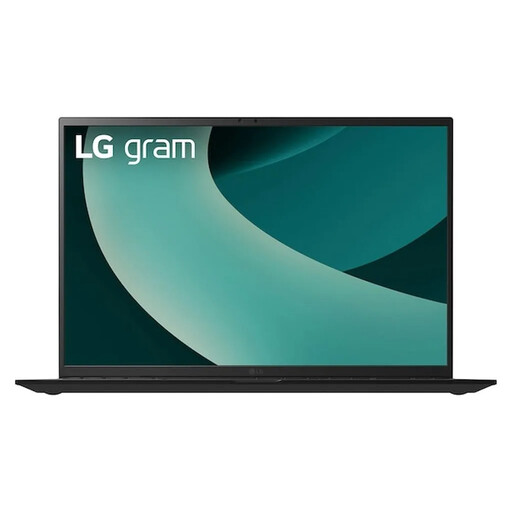 No image available
The 17-inch WQXGA IPS display gives you plenty of built-in screen space for maps; the stated weight is 1.39 kg.
The listed specifications include an Intel Core Ultra 7 256V, Intel Arc Graphics 140V, 16 GB RAM, a 1-TB SSD and Windows 11 Home. Ports listed include Thunderbolt 4, USB-A and HDMI 2.1.
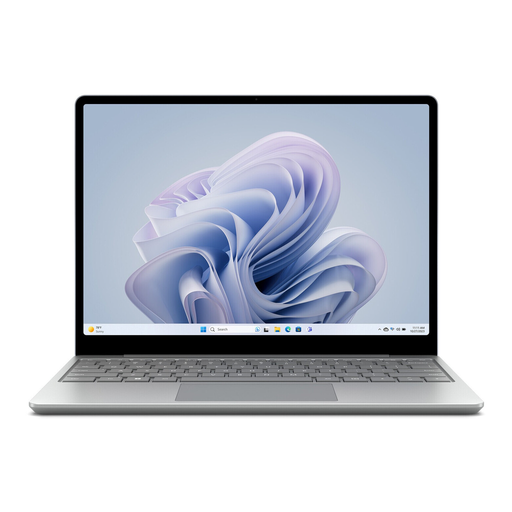 No image available
The stated weight of 1.13 kg and the touchscreen will appeal to anyone who wants to take a compact device with them regularly. The smaller display gives you less room for maps than larger laptop screens.
The listed specifications include an Intel Core i5, 8 GB RAM, a 256-GB SSD and Windows 11 Home.
There’s no evidence that you need a special graphics processor for the web-based route planning described here. Komoot explains how to plan routes and edit waypoints on its website. If you use additional local applications, check their specific requirements separately.
Komoot explains how to export GPX files via its website and import GPX, TCX and FIT files. According to Komoot, a GPX export contains only the GPS coordinates for the route; the starting region must also be unlocked to export it. Check which formats your destination device supports.
Not via the Komoot website. According to Komoot, you can only download regions and routes for offline use in the app. This is different from exporting a GPX file via the website.
Compare the map area you can comfortably read with the space you need for a mouse and other input devices. The BAuA describes external monitors and input devices as a way to make more extensive use of laptops at a suitably set-up workstation. This doesn’t mean they’re essential in every student’s room.
Your statutory rights if a product is faulty are different from a voluntary manufacturer’s warranty. According to the Verbraucherzentrale, consumers generally have a 14-day right to cancel an online contract from the date they receive the goods. Statutory details and exceptions still apply.