Which laptop is right for you?

Testers working with a platform-specific app

If you need to test a desktop build on its intended Windows or macOS system, decide on the operating system, processor architecture and test tools before you buy. Apple Developer explains how to test macOS apps on a Mac, while Microsoft Learn outlines the requirements for Windows on Arm.

Testers using a shared workspace

If you regularly connect monitors and input devices at a shared desk, check the specific laptop against the dock and its ports. Bitkom e. V. lists interfaces, docking functionality, operating system and power supply as important laptop features.

Testers running multiple environments

If you’ll be running virtual machines or other test tools alongside the app, consider the Windows edition, virtualisation requirements and memory together. Microsoft Learn lists additional requirements for Hyper-V; choosing the right edition alone isn’t enough.

What should you look for when buying?

Windows on x64

A good fit if: Your app or test tools require a Windows environment running on x64 hardware.

Bear in mind: According to Microsoft Learn, Hyper-V requires suitable hardware and enabled virtualisation, as well as Windows 11 Pro or Enterprise.

Windows on Arm

A good fit if: Windows on Arm is your target environment, or you specifically want to test Arm64 behaviour.

Bear in mind: Microsoft Learn says Windows 11 on Arm can emulate x64 applications, but not kernel drivers. Those require native Arm64 versions.

macOS on a Mac

A good fit if: You need to build and run a macOS desktop app with Xcode on a Mac.

Bear in mind: A Mac is no substitute for a native Windows x64 test. Also check that the macOS version and Mac processor are right for your specific test requirements.

What to consider What to check before buying Who should pay particular attention
Target platform and app compatibility Check the target operating system, supported versions, x64 or Arm64 builds, and required drivers and tools against your test plan. If I need to test a specific build natively, I check the platform and architecture first. Around 33% of consumers prioritise the right target platform.
Connecting to a shared desk Compare the dock interface, display outputs, number of monitors and required charging power with the specific laptop configuration. If I regularly move between workspaces, I need the laptop to work with the monitors and dock already there. Around 27% of consumers prioritise seamless connections to workplace peripherals.
Capacity for parallel testing Check the requirements of the programmes and virtual machines you’ll run at the same time against the memory, storage, Windows edition and virtualisation hardware. If I’m running several test environments alongside the app, I need to assess the resources and requirements together. Around 20% of consumers prioritise capacity for parallel testing.
Protecting test data Check that the device’s locking and sign-in features, as well as your organisation’s IT policies, are suitable for the intended device and testing process. If sensitive test data is stored on a device at a shared desk, I want to control access even when I step away briefly. Around 20% of consumers prioritise protecting test data.

Laptop and dock buying pitfalls

  • Mistaking emulation for a native test

    Windows 11 on Arm can emulate x64 applications. However, this doesn’t show how the app runs on native x64 hardware. According to Microsoft Learn, kernel drivers must be available as Arm64 versions.

    Set your target architecture and use the corresponding hardware for architecture-specific tests.

  • Checking only the shape of the ports at a shared desk

    The monitor connection and power supply need to work with both the laptop and the existing dock. Dell lists different power specifications for its dock when used with Dell and non-Dell systems, so a USB-C connection alone doesn’t guarantee that the whole setup will work.

    Compare the dock’s ports, display output and charging requirements with those of the exact laptop configuration you’ve chosen.

    Depending on the equipment already available, you may also need a suitable adapter, a different dock or a power supply. A documented Dell Pro 14 configuration does not include a power adapter.

  • Assuming Windows 11 Pro alone guarantees VM compatibility

    According to Microsoft Learn, Hyper-V requires a supported Windows edition, compatible hardware and enabled virtualisation. The host and virtual machines also need enough memory to run together.

    Check the Windows edition, processor and virtualisation requirements, and planned memory usage against your test plan.

  • Confusing a warranty with statutory rights

    Verbraucherzentrale distinguishes between your statutory rights against the seller and a voluntary warranty with its own terms. Different contract terms may also apply to business purchases.

    Before buying, check who the seller is and which warranty and service terms apply to your specific purchase.

Relevant brands and product ranges

Lenovo

The ThinkPad T14 Gen 6 (Intel), configuration 21QC0042GE, is a Windows 11 Pro option with 32 GB RAM and a 1 TB SSD. These manufacturer specifications apply to this exact configuration.

  • The configuration clearly specifies the memory and SSD capacity.
  • Check the ports and availability of the exact configuration being offered.

Dell

The Dell Pro 14 range includes configurable Windows laptops. The documented PC14250 configuration comes with Windows 11 Pro, 16 GB RAM and a 512 GB SSD.

  • The range offers different configurations to match your test plan.
  • The documented configuration does not include a power adapter. Check the charging setup and features of the configuration you choose.

HP

HP lists Windows 11 Pro, 32 GB RAM and a 1 TB SSD for the EliteBook 840 G11 in configuration A26QBEA#ABD. These specifications apply to this configuration and are not an independent performance test.

  • The specific configuration is described by its operating system, memory and SSD capacity.
  • Don’t assume these configuration details apply to other EliteBook models.

Apple

The 13-inch MacBook Air with M5 is a macOS option if you need to test the app on a Mac. Apple lists 16 GB of unified memory and a 512 GB SSD for the base model.

  • Apple lists two Thunderbolt 4 ports for this model.
  • An HDMI port isn’t listed among the connections, so check that the MacBook works with your existing dock. The specifications don’t demonstrate a native Windows x64 test.

Joybuy laptops for Windows testing

The Joybuy picks below are Windows laptops for test plans using Windows 11 Pro. Before buying, check that the app version, processor architecture, required drivers and test tools match your target environment.

Dell Pro 14 Essential PV14255 Copilot+ PC with Ryzen AI 7 350, 16 GB RAM and 1 TB SSD

Dell Pro 14 Essential PV14255 Copilot+ PC

An option for testing Windows desktop apps, provided the specific app and its tools are compatible with your target environment.

Windows 11 Pro; AMD Ryzen AI 7 350; 16 GB RAM; 1 TB SSD; 14-inch; Full HD+; USB-A, USB-C and HDMI.

View at Joybuy
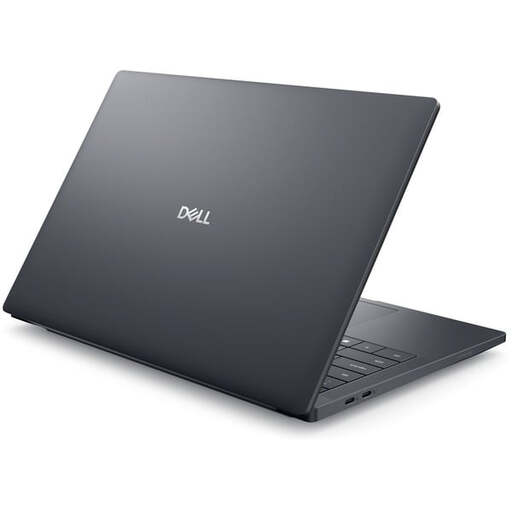
Dell Pro Max 14 Premium MA14250 mobile workstation with Intel Core Ultra 7 265H, 32 GB RAM and 1 TB SSD

Dell Pro Max 14 Premium MA14250

This configuration may suit test plans involving several environments running at once. Check your actual memory requirements and app compatibility.

Windows 11 Pro; Intel Core Ultra 7 265H; 32 GB RAM; 1 TB SSD; RTX PRO 2000; two Thunderbolt 5 and two Thunderbolt 4 ports.

View at Joybuy
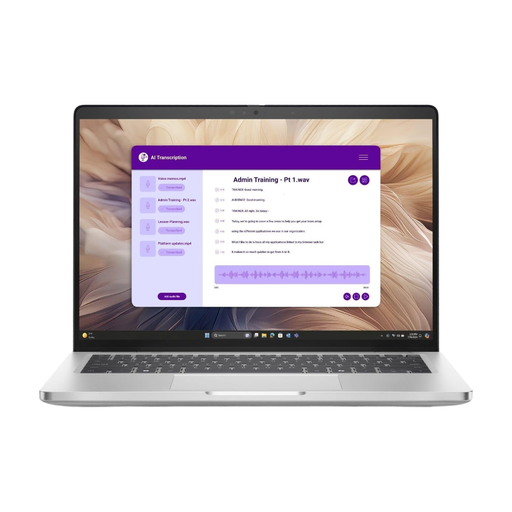
Dell Pro 14 Plus PB14250 with Intel Core Ultra 7 266V, 16 GB RAM and 512 GB SSD

Dell Pro 14 Plus PB14250 U7-266V

A Windows option for tests where the app and required tools are compatible with the specified processor architecture.

Windows 11 Pro; Intel Core Ultra 7 266V; 16 GB DDR5 RAM; 512 GB NVMe SSD; 14-inch; IPS display.

View at Joybuy
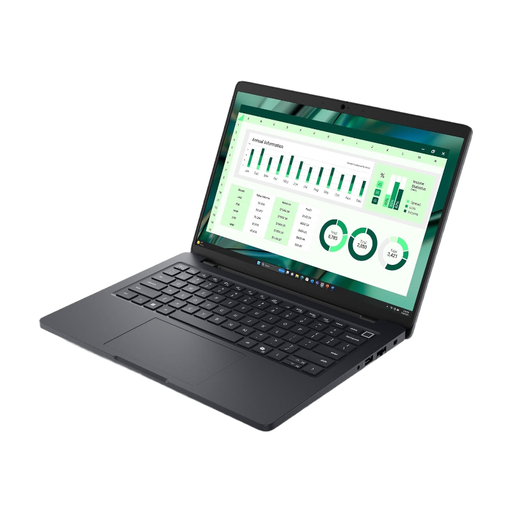
Dell Pro Max 14 MC14250 with Intel Core Ultra 7, 16 GB RAM and 512 GB SSD

Dell Pro Max 14 MC14250 U7-265H

This laptop may suit Windows testing if its specific app and tools match your target environment.

Windows 11 Pro; Intel Core Ultra 7; 16 GB DDR5 RAM; 512 GB SSD; fingerprint reader, IR camera and smart card support.

View at Joybuy
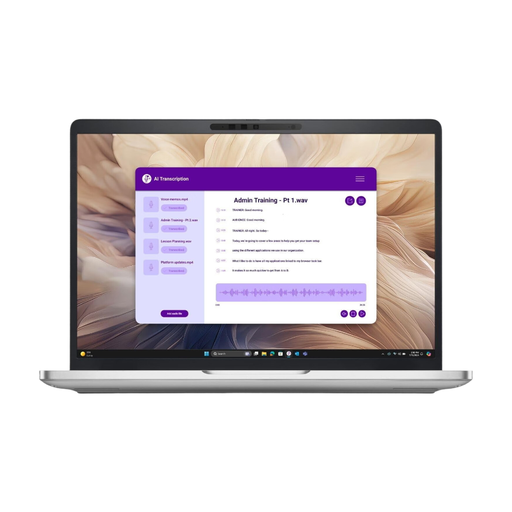
Dell Pro 13 Plus PB13250 with Intel Core Ultra 7 268V, 32 GB RAM and 512 GB SSD

Dell Pro 13 Plus PB13250 U7-268V

A more compact option for Windows testing, provided the app, architecture and required test tools are compatible with this configuration.

Windows 11 Pro; Intel Core Ultra 7 268V; 32 GB DDR5 RAM; 512 GB NVMe SSD; 13.3-inch.

View at Joybuy

Frequently asked questions

Do I need Windows 11 Pro for desktop app testing?

Not necessarily. If your test plan requires the full Hyper-V feature set, Microsoft Learn specifies Windows 11 Professional or Enterprise, along with additional hardware requirements. For other tests, the required edition depends on the app and tools you’re using.

Can I test a Windows x64 app on an Arm laptop without making changes?

Windows 11 on Arm can emulate x64 applications, but that isn’t the same as testing on native x64 hardware. According to Microsoft Learn, any required kernel drivers must be available as Arm64 versions.

How do I connect a laptop to the existing dock?

Compare your monitors’ connections and the dock interface with the laptop’s display output and charging requirements. The fact that a device has USB-C doesn’t mean the full setup has been verified.

What should I do if I leave the shared desk briefly?

Lock the device, even if you’re only stepping away for a moment. This is recommended by the German Federal Office for Information Security; your organisation’s IT policies also apply to company data.

Are a manufacturer’s warranty and statutory rights the same thing?

No. Statutory rights are a legal entitlement against the seller, while a warranty is a voluntary service with its own terms. Consumer guidance on this subject does not necessarily apply to a purchase made by a business.