Lots of walking ahead
If you’ll be carrying your laptop for a while, a compact design and a comfortable keyboard are important. Lenovo lists ports such as USB-A and HDMI for the ThinkPad X13 Gen 6; the features depend on the specific configuration.


For planning an essay while you’re out and about, first make sure the device works with your writing software and that the files you need are genuinely available offline. Google Docs Help recommends making files available offline in advance; Microsoft Support says that the cloud files covered in its guidance need to be opened online beforehand. Then choose between a Chromebook, Windows laptop and MacBook based on software compatibility, portability and charging requirements. Apple’s claim of up to 18 hours refers to video streaming, not guaranteed writing time.
If you’ll be carrying your laptop for a while, a compact design and a comfortable keyboard are important. Lenovo lists ports such as USB-A and HDMI for the ThinkPad X13 Gen 6; the features depend on the specific configuration.
You want to open and edit your outline without a connection, then sync it later. You’ll need to set up offline access before you leave and make sure the right file is available; Google Docs Editors Help explains how to prepare.
If you have to use a particular application or continue working with existing documents, check the operating system and file compatibility first. PC-WELT notes that many educational programmes are only available on PCs.
A good fit if: you mainly use Google Docs and make the files you need available offline before you leave.
Things to weigh up: Check that any required software runs on ChromeOS and that you’ll be comfortable working on the screen size of the specific model.
A good fit if: you need a particular Windows programme or ports for your existing peripherals.
Things to weigh up: Windows doesn’t automatically make cloud files available offline. Set up access in the relevant application, and check the ports and charging accessories included with the configuration.
A good fit if: the software you need runs on macOS and this way of working suits you.
Things to weigh up: Check compatibility, the ports you need and what’s included with the specific model. The quoted video-streaming battery life isn’t a measure of writing time.
| Consideration | What to check before buying | Who is this important to? |
|---|---|---|
| Portability | Check the weight and dimensions of the specific model, as well as the screen size and keyboard by trying out some typing. | If I’m carrying my laptop for a long time on a trip, I need a compact design and a keyboard I can type comfortably on. Around 33% of consumers put portability first. |
| Working offline | Open the file offline before you leave and test-save a change; check that it syncs later, too. | I want to keep working on my outline if I lose my connection, so I set up offline access in advance. Around 27% of consumers put working offline first. |
| Software compatibility | Make a note of the application you need, the operating system, file format and any required ports before comparing models. | If a specific application or my existing documents determine how I work, I check compatibility before choosing a device. Around 20% of consumers prioritise having the right software environment. |
| Purchase and ongoing costs | Consider the laptop and any essential charging accessories together; assess optional extras separately. | I want to know whether my writing setup needs any essential accessories, rather than focusing on the laptop alone. Around 20% of consumers put purchase and ongoing costs first. |
A file saved in the cloud isn’t automatically available offline. Without preparing in advance, you may not be able to access the outline you need while you’re out, even if your laptop is working.
Open the file before you leave and test editing it without an internet connection.
Apple quotes up to 18 hours of video streaming for the MacBook Air covered here. That’s not a guarantee of how long the battery will last while you’re writing.
Take note of the stated test conditions, plan conservatively for how long you’ll use it and check what charging options are available.
Dell doesn’t list a charger as included with the XPS 13 DX13260 covered here. The Joybuy listing for the MacBook Air M5 covered here doesn’t include one either.
Check what’s included and the charging requirements for the specific model. If necessary, you’ll need to budget for a compatible charger separately.
You may need to make an additional purchase if a compatible charger is required.
Your statutory rights against the seller and a voluntary guarantee are two different things.
Check your statutory rights first, then assess any additional guarantee against its own terms and conditions.
An optional extra may come at an additional cost.
The 13-inch MacBook Air with M5 is a macOS option if your writing software is compatible.
The ThinkPad X13 Gen 6 is a compact Windows range for writing on the go and for anyone who needs a choice of ports.
The XPS 13 DX13260 is a compact Windows option.
The Fortis 11 G10 Chromebook is a ChromeOS option for a straightforward writing setup prepared in advance.
The MagicBook Pro 14 is a Windows option if you’d like a larger screen as well as space for your outline.
This selection includes Windows laptops and a MacBook to suit different requirements for writing software, screen size and portability.
 No image available
For a Windows writing setup if you’re looking for a compact screen.
11.6-inch touchscreen, Intel® Pentium® Gold 6500Y, 8 GB RAM, 256 GB SSD and Windows 11 Pro.
 No image available
For writing software that’s compatible with macOS; the laptop is listed as weighing 1.23 kg and having a 13.6-inch display.
10-core CPU, 8-core GPU, 16 GB memory and 512 GB SSD. Apple quotes up to 18 hours of video streaming, not guaranteed writing time. A power adapter isn’t included.
 No image available
For a Windows writing setup if you prefer a larger workspace and are happy to carry the extra bulk.
Intel Pentium Gold 6500Y up to 2.9 GHz, 16 GB RAM, 512 GB SSD and Windows 11 Pro.
 No image available
For a Windows writing setup with a larger display; bear in mind that a 16-inch laptop takes up more room when you’re out and about.
Intel Core i5-8210Y, 16 GB RAM, 512 GB SSD, Windows 11 Pro and RJ45 port.
 No image available
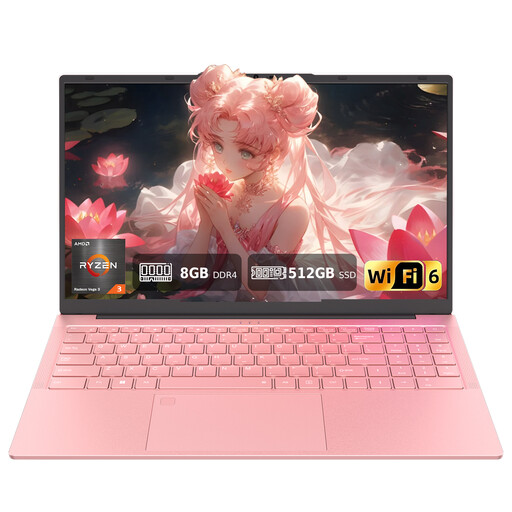
For a Windows writing setup if you prefer a larger display and a backlit keyboard; allow for the larger size when carrying it.
AMD 3250C, 8 GB DDR4 RAM, 512 GB SSD, Windows 11, Wi-Fi 6 and backlit keyboard. A wired mouse is listed as included.
Yes, as long as you set up offline access while you have a connection and make the file you need available offline. Google Docs Editors Help lists Chrome or Edge, an enabled offline extension and enough device storage among the requirements for setting this up on a computer. Check the file before you leave.
Open the file online beforehand and check that it’s available locally. For the mobile apps covered by its Word Help page, Microsoft Support says that cloud files opened online beforehand can be edited offline and synced later. Check the instructions for the app you actually use.
Once you’re back online, check that your changes have synced. Google explains how Chromebook files edited offline sync later; for other apps, check their sync status.
In Germany, consumers who buy online generally have a 14-day right of withdrawal from receiving the goods. Check for any exceptions and notify the seller that you’re withdrawing from the purchase; Verbraucherzentrale explains the requirements and time limits.