USB-C laptop and limited desk space
If you only need to add an RJ45 port and don’t have room for a hub on your small desk, a compact USB-C Gigabit adapter could be a good fit. TP-Link offers the UE300C, among other options.


If you only need to add Ethernet, choose a compact adapter that fits your laptop’s available USB-C or USB-A port. If you also need to charge your laptop or connect other devices through the same USB-C port, consider an Ethernet adapter with charging passthrough or a hub instead. A 2.5 Gbps adapter is a good option if the rest of your network connection supports that speed too.
If you only need to add an RJ45 port and don’t have room for a hub on your small desk, a compact USB-C Gigabit adapter could be a good fit. TP-Link offers the UE300C, among other options.
If you want to keep your USB-C port free for other devices, a USB-A-to-Gigabit adapter can add Ethernet. TP-Link offers the UE300 as one way to connect.
If you also need the same USB-C port for charging or other devices, compare Ethernet adapters with charging passthrough and USB-C hubs. These combine different functions, as the models from Belkin, TP-Link and Anker show.
First, check which port is free on your laptop and whether you only need Ethernet or also want to charge your laptop and connect other devices.
| Buying priority | What to check | Who is it important to? |
|---|---|---|
| Compact design | Check the USB-C plug, RJ45 port and how the casing or cable will fit on your desk. | If I only want to add LAN in a small space, I want the adapter to take up as little room as possible. Around 36% of consumers prioritise a compact standalone adapter. |
| Spare USB-A port | Check the plug type and the operating system and driver information for the specific model. | If I want to keep USB-C free for other devices, I want to connect Ethernet through an existing USB-A port. Around 29% of consumers prioritise having a USB-A connection. |
| Charging or extra ports | If you need charging, check your laptop’s Power Delivery support and the power it requires. If you need to connect accessories, compare the hub’s available ports. | If I also need the same USB-C port for charging or other devices, I want to combine these uses with Ethernet. Around 21% of consumers put charging or extra ports first. |
| 2.5 Gbps network | Check the speed of the network device you’ll connect to and compatibility with your laptop. | If my local network is set up for a faster connection, a compatible multi-gigabit adapter could be a good option. Around 14% of consumers prioritise this specific networking requirement. |
The two plug types won’t fit the same laptop port. An adapter with the wrong plug won’t work with the port you intend to use.
Check the type of available port before you buy, then choose a USB-C or USB-A model accordingly.
A standalone Ethernet adapter doesn’t automatically offer charging passthrough or extra ports.
If you need to use the same port for charging, check the Power Delivery function and your laptop’s charging requirements. If you need to connect other peripherals, compare the ports on a suitable hub.
An adapter rated at 2.5 Gbps won’t provide that speed on its own if the network device you connect to supports a slower speed.
Compare the speeds supported by the rest of your network devices before choosing between a Gigabit and a 2.5 Gbps adapter.
TP-Link offers compact standalone Gigabit adapters for USB-C and USB-A, as well as USB-C models with extra ports.
According to Belkin, the Connect INC019btBK combines Gigabit Ethernet with USB-C charging passthrough.
The C22G-USB-ETHERNET is a standalone USB-C adapter for Ethernet at speeds of up to 2.5 Gbps.
The Anker 555 USB-C Hub combines Ethernet with other ports for a workspace where your laptop is short on connections.
UGREEN also offers USB-C-to-Ethernet adapters.
This selection from Joybuy includes compact USB-C Ethernet adapters and USB-C hubs with extra ports.
 No image available
An option if you want to add Ethernet through a spare USB-C port without opting for a hub.
The product title specifies 1000 Mbps.
 No image available
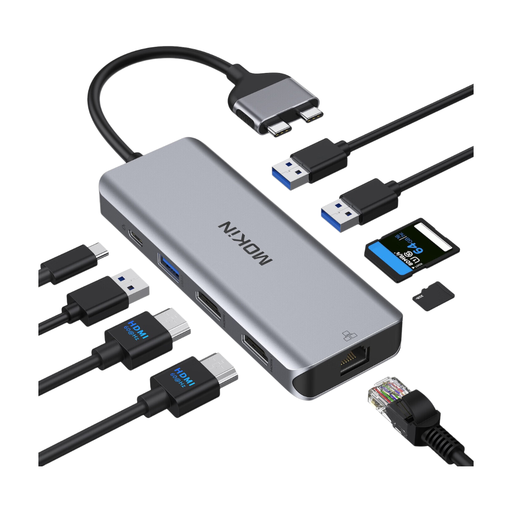
If you want to connect other devices as well as Ethernet, this hub brings together several types of connection.
The product title lists HDMI, two USB 3.0 ports, USB 2.0, RJ45, SD/TF and a PD charging port. Check compatibility with your laptop before you buy; the product information notes limitations with MacBook models using standard M1, M2 or M3 chips.
 No image available
A way to use Ethernet alongside several other connections when a standalone adapter isn’t enough.
The product title lists RJ45, HDMI 4K@120Hz and 4K@60Hz, USB-A at 10 Gbps and 480 Mbps, USB-C at 10 Gbps, SD/TF and USB-C PD.
 No image available
This hub offers various connection types if you want to connect Ethernet and several peripherals to your laptop.
The product title lists RJ45, HDMI, USB-A, SD/TF, 3.5 mm audio and a USB-C PD port.
 No image available
An option if you want to add a wired network connection through a spare USB-C port.
The product title lists RJ45 at 10/100/1000 Mbps and compatibility with Windows and MacOS.
It depends on the model and operating system version. For the UE300C, TP-Link says a driver must be installed on Windows 7, Windows 8, Windows 8.1 and macOS 10.6 to 10.8. Check the information for the specific model against your laptop’s operating system.
Plug the right USB-C or USB-A connector into a spare port on your laptop, then connect the RJ45 port to your network cable. Before you buy, check that the casing and cable will fit around your laptop’s ports. For example, TP-Link publishes the casing dimensions of the UE300C.
Not all Ethernet adapters support charging. Belkin specifies USB-C Power Delivery passthrough of up to 100 W for the Connect INC019btBK; whether that’s enough depends on your laptop’s charging requirements. A standalone adapter such as the TP-Link UE300C provides USB-C and RJ45, but no charging passthrough.
For new goods, consumers can assert their statutory warranty rights against the seller within two years of receiving the goods, according to the Verbraucherzentrale (German consumer advice centre). This is separate from a manufacturer’s guarantee. Online purchases also generally come with a 14-day right to cancel. The conditions and when the time limit starts depend on the individual case.