Who is a laptop for planning on the train suitable for?

Planners who travel by train regularly

If you often work on schedules and messages while travelling, you’ll need a handy device and enough room to work at your seat. Deutsche Bahn says Wi-Fi is available across its ICE fleet, as well as on some Intercity trains and selected regional services. Check what’s available on your route.

Coordinators working with teams in the cloud

If you coordinate tasks and documents with others, you should be able to work on important files offline when needed and sync them later. You can’t count on having an internet connection on every train journey.

Organisers handling sensitive lists

When dealing with registration details and attendee lists, access permissions and suitable security measures matter just as much as your laptop. Germany’s Federal Office for Information Security recommends using suitable hardware and VPN solutions for remote working, among other measures.

What should you look for when choosing one?

Criterion What to look for when buying Who it matters most to
Comfort at your seat Check the dimensions, weight and keyboard of the exact model, and make sure it suits the space available on the train and in your bag. If I often change trains and work on schedules at my seat, a device that’s easy to carry is important to me. Around 24% of consumers put portability and ease of transport first.
Power on the go Compare battery-life claims and their test conditions, and check the charging port, required charger wattage and what’s included in the box. If I want to work during my journey without relying on a spare power socket, battery life with my programmes matters. Around 24% of consumers prioritise power.
Working offline Check in advance whether the programmes and files you need work offline and can be synced later. If the connection drops, I want to keep working on plans and be able to sync my changes afterwards. Around 19% of consumers prioritise offline working.
Keeping in touch with your team Check the camera, microphone and ports you need. Only consider mobile data if it’s included in the configuration you’ve chosen. If I need to discuss changes with other organisers while travelling, reliable ways to communicate are important. Around 19% of consumers put team communication first.
Programmes and what’s included Check that the laptop is compatible with the programmes you use, and check the charger and ports included with the exact model. If I want to keep using my existing event-planning programmes and accessories, the right specification matters. Around 14% of consumers pay particular attention to programmes and what’s included.

Avoid common mistakes when choosing

  • Assuming advertised battery life is guaranteed on the train

    Manufacturers distinguish between different types of use, such as video streaming and wireless browsing. Your mix of documents, communication and other programmes may be different.

    Compare battery-life figures only when they use the same definitions and test conditions, and leave some battery in reserve for your journey.

  • Assuming optional features come with every model in a range

    For the Dell Pro 13 Plus, the 2-in-1 design and 5G are options that depend on the model, not features of every configuration.

    Check the full specification before assuming your chosen model has a touchscreen or mobile data. Mobile data doesn’t guarantee a continuous connection, either.

  • Overlooking what’s included with the exact model

    Dell notes that a charger isn’t included with one of its pre-configured models. Check the listed contents for other variants, too.

    Check the charging requirements and what’s included with the model you’ve chosen, and find out whether you’ll need a compatible charger.

Relevant brands and product ranges

Lenovo

The ThinkPad X13 Gen 6 is an example of a compact, traditional business laptop with a fixed keyboard.

  • For configuration 21RK0042GE, Lenovo lists a matte 13.3-inch display, 32 GB of soldered memory and a 65 W charger.
  • These features apply to the configuration listed, not to every ThinkPad.

Apple

The 13-inch MacBook Air with M5 is worth considering if the event-planning programmes you need support macOS.

  • For the base model shown, Apple Germany lists 16 GB of unified memory and USB-C charging.
  • The manufacturer’s claim of up to 15 hours of wireless browsing is based on test conditions; it isn’t a prediction of how long the laptop will last while planning and making video calls on a train. Also check that the programmes you need support macOS.

Dell

The Pro 13 Plus PB13250 is a product range where the laptop, 2-in-1 and mobile data options depend on the model you choose.

  • Dell lists 2-in-1 and 5G as options, not features of every configuration.
  • Dell notes that a charger isn’t included with one pre-configured model. Check the exact variant and what comes with it.

HP

The Pavilion Aero 13-bg0780ng is an example of a 13.3-inch laptop designed with a focus on low weight.

  • HP describes this model as weighing less than 1 kg.
  • The weight is a manufacturer’s claim, not an independent measurement.

Joybuy laptops for planning on the go

The Joybuy products below include traditional laptops and 2-in-1 devices for planning and coordinating while you’re on the move.

Lenovo Yoga Slim 7i Aura Edition, 14-inch, Core Ultra 7 355, 16 GB RAM and 1 TB SSD

Lenovo Yoga Slim 7i Aura Edition 14-inch, 2.8K OLED, Core Ultra 7 355, 16 GB RAM, 1 TB SSD

A traditional laptop for planners who often type at their seat and want a portable design.

The product description lists a weight of 1.14 kg, a 70 Wh battery, a German keyboard, a front-facing camera and USB-C charging. Battery capacity alone doesn’t tell you how long it will last on your particular train journey.

View at Joybuy

Apple 13-inch MacBook Neo with A18 Pro, 8 GB RAM, 256 GB SSD, Rose, English QWERTY keyboard

Apple 13-inch MacBook Neo (A18 Pro, 2026), 8 GB RAM, 256 GB SSD, Rose, English QWERTY keyboard

A compact laptop for travelling, provided the event-planning programmes you use support macOS.

The product description lists a weight of 1.23 kg and a 1080p front-facing camera. The claimed battery life of up to 11 hours of wireless browsing isn’t a prediction of how long it will last during your own train journey. Note that it has an English QWERTY keyboard.

View at Joybuy
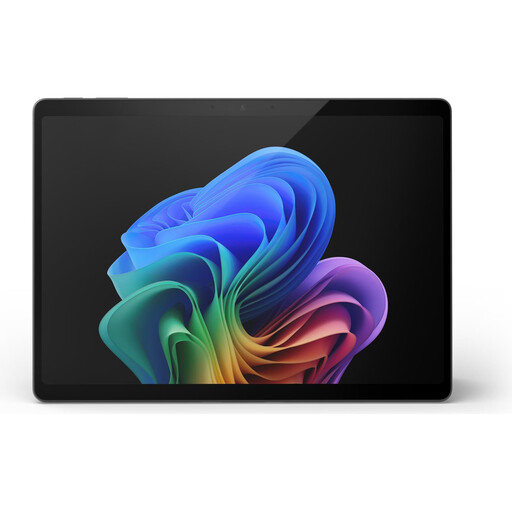
Microsoft Surface Pro 11, 13-inch, Snapdragon X Elite, 16 GB RAM and 512 GB SSD

Microsoft Surface Pro 11, 13-inch, Snapdragon X Elite, 16 GB RAM, 512 GB SSD

A 2-in-1 device for anyone who wants to view or edit plans on a touchscreen as well as type on a keyboard.

The product description lists a 13-inch OLED touchscreen, a weight of 0.872 kg, two Thunderbolt 4 ports and a Quad HD front-facing camera. The claimed battery life of up to 14 hours isn’t a measurement from a particular train journey. Check whether a compatible keyboard is included with the model you’ve chosen.

View at Joybuy

HP OmniBook Ultra Flip 14-fh0670ng, 14-inch, 2-in-1, 32 GB RAM and 1 TB SSD

HP OmniBook Ultra Flip 14-fh0670ng, 14-inch, 2-in-1, Core Ultra 7 258V, 32 GB RAM, 1 TB SSD

A 2-in-1 device for planners who want to switch between typing and using the touchscreen.

The product description lists a weight of 1.34 kg, a 64 Wh battery, a 2.8K OLED touchscreen and laptop, tablet, stand and tent modes. The claimed battery life of up to 16.25 hours isn’t based on a train journey test.

View at Joybuy

Microsoft Surface Pro 11 for Business, 13-inch, Core Ultra 7 266V, 16 GB RAM and 512 GB SSD

Microsoft Surface Pro 11 for Business, 13-inch OLED, Core Ultra 7 266V, 16 GB RAM, 512 GB SSD, Win11 Pro

A 2-in-1 device for planning on the go, if a touchscreen would be useful alongside laptop functionality.

The product description lists a weight of 0.872 kg, a 53.3 Wh battery, a Quad HD front-facing camera and two Thunderbolt 4 ports. The claimed battery life of up to 14 hours isn’t a prediction of how long it will last on your journey. Check whether a compatible keyboard is included.

View at Joybuy

Frequently asked questions

Can I rely on train Wi-Fi and a power socket for planning?

Not on every service or at every seat. Deutsche Bahn says Wi-Fi is available across its ICE fleet, as well as on some Intercity trains and selected regional services. Connection quality and speed can depend on the route and how busy the service is. In second class, it says there is generally one power socket per pair of seats on ICE trains, and one per seat on selected train models. Keep important files available offline if needed.

What should I set up before my first journey?

Install the event-planning programmes you need and use a non-sensitive file to test whether you can work on it offline and sync it later. For remote working, Germany’s Federal Office for Information Security recommends suitable security measures and VPN solutions, among other things. You should also follow your organisation’s requirements.

What happens if a product develops a fault after I buy it in Germany?

According to the Verbraucherzentrale, if you buy a new product that’s faulty, you can assert your statutory warranty rights against the seller within two years of receiving or taking delivery of it. A voluntary guarantee is separate from these rights.

Is choosing a particular type of laptop enough to protect attendee lists?

No. Choosing a device alone doesn’t determine access permissions or the security measures you need. If you process personal registration details, check the requirements for your specific purpose and follow your organisation’s data protection and security policies.