For research using online sources, a screen that’s easy to read and a laptop you can carry comfortably are key considerations. If you’ll be working for longer without a power socket, clear information about battery life can help you decide. If you also use genealogy software installed on your laptop, check that it’s compatible with the operating system and has the ports you need before buying. Manufacturers’ battery-life claims don’t necessarily reflect how long a laptop will last in a café.
Who researches in a café?
Readers of historic parish registers
If you’re comparing handwritten entries, you’ll want to see the details clearly on a portable screen for longer periods. ARCHION describes parish registers as handwritten sources for family history research, so the screen finish and distracting reflections are worth checking.
Genealogists updating their family tree on the move
When you switch between researching sources and recording people, places and evidence, it matters whether you work in a browser or use software installed on your laptop. The Gramps project lists downloads for Windows, as well as for Intel and Apple Silicon Macs.
Researchers without access to a power socket
If you work in a café where internet access varies, consider the conditions under which the stated battery life was tested, and plan how you’ll use public Wi-Fi. The Verbraucherzentrale recommends turning off file and folder sharing before connecting to a hotspot, if it’s enabled.
What to look for when buying
At a small café table, the screen needs to suit the space available. After that, software compatibility, ports and internet access will help you choose the right configuration.
| What matters |
What to check before buying |
Who it matters most to |
| Reading historical documents |
Check the screen size, resolution and finish of the specific configuration. An anti-glare screen may help with distracting reflections, but that alone doesn’t guarantee good readability. |
When I’m comparing handwritten entries in parish registers, I want to zoom in on details without being distracted by reflections; readability is the top priority for around 33% of consumers. |
| Portability and battery |
Compare the weight and dimensions of the specific configuration, as well as the conditions under which the battery life was tested. Check what’s included and whether there’s a suitable charging option. |
When I’m working in a café without a dedicated power socket, I want a laptop that’s easy to carry and lets me plan my research; around 27% of consumers prioritise portability and battery life. |
| Software and files |
Check that the software version you need is compatible with the operating system, and make sure the specific configuration has the ports you require. |
If I use a particular genealogy programme, my own source files or existing accessories as well as a browser, the configuration needs to support them; around 20% of consumers prioritise software and file use. |
| Getting online in a café |
Check in advance what internet connection is available. On public Wi-Fi, turn off active file and folder sharing before connecting. |
If I use online archives and want to protect my personal data in a café, I plan how I’ll connect to the internet; around 20% of consumers put secure internet access first. |
Buying pitfalls
-
Assuming the stated battery life is guaranteed café working time
A stated battery life applies to a particular type of use and won’t tell you how long a laptop will last at your screen brightness and with your research habits. Apple quotes up to 15 hours of wireless web browsing for the 13-inch MacBook Air with M5.
Compare the test conditions, and check what’s included with the specific configuration separately from the stated battery life.
-
Assuming a series name means the specification is fixed
Display, operating system and ports can vary between configurations of the HP Pavilion Aero 13-BG0000 and ASUS Vivobook S 14 OLED S5406.
Check the full model or product number against the details of the configuration on offer.
-
Treating public café Wi-Fi like a private network
Public hotspots can put personal data at risk, particularly if file or folder sharing is enabled. The Verbraucherzentrale highlights this risk.
Check which sharing options are active before connecting, and use suitable safeguards for sensitive accounts.
Relevant brands at a glance
Lenovo
The ThinkPad X9-14 Gen 1 Aura Edition is a specific 14-inch Windows option for research on the move. These details apply to this model, not to every ThinkPad.
- For model 21QA001QGE, Lenovo’s specification sheet lists Windows 11 Pro, a German keyboard and an anti-glare OLED display.
- This configuration doesn’t have a card reader or integrated WWAN.
Apple
The 13-inch MacBook Air with M5 is a macOS option for researching online sources or using locally installed software that supports macOS.
- For the M5 model, Apple quotes up to 15 hours of wireless web browsing and lists two Thunderbolt 4 USB-C ports.
- The stated battery life isn’t a guarantee of how long it will last while you’re researching in a café. Also check whether the specific offer includes a charger.
HP
The Pavilion Aero 13-BG0000 series includes compact Windows configurations with different display and port options.
- HP lists anti-glare 13.3-inch IPS options, as well as USB-A and USB-C, for the series.
- HP says components can vary by configuration and country, so check the specification of the specific model you’re considering.
ASUS
The Vivobook S 14 OLED S5406 is a 14-inch range that may be worth considering if you have USB-A accessories or use microSD cards.
- ASUS lists these port types for the range.
- The range includes several processor, screen and operating system variants, and not every configuration has the same specification.
Joybuy laptop options for café research
This selection includes compact Windows laptops and MacBook Air models for researching online sources or using compatible genealogy software installed on your laptop.
 No image available
HP OmniBook Ultra 14-kd0072ngx, 14-inch, 3K, Intel Core Ultra 7 356H, 16 GB, 1 TB SSD, Windows 11 Home
A Windows option if you’re looking for a 14-inch screen for digital sources and want to consider the listed weight of 1.27 kg for portability.
The listing specifies a 3K OLED display, 16 GB RAM and a 1 TB SSD.
View at Joybuy
 No image available
Dell Pro 14 Essential PV14255 Copilot+ PC, AMD Ryzen AI 7 350, 16 GB, 1 TB SSD, Windows 11 Pro
A Windows configuration for reading sources if an anti-glare screen and ports for your existing accessories matter to you.
The listing specifies an anti-glare 14-inch IPS display with a resolution of 1920 × 1200 pixels, as well as USB-A, USB-C and HDMI.
View at Joybuy
 No image available
HP OmniBook Ultra Flip 14-fh0670ng, 14-inch 2-in-1, Intel Core Ultra 7 258V, 32 GB, 1 TB SSD, 2.8K OLED, Windows 11 Home
This 2-in-1 configuration could suit you if you’d like to switch between different modes as you move from research to taking notes.
The listing specifies a 14-inch 2.8K OLED touchscreen, 32 GB RAM, a 1 TB SSD and a weight of 1.34 kg. A power adapter is included, according to the description.
View at Joybuy
 No image available
Apple MacBook Air 13-inch (M5, 2026), 10-core CPU, 10-core GPU, 16 GB, 1 TB SSD, Silver, German QWERTZ keyboard
A compact macOS option if your genealogy software supports macOS or you do most of your research in a browser.
The listing specifies a 13.6-inch display with a resolution of 2560 × 1664 pixels, 16 GB of memory, a 1 TB SSD and a weight of 1.23 kg. A power adapter isn’t included, according to the description.
View at Joybuy
 No image available
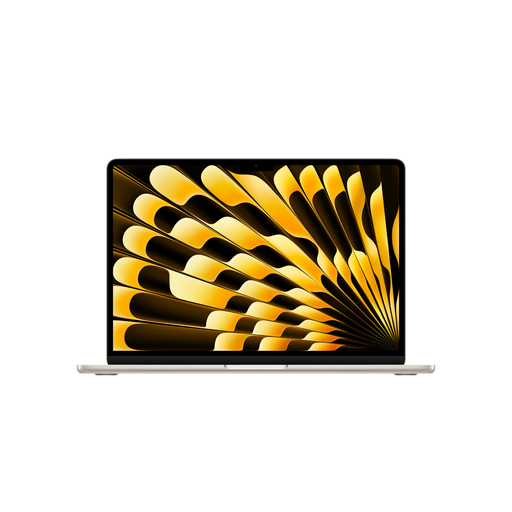
Apple MacBook Air 13-inch (M5, 2026), 10-core CPU, 10-core GPU, 24 GB, 1 TB SSD, Starlight, German QWERTZ keyboard
A compact macOS option if your genealogy software supports macOS or you do most of your research in a browser.
The listing specifies a 13.6-inch display with a resolution of 2560 × 1664 pixels, 24 GB of memory, a 1 TB SSD and a weight of 1.23 kg. A power adapter isn’t included, according to the description.
View at Joybuy
Frequently asked questions
Do I need a dedicated graphics card to view parish registers online?
A dedicated graphics card isn’t automatically necessary for reading digitised parish registers. First, check whether the screen and controls make it easy to zoom in on and compare handwritten entries.
Can I install my genealogy software on Windows and macOS?
It depends on the programme. The Gramps project lists downloads for Windows, as well as for Intel and Apple Silicon Macs. Also check that the version you need and your existing files are compatible.
What should I set up before using a café’s Wi-Fi for research?
Turn off file and folder sharing before connecting, if it’s enabled. The Verbraucherzentrale recommends doing this on public hotspots to limit access to shared content.
What costs and rights should I be aware of when buying online?
Check what’s included with the specific configuration: according to the product descriptions, the MacBook Air offers shown here don’t include a power adapter. The Verbraucherzentrale says that online purchases in Germany generally come with a 14-day right of withdrawal; when the period starts and any exceptions depend on the specific contract. Your statutory rights if a product is faulty are separate from any additional manufacturer’s warranty.
Does a Wi-Fi-enabled laptop sold in Germany need a CE mark?
The Bundesnetzagentur explains that products covered by EU harmonisation legislation and placed on the EU market must carry a CE mark. Whether this applies to a particular device depends on the relevant legislation.


