If you spend long periods writing and reading sources, check the keyboard, display and potential sources of noise on the specific model before focusing on maximum processing power. A matte Windows laptop may be a good fit if reflections are a problem. A compact or lighter model is worth considering if you’ll be carrying it around often or working away from a power socket. Before buying, make sure you know which programmes and ports you need, and check the specifications of the exact configuration.
Which priorities suit which users?
Frequent writers who read lots of sources
If you write lengthy notes and often switch between your text and source material, the keyboard, display and potential sources of noise matter more than top performance. Lenovo lists a matte display and a backlit German keyboard for one available ThinkPad E14 Gen 6 AMD configuration.
Writers without a regular power socket
If you’re planning longer library sessions without reliable access to a power socket, compare battery-life claims only after taking the test conditions into account. Apple quotes up to 15 hours of wireless web browsing for the MacBook Air with M5; this isn’t a guaranteed battery life for your writing routine.
Researchers on the move
If you regularly carry your laptop between the field, the library and home, weigh its portability against the screen space you need for notes and sources. HP describes the OmniBook 7 Aero 13-bg1750ng configuration as weighing under 1 kg and lists a 13.3-inch display.
What should you look for when buying?
Start with typing comfort and screen readability. Then compare battery life and weight, and check that your work tools are compatible before you decide.
| Priority |
What to check before buying |
Who is it important to? |
| Typing comfort and readability |
Try the keyboard and display for yourself if possible. If you need a quiet workspace, also check noise information for the specific model, including fan and typing noise. |
If I type for long periods and read sources, I want a keyboard that suits me and a screen that’s easy to read, without disturbing others in the library. Around 36% of consumers put typing comfort and readability first. |
| Working away from a power socket |
Compare battery-life claims only alongside their respective test conditions; check the charging port and power adapter requirements. |
If I can’t count on having access to a power socket, I want a laptop that will last for my actual session. For around 29% of consumers, being independent of a power socket is a priority. |
| Portability |
Consider the weight of the exact configuration, including its power adapter; check that the screen is large enough for your notes and sources open side by side. |
If I regularly carry my laptop between different places, I want to avoid taking more weight than necessary while still having enough room to work. For around 21% of consumers, portability comes first. |
| Software compatibility |
Check that the programmes and peripherals you need are supported on macOS or Windows on Arm, as applicable. |
If I need to keep using specific research programmes or devices, I want to check they’re supported before switching platforms. Around 14% of consumers put compatibility first. |
Which buying mistakes should I avoid?
-
Assuming a quiet keyboard means a quiet laptop
ASUS describes the Vivobook 14 X1407’s keyboard as quiet. That doesn’t tell you how much noise the fan and keyboard make together in your working conditions.
Try the keyboard if you can, and if you work somewhere particularly quiet, look for measurements for the exact model variant.
-
Comparing different battery-life claims directly
Apple’s wireless web-browsing figure and the battery life advertised by ASUS aren’t based on the same published test. You can’t use them to make a direct comparison of battery life while writing.
Consider each manufacturer’s figure in light of its test conditions, and allow some extra battery life for your own working routine.
-
Confusing a voluntary guarantee with your statutory rights
Your statutory rights are against the seller; a voluntary guarantee is subject to its own terms.
Keep your proof of purchase and, if something goes wrong, first check your rights against the seller. The German Federal Government explains that, as a general rule, retailers are responsible for defects for two years after a purchase.
Brands and model ranges to consider
Lenovo
The ThinkPad E14 Gen 6 AMD is an example of a traditional 14-inch Windows laptop for writing and research.
- For one available configuration, Lenovo lists a matte WUXGA IPS display and a backlit German keyboard.
- These specifications don’t automatically apply to every E14 variant. A matte display doesn’t prove that the laptop runs silently or at any particular noise level.
Apple
The 13-inch MacBook Air with M5 is worth considering if your work programmes run on macOS and you’re looking for a compact device.
- Apple lists a 13.6-inch display and up to 15 hours of wireless web browsing.
- Don’t assume the web-browsing figure reflects battery life for your field-notes workflow. Check your programmes and ports before switching platforms.
HP
The OmniBook 7 Aero 13-bg1750ng is an example of a lightweight Windows laptop for frequent travel between locations.
- HP describes this configuration as weighing under 1 kg and lists a 13.3-inch display.
- These details don’t tell you how noisy the laptop is or what type of display surface it has, and they don’t apply across the entire OmniBook range.
ASUS
The Vivobook 14 X1407 and Vivobook S14 S5408 are different Windows laptop ranges, each with its own features.
- ASUS describes the X1407’s keyboard as quiet and advertises long battery life for the S5408.
- The keyboard claim isn’t a measurement of the laptop’s overall noise. If you’re considering the Snapdragon model, check that each programme you need is compatible.
Joybuy products for writing and research
These models offer different combinations of screen size, anti-glare displays, keyboard layouts and portability for working with notes and sources.
 No image available
Lenovo Yoga Slim 7i Aura Edition 14" 2.8K OLED Core Ultra 7 355, 16 GB/1 TB SSD
Could suit you if you’re looking for a German keyboard layout and a compact 14-inch format for writing.
- 14-inch display with 2.8K OLED
- 16 GB RAM and 1 TB SSD
- Backlit German keyboard
- Weight: 1.14 kg
- Windows 11 Evo
Joybuy
 No image available
Microsoft Surface Laptop 8 Core Ultra 5, 24 GB/512 GB, Platinum
A possible choice if you prefer a compact screen for working on the go and a backlit keyboard.
- 13-inch touchscreen in a 3:2 aspect ratio
- 24 GB RAM and 512 GB SSD
- Screen brightness: 500 cd/m²
- Backlit keyboard
- Weight: 1.24 kg
Joybuy
 No image available
HP ProBook 4 G1a 16" Ryzen 5 230, 16 GB/512 GB SSD
Could be a good fit if you prefer a larger, anti-glare screen for viewing text and sources.
- 16-inch WUXGA IPS display, anti-glare
- 16 GB DDR5 RAM and 512 GB SSD
- AMD Ryzen 5 230 and Radeon 760M Graphics
- Backlit keyboard with German layout
- Windows 11 Pro
Joybuy
 No image available
Apple 13-Inch MacBook Air (M5, 2026), 10-Core CPU/8-Core GPU, 16 GB/512 GB SSD, Silver
Could suit you if your programmes run on macOS and you’re looking for a compact device with a German keyboard layout.
- 13.6-inch display
- 16 GB memory and 512 GB SSD
- German backlit QWERTZ keyboard
- Two Thunderbolt 4 ports
- Weight: 1.23 kg
- According to the product description, a power adapter isn’t included and must be purchased separately.
Joybuy
 No image available
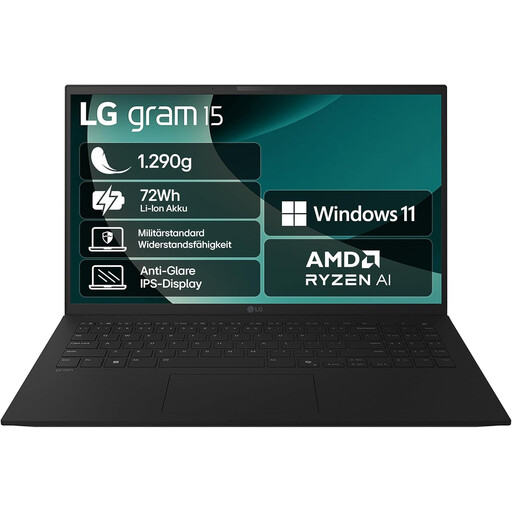
2025 LG Gram Notebook 15 Inch, Ryzen AI 7 350, 16 GB/1 TB SSD
An option if you want a larger, anti-glare screen and a German keyboard layout for writing on the go.
- 15.6-inch Full HD IPS display, anti-glare
- 16 GB RAM and 1 TB SSD
- AMD Ryzen AI 7 350 and Radeon 860M Graphics
- Windows 11 Home
- German QWERTZ keyboard
- Weight: approx. 1.29 kg
- Bluetooth 5.3 and Thunderbolt 4
Joybuy
Frequently asked questions
Can I rely on manufacturers’ battery-life claims for the length of my library session?
No. Manufacturers’ figures aren’t a guarantee of how long your session will last. For example, Apple quotes a figure for wireless web browsing, while ASUS advertises battery life for its model range. Screen brightness, programmes and connections can all affect power consumption.
Will I have to give up my existing Windows programmes if I buy a Windows on Arm laptop?
Not necessarily: Microsoft describes native Arm apps as well as programmes that run through emulation. Even so, check that every application and peripheral you need for your fieldwork is supported.
How can I keep using my existing laptop for longer?
The German Environment Agency recommends looking into repairs or upgrades before buying a new laptop, and using power-saving features. Whether you can upgrade the RAM or storage depends on the specific device.
What are my rights if something is faulty after purchase in Germany?
The German Federal Government explains that, as a general rule, retailers are responsible for defects for two years after a purchase. Your statutory rights against the seller are separate from any voluntary guarantee. The circumstances of the purchase and fault are relevant in each case.
Can I put an old laptop in the household rubbish?
No. The German Environment Agency states that electrical appliances must not go in household rubbish and should be collected separately.


