Which laptop is right for you?

Students with a GIS assignment

If you need to edit or style geodata as layers, or submit a map layout, first check whether QGIS or a particular file format is required. QGIS and its documentation explain the available installation options and layout features.

Students with a web mapping assignment

You don’t necessarily need a desktop GIS setup to create a map or tour with places and descriptions in a browser. Google Earth Outreach says you’ll need Chrome and a signed-in Google Account for the Google Earth web option described.

Students moving between their room and campus

If you use the same laptop in your student room and elsewhere, you’ll need to weigh screen space against portability. Specifications vary between individual models, so check the details from the manufacturer for the version you’re considering.

What should you look for when buying?

Web map in a browser

A good fit if: Your assignment allows an interactive map or tour and permits you to use a browser.

Consider: Check the specific requirements. The Google Earth web option described requires Chrome and a signed-in Google Account; it won’t necessarily meet a requirement to submit a QGIS project.

QGIS on a laptop

A good fit if: You need to edit geodata and layers, or create a map layout with elements such as a legend and scale bar.

Consider: Check that the operating system, required project file and submission format match your assignment. A larger display alone doesn’t tell you how well a particular configuration performs or whether it’s suitable for your submission.

Consideration What to check before buying Who should consider this?
Desktop GIS and submission format Check the operating system, required software and assignment file format. If you need to submit QGIS layers or a particular layout, I’d base my choice first on the software and submission requirements. Around 31% of consumers make desktop GIS their main consideration.
Creating a web map Check whether a web project is accepted and whether you can use Chrome and a Google Account. If a map or tour in a browser is enough, I wouldn’t want to plan for an unnecessary desktop GIS setup. Around 31% of consumers prioritise web mapping.
Room for the map and layout Compare the display size, resolution and aspect ratio. If you have a monitor, check the connections on the specific model. If I need to see the map view and page layout at the same time, a clear, spacious workspace matters to me. Around 23% of consumers with this as their main consideration prioritise layout space.
Carrying it around and working in your room Check the size, weight, power adapter and connections you need for the specific configuration. If I move between my student room and other places to work, the smaller screen still needs to be big enough for me. Around 15% of consumers prioritise portability.

Avoid common buying pitfalls

  • Buying based only on a “for students” label

    A web tour and a QGIS layout involve different ways of working and submitting your work. A general claim that a laptop is suitable for students doesn’t tell you whether it’ll meet the requirements of your assignment.

    First, find out which software and submission format you need. Then compare suitable laptops.

  • Assuming every version in a model range is the same

    ASUS Vivobook 16 (M1605) models have different full model numbers and processors. You can’t assume that details for one version apply to the whole range.

    Check the full model number, display, storage, operating system and what’s included in the box.

  • Assuming the power adapter and workspace from the product name

    For the OmniBook 3 16-bw0771ng, HP says the power adapter is sold separately. You’ll also need to check that the connections on the specific model are suitable for an external monitor.

    Check what’s included and which monitor connections are available using the full model number.

    A power adapter sold separately or any connection accessories you need could add to the cost.

Relevant brands and model ranges to consider

ASUS

The Vivobook 16 M1605 family offers Windows laptops suited to mapping and layout work at a desk.

  • For certain M1605NAQ models, ASUS lists a matt 16-inch display with a resolution of 1920 × 1200 pixels.
  • Processors and full model numbers vary; the display specifications listed don’t necessarily apply to every M1605 model.

Lenovo

The ThinkPad E14 Gen 7 in the specified AMD configuration is a 14-inch Windows option for working in different places.

  • For model number 21T0CTO1WWDE5, Lenovo lists a matt 1920 × 1200-pixel display, 16 GB RAM and an EU power adapter.
  • The 14-inch screen gives you less workspace than the 16-inch options described here. Performance and durability claims are based on information from the manufacturer.

HP

The OmniBook 3 16-bw0771ng is a large-screen Windows model suited to layout work.

  • For this version, HP lists a 16-inch, 1920 × 1200-pixel display, 16 GB RAM, USB-C, USB-A and HDMI.
  • The power adapter is sold separately for this specific version; this doesn’t necessarily apply to other models.

Samsung

The Galaxy Book5 NP750XHD-KD2DE is a 15.6-inch option for students who work in different places.

  • Samsung lists 16 GB RAM and 512 GB storage for this version.
  • The stated video playback time of up to 19 hours isn’t a measure of battery life while working with maps.

Apple

The MacBook Air with M5 is a macOS option, provided the mapping software required for your assignment can be used on it.

  • Apple lists, among other options, a 13.6-inch model with 16 GB unified memory and a 512 GB SSD. QGIS offers macOS installations.
  • The smaller display may be a compromise for more extensive layout work. Apple’s claim of up to 18 hours isn’t based on a map-editing test.

Joybuy products for your mapping task

The laptops below are options for working with maps in QGIS, either at a desk or in different locations.

HP ZBook 8 G1i 16 Ultra 7 265H with 64 GB RAM and 2 TB SSD

HP ZBook 8 G1i 16 Ultra 7 265H, 64 GB RAM, 2 TB SSD

This 16-inch model is an option if you want room for both the map view and layout on your desk.

The product specifications list 64 GB RAM and a 2 TB SSD. Windows 11 Pro is specified, and QGIS offers a Windows installation.

View at Joybuy
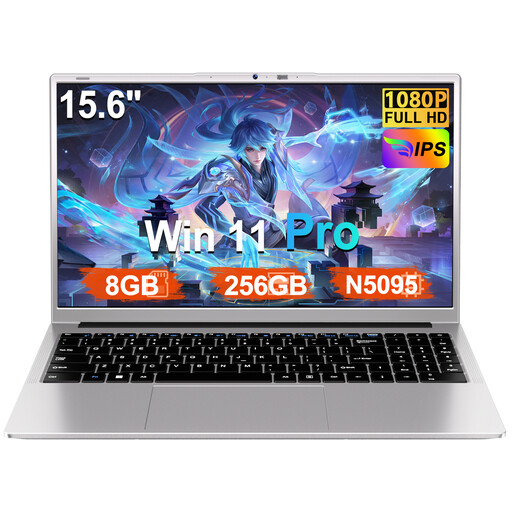
Ruzava laptop with 15.6-inch FHD display, N5095, 8 GB RAM and 256 GB SSD

Ruzava 15.6-inch laptop, N5095, 8 GB RAM, 256 GB SSD

The stated display size is suited to working with maps at a desk. First, check that the specific configuration meets your software and submission requirements.

The product title specifies an FHD display, Windows 11 Pro and a 256 GB SSD that can be expanded up to 1 TB.

View at Joybuy

Auusda T156A with 15.6-inch FHD display, AMD 3250C, 8 GB RAM and 512 GB SSD

Auusda T156A, AMD 3250C, 8 GB RAM, 512 GB SSD

This 15.6-inch model is an option for working with maps at a desk. Check that the laptop meets your assignment’s software requirements.

The product title lists a 15.6-inch FHD display, 8 GB DDR4 RAM and a 512 GB SSD.

View at Joybuy

HP ZBook 8 G1i 14 Ultra 9 285H with 64 GB RAM and 1 TB SSD

HP ZBook 8 G1i 14 Ultra 9 285H, 64 GB RAM, 1 TB SSD

This 14-inch model is an option if you carry your laptop around often. There’s less built-in screen space for viewing the map and layout at the same time than on a larger display.

Windows 11 Pro is specified, and QGIS offers a Windows installation.

View at Joybuy

HP OmniBook Ultra Flip 14-fh0670ng, 14-inch 2-in-1 with 32 GB RAM and 1 TB SSD

HP OmniBook Ultra Flip 14-fh0670ng, 14-inch 2-in-1

This 14-inch model is designed for working in different locations. If you want to view the map and layout at the same time, bear in mind that the built-in screen is smaller.

The product title lists an Intel Core Ultra 7 258V, 32 GB RAM, 1 TB SSD, a 2.8K OLED touchscreen and Windows 11 Home.

View at Joybuy

Frequently asked questions

Do I need to install QGIS to create a simple interactive geography map?

Not necessarily. Google Earth Outreach describes a web-based way to create maps and tours with place markers and lines. According to its instructions, you’ll need Chrome and a signed-in Google Account. If your assignment specifically requires QGIS files or a particular layout, base your choice on those requirements.

How do I submit a map created in QGIS?

In the QGIS Print Layout, you can arrange elements such as the map, legend and scale bar, then export the layout as a PDF or image. Check which format your course requires: the project file on its own isn’t the same as an exported map.

What should I check about the power adapter and potential extra costs?

Check what’s included using the full model number. HP says the power adapter for the OmniBook 3 16-bw0771ng is sold separately. If you have a monitor, you may need suitable connections or accessories, so check the specific laptop model.

Can I use OpenStreetMap data in a map I submit?

OpenStreetMap makes its data available under the ODbL and requires attribution and a licence notice where applicable. The OpenStreetMap Foundation’s guidelines distinguish between publicly used maps and internal use, among other things. Check the terms for your specific submission and any plans to publish it.

What rights do I have when buying a laptop online in Germany?

For a qualifying purchase from a trader, you’re entitled to the statutory two-year legal guarantee from the date you receive the goods. This is different from a voluntary manufacturer’s warranty. The EU portal also explains that ordinary online purchases of goods generally come with a 14-day right to cancel from delivery, and outlines conditions and exceptions that may apply in individual cases.