What should you look for when buying?
Compact MacBook Air with macOS
A good fit if: Your application software and file formats work with macOS, and you want a light device for longer journeys. Apple lists the 13-inch M5 model as weighing 1,23 kg.
Things to consider: The quoted battery life of up to 18 hours is a manufacturer figure. It can’t predict how long your mix of writing, research and video calls will last.
14-inch Windows business laptop
A good fit if: Your working environment requires Windows 11 Pro, a German keyboard or a matte display for work. Lenovo lists these features for the ThinkPad E14 21Y8CTO1WWDE4; HP lists Windows 11 Pro for configuration AD3G8ET#ABD.
Things to consider: These configurations don’t confirm a specific battery life away from mains power or guarantee a better typing experience. Check test results for the exact model and, if possible, try the keyboard for yourself.
Before comparing models, first check how long you need to work away from a socket and whether your programmes are compatible. Then consider the keyboard, display and how you’ll access your files without an internet connection.
| What matters |
What to check before buying |
Who is it important to? |
| Battery life away from a socket |
Compare battery life tests for the exact configuration and similar use; check the charging port and what’s included in the box. |
If I’m writing for long stretches without access to power, I don’t want to have to hunt for a socket halfway through an application. Around 36 % of consumers put battery life away from a socket first. |
| Typing comfort and workspace |
Check the keyboard layout and feel, along with the screen size, resolution and finish of the specific model. |
When writing for long periods and checking attachments, I need a keyboard that’s comfortable to type on and enough clear screen space. Around 29 % of consumers prioritise typing comfort and screen space. |
| Documents without an internet connection |
Sync or open your files beforehand, then test editing and saving without a connection. Google Docs must be set up according to Google’s requirements. |
If I need to access templates and attachments while I’m out, I want to be able to open and continue working on my application without an internet connection. Around 21 % of consumers put offline access first. |
| Protection and recovery |
For confidential files, check the encryption options and set up a backup that lets you restore your files. |
When handling sensitive application data, I want to avoid both a data breach if my device is lost and losing my work. Around 14 % of consumers prioritise data protection and recovery. |
Laptops at Joybuy
The Joybuy picks below include 14-inch laptops and a 13-inch MacBook Air. Check the operating system, file compatibility and specific features you need for your grant application.
 Image unavailable
HP OmniBook Ultra 14-kd0072ngx, 3K, Core Ultra 7 356H, 16 GB, 1 TB SSD
The 14-inch format is an option if you’re looking for a laptop for drafting on the go.
The product title lists a 3K display, an Intel Core Ultra 7 356H, 16 GB RAM, a 1-TB SSD and Windows 11 Home.
The product description lists a weight of 1,27 kg.
View at Joybuy
 Image unavailable
HP ZBook 8 G1i 14 Ultra 9 285H, 64 GB, 1 TB SSD
This 14-inch laptop is an option if you prefer an anti-glare display for writing on the go.
The product description lists Windows 11 Professional, an anti-glare display, 64 GB RAM and a 1-TB SSD.
Its listed weight is 1,43 kg.
View at Joybuy
 Image unavailable
Dell Pro 14 Essential PV14255, Ryzen AI 7 350, 16 GB, 1 TB SSD
The matte 14-inch display may be useful for writing and checking documents.
The product description lists a matte FHD+ IPS display, Windows 11 Pro, 16 GB RAM and a 1-TB SSD.
The product title also lists AMD Ryzen AI 7 350 and Wi-Fi 6E.
View at Joybuy
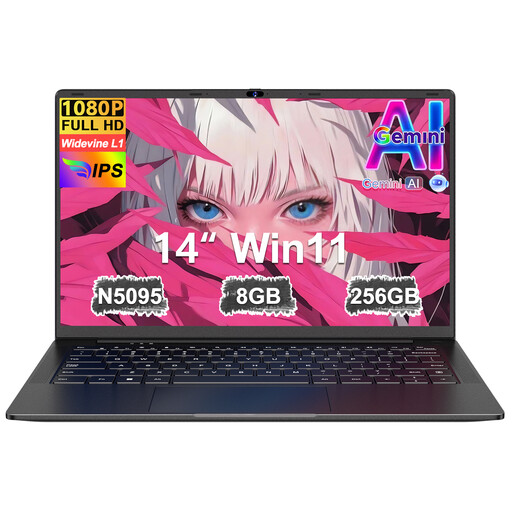 Image unavailable
Ruzava 14-inch laptop, N5095, 8 GB RAM, 256 GB SSD
The 14-inch format is an option for drafting with files stored locally.
The product title lists an N5095 processor with speeds of up to 2,9 GHz. The title and product description also list 8 GB RAM, a 256-GB SSD and an FHD display.
According to the product title, the SSD storage can be expanded to up to 1 TB.
View at Joybuy
 Image unavailable
Apple 13-Inch MacBook Air (M5, 10-Core CPU, 10-Core GPU, 16 GB, 1 TB SSD, Silver)
The compact MacBook Air is worth considering if the programmes and file formats you need work with macOS.
The product title lists a German QWERTZ keyboard, 16 GB of memory and a 1-TB SSD.
According to the product description, a power adapter isn’t included. Check whether you need to buy a compatible one.
View at Joybuy
Frequently asked questions
Will the advertised 18-hour battery life last for a full day working on a grant application?
Not necessarily. Apple quotes up to 18 hours for the MacBook Air with M5. Judge how long you need it to last by looking at an independent test with a similar workload and considering how you use your own laptop.
How do I prepare my laptop for working without the internet?
Download or open the files you need beforehand, then test your workflow without a connection. Microsoft Support explains how to work offline with Word files saved locally or opened online beforehand. For Google Docs, you need to set up offline mode in advance; Google lists an internet connection for setup and a supported browser among the requirements.
How can I avoid losing an almost-finished application?
Create a separate backup and check that you can restore a file from it. For confidential documents stored locally, you should also check the encryption options. These are security measures, not a legal requirement that applies to every buyer.
Do online purchases in Germany come with a 14-day right to cancel?
Generally, yes, for a qualifying online purchase made as a consumer: the European Union’s consumer information gives a 14-day period from delivery for goods and explains that exceptions apply. If you’re buying for an organisation as part of its work, don’t assume that you have a consumer right to cancel without checking.
Is a manufacturer’s warranty the same as your statutory rights?
No. Germany’s consumer advice centre distinguishes statutory rights against the seller from a voluntary warranty. Check who your contract is with for the specific offer and what additional warranty terms apply.


