Choose your laptop to suit the way you manage files. For a permanent workspace, usable screen space and the right ports matter; if you work in different locations, portability and access to your source files matter too. Zotero does not synchronise linked files, so plan how you’ll transfer and back them up separately from your index file. Check OCR text from historical adverts against the original scan, as the Library of Congress warns that recognition errors can occur.
Who is this workflow for?
Cataloguers with a local source archive
If you catalogue adverts, you’ll want to be able to find scans or PDFs even after changing devices. Zotero documents the use of relative file paths within a base directory and notes that linked files need to be synchronised separately.
Researchers checking historical scans
If you compare adverts with scans and correct recognised text, check the original image directly. The Library of Congress cites unusual typefaces and very small print as possible causes of OCR errors.
Researchers on the move
If you catalogue material in different locations, you’ll need to weigh portability and screen space against access to your source files. The ports you need will depend on your drives and where you work.
What should you look for when buying?
First, work out how you’ll store source files and make them available in different locations. Then compare the screen, ports and portability with the way you work.
| Buying priority |
What to look for |
Who is it important for? |
| Keep source files accessible |
Check file paths and how you’ll transfer linked files separately. Zotero can reference files relatively within a base directory, but it does not synchronise linked files. |
If I need to reopen entries after changing folders or devices, I pay particular attention to how files are managed. Around 28% of consumers put being able to find linked source files over time first. |
| Check scans and catalogue fields |
Compare the usable screen space on the laptop with your workspace, and check whether you can connect an external monitor if needed. Small print and unusual typefaces can make OCR more difficult, as the Library of Congress explains. |
If I need to compare small print with my catalogue fields, I want to view the scan and index side by side. Around 22% of consumers prioritise visually checking historical adverts. |
| Store and back up scans |
Estimate your storage needs based on your own files and check that the laptop has a port compatible with your backup device. An internal SSD is no substitute for a separate backup; the German Federal Office for Information Security recommends backing up data regularly. |
If I need to restore my index and source files after a device problem, I plan for backups from the outset. Around 22% of consumers put storage and recoverability first. |
| Check OCR as part of your workflow |
Check that your chosen OCR application is compatible and test it with typical scans. Whatever the laptop or AI branding claims, check recognition results against the original image. |
If I want to reuse recognised advert text, I need to be able to spot and correct errors by checking the scan. Around 17% of consumers prioritise checking OCR results. |
| Work with the same sources on the move |
Compare portability, screen size and the ports you need. If you can’t access source files at your workplace on another device, plan how to keep them available locally. |
If I catalogue material in different locations, I need access to the right sources there and want a laptop I can still carry comfortably. Around 11% of consumers put portability first. |
Common pitfalls
-
Confusing file links with a backup
A linked file in an entry doesn’t automatically mean that the source file will be available on another device. Zotero does not transfer linked files through its file-syncing service.
After changing devices or folders, check a sample of entries to make sure they can still open their scans, and back up source files separately.
-
Assuming OCR or AI labels guarantee accurate text
Historical documents with unusual or small print can contain recognition errors. The Library of Congress notes that OCR text is not completely error-free.
Test typical documents with your application and check important details against the scan.
-
Focusing only on the built-in screen size
A compact laptop can be convenient to carry, but it offers less built-in screen space than a larger device when comparing scans with index fields.
Before buying, check that the screen space and video ports suit your permanent workspace and any external monitor you may use.
Brands to consider
Lenovo
The ThinkPad E14 Gen 7 (AMD), model 21T00050MB, is a documented Windows option with a 14-inch WUXGA display.
- Lenovo PSREF lists 16 GB RAM, a 512 GB SSD, USB-A, USB-C, HDMI and Ethernet for this model.
- The documented configuration has a Belgian keyboard. This does not indicate a German keyboard layout or the specification of other E14 configurations.
HP
The HP ProBook 4 G1i 14, variant AD2N3ET#ABD, is a documented Windows business laptop configuration.
- HP lists a 14-inch WUXGA display, 16 GB RAM and a 512 GB SSD for this variant.
- These specifications apply to the variant named and do not demonstrate that the ProBook range as a whole offers better performance.
Acer
The Swift Go 14 AI SFG14-64-R3EW, part number NX.JDAEG.009, is a documented 14-inch WUXGA model.
- Acer Germany lists 16 GB RAM and a 512 GB SSD for this variant.
- The ‘AI’ in the name does not prove that it can recognise historical adverts more accurately. Check other Swift Go variants separately.
Apple
The MacBook Air with M5 is a macOS option if the index and OCR applications you actually use are compatible with this operating system.
- Apple lists 13- and 15-inch models, as well as configurations with 16 GB of unified memory and a 512 GB SSD.
- Apple lists two Thunderbolt ports for the M5 range. Check that your software and devices are compatible; manufacturer battery-life claims aren’t a measure of how long your archive workflow will run.
Dell
The Dell Pro 14 PC14250 is a documented business laptop option for comparing configurations and ports.
- Dell Germany lists the PC14250 as a specific laptop range.
- Specifications may vary depending on the configuration you choose. Check the details of the specific variant and make sure it’s compatible with your OCR software.
Joybuy product selection
This selection includes laptops with larger screens for a permanent workspace, as well as options for working on the move with external devices.
 No image available
Acer TravelMate TMP216-41-TCO, 16-inch
The 16-inch format is an option if you want a larger built-in display for comparing scans with catalogue fields at a permanent workspace.
Specifications listed include a WUXGA display, AMD Ryzen 3 PRO 7335U, 16 GB DDR5, 512 GB SSD, AMD Radeon 660M and Windows 11 Pro Education.
View at Joybuy
 No image available
HP OmniBook Ultra Flip 14-fh0670ng, 14-inch
The 14-inch 2-in-1 format could suit you if you work on the move and your specific cataloguing and OCR software is compatible with Windows 11 Home.
Specifications listed include Intel Core Ultra 7 258V, 32 GB RAM, 1 TB SSD and a 2.8K OLED touchscreen.
View at Joybuy
 No image available
HONOR Magicbook X16 AMD 2025, 16-inch, German keyboard
The 16-inch format is an option if you prefer a larger built-in screen when checking adverts.
Specifications listed include AMD R5 6600H, 16 GB RAM, 512 GB SSD and a German keyboard.
View at Joybuy
 No image available
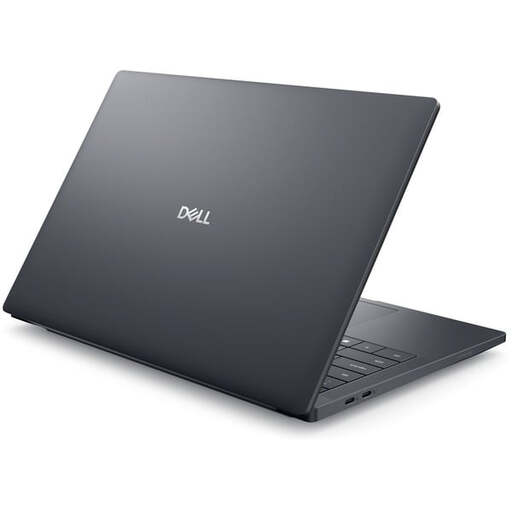
Dell Pro Max 14 Premium MA14250
The 14-inch format is an option for working on the move. Check that the display and ports suit the way you work with scans and files.
Specifications listed include an FHD+ display, Intel Core Ultra 7 265H, 32 GB RAM, 1 TB SSD, RTX PRO 2000 and Windows 11 Pro.
View at Joybuy
 No image available
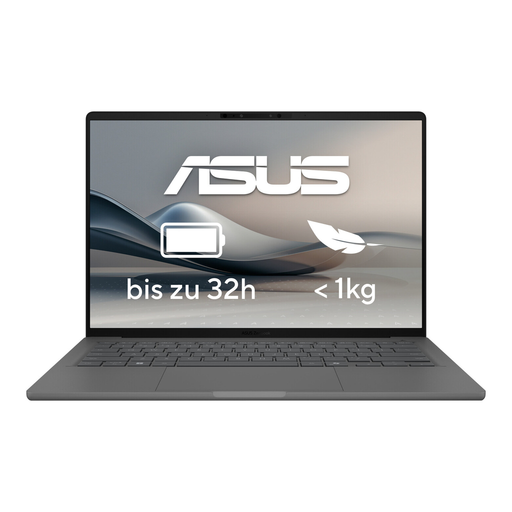
ASUS Zenbook A14 OLED UX3407RA-QD011W
If you’re considering it for mobile scanning and cataloguing, check that your software is compatible and that it has the ports your devices need before buying.
View at Joybuy
Frequently asked questions
How can I keep links to source files working after changing devices?
Set up the file storage location consistently on the devices involved, then transfer or synchronise source files separately. Zotero can reference files relatively within a base directory, but it does not synchronise linked files. For other indexing programmes, check their own rules for file paths.
Can I rely on OCR alone when cataloguing historical adverts?
No. Check important details against the scan. The Library of Congress warns that OCR errors can occur, particularly with unusual typefaces and very small print.
What should I plan for beyond my laptop’s SSD?
Plan to back up your index and source files regularly, using a separate device. The German Federal Office for Information Security lists external drives as possible backup media; the capacity you need will depend on the amount of data you have.
Is a manufacturer’s warranty the same as my legal rights when buying a laptop?
No. When you buy as a consumer from a business seller, you have statutory rights if the goods are faulty. Any additional manufacturer’s warranty is subject to its own terms and does not replace those rights. The European Union’s consumer information explains the minimum two-year legal guarantee for faulty goods.


