For the occasional short holiday video, first check that your editing software and laptop are suited to your files and workflow; you don’t automatically need a dedicated graphics card. If you regularly work on larger projects, Adobe’s recommendations for Premiere on Windows or Intel Mac systems can be a useful starting point. Also check that the display and ports suit your monitor, memory cards and drives, as specifications vary between individual models.
Which laptop is right for you?
For regular editors
If you often edit longer holiday projects, check that the specifications match your editing software, source files and workflow. For Premiere on Windows or Intel Mac systems, Adobe recommends 32 GB of RAM or more as a general hardware guideline.
For editing at your home workstation
If you work at a desk with a monitor, memory cards or external storage, check the ports on the exact configuration you’re considering. Apple explains that Final Cut Pro can import media from connected storage devices and memory cards, among other sources.
For occasional editors
If you only edit shorter videos now and then, start by checking the requirements of the software you actually use. Only budget for extra features if your workflow needs them. Apple recommends 16 GB of RAM for Final Cut Pro; this isn’t a blanket recommendation for other software.
What should you look for when buying?
Windows for occasional projects
A good fit if: you edit short videos occasionally and meet the requirements of the software you use.
The trade-off: A less powerful specification may offer less headroom for larger projects.
Windows creator laptop
A good fit if: you regularly edit larger Premiere projects and want to check the specifications against your software’s requirements.
The trade-off: The specifications of one creator configuration don’t prove a particular editing speed, or that its extra power is necessary for every project.
Mac for macOS or Final Cut Pro
A good fit if: you want to work with macOS or use Final Cut Pro; Apple specifies macOS 14.6 or later and recommends 16 GB of RAM.
The trade-off: Final Cut Pro’s requirements and Adobe’s recommendations for Windows or Intel Mac systems aren’t interchangeable.
| Priority |
What to check when buying |
Who it matters most to |
| Editing software and performance headroom |
Check that the software and operating system, video format, processor, RAM and graphics are suited to the complete configuration. |
If I regularly work on larger projects, I want enough headroom without applying the requirements of other programmes. Around 37% of consumers put editing performance first. |
| Assessing footage on the laptop |
Check the screen size, resolution, finish and stated colour gamut coverage for the exact model variant. |
If I mainly assess the preview and timeline on the built-in screen, its exact specifications are important to me. Around 27% of consumers prioritise assessing footage. |
| Ports at your editing workstation |
Check that the video output, USB ports and card reader work with your monitor, cables and memory card type. |
If I connect a monitor, camera or drive at my desk, I want to avoid unnecessary adapters. Around 18% of consumers put the ports at their workstation first. |
| Project files and backups |
Allow for the size of your footage, space for working files and a separate backup method. |
If I want to keep my holiday videos and working files safe, I want to plan for a separate backup as well as the laptop’s storage. Around 18% of consumers prioritise storage and backups. |
Avoid common buying mistakes
-
Assuming a product range name tells you the full specification
RAM, graphics, display, SSD and ports can vary within the same laptop range. The range name alone won’t tell you what’s included in a particular model.
Check the full model number and the specifications of the laptop on offer. Also make sure its ports and card reader work with your existing devices, and factor in any adapters or storage media you may need.
-
Confusing a fast SSD with a backup
An SSD can store project files and cache, but it doesn’t replace a separate backup of your footage. Germany’s Federal Office for Information Security recommends backing up data so you can restore files after loss or damage.
Allow for storage for your media and working files, as well as a separate backup method that you check regularly.
Brands and product ranges at a glance
ASUS
The ProArt P16 range includes Windows configurations designed for creative work. Specifications apply to the specific variant listed.
- For the ProArt P16 H7606WP-RJ090W, ASUS lists 32 GB of onboard RAM, an RTX 5070 with 8 GB of graphics memory, a 2 TB SSD, HDMI, USB4 and an SD Express card reader.
- These are manufacturer specifications, not independent performance test results. Other P16 variants may differ.
Apple
The MacBook Pro is worth considering for a macOS workflow, particularly if you want to use Final Cut Pro.
- Apple lists hardware acceleration for certain video formats on specified MacBook Pro chips. For Final Cut Pro, Apple recommends 16 GB of RAM.
- Check the chip, storage and ports on the specific configuration. Details for particular chips don’t prove how every MacBook Pro performs.
Lenovo
The Yoga Pro 9i is another Windows range for creative applications.
- For a listed Gen 11 configuration, Lenovo specifies 32 GB of RAM, RTX 5060 graphics and a 16-inch display. It also lists 8 GB of graphics memory and a 1 TB SSD.
- The RAM is listed as soldered for this package. Display and specification details apply to the relevant configuration and listed options.
HP
The OMEN 16 range includes configurable Windows laptops, if you’re also considering a design that’s more gaming-focused.
- Different processor and RAM options are listed for the 16-AP0000 series.
- HP notes that specifications and regional availability may vary. The series name alone doesn’t specify a particular configuration.
Joybuy laptops for video editing
This selection includes Windows laptops with different display, port and storage specifications, as well as models with dedicated graphics. The right option for your video editing depends on your software, project size and workspace.
 No image available
ASUS Zenbook S16 UM5606GA-SS335W, 16-inch OLED, 32 GB/1 TB, without power adapter
An option if you need an SD card reader and ports for an external monitor at your desk.
16-inch OLED display with 2880 × 1800 pixels, Ryzen AI 9 465, 32 GB of RAM and 1 TB SSD. Includes an SD card reader, HDMI 2.1 and two USB-C 4 ports.
Joybuy
 No image available
Lenovo ThinkPad E16 Gen 3 21ST, Ryzen 7 250, 32 GB/1 TB
A Windows option if 32 GB of RAM and a 1 TB SSD suit the size of your projects and you want to use the ports at your desk.
16-inch WUXGA IPS display, Radeon 780M, 32 GB of RAM and 1 TB SSD. The stated display coverage is 45% NTSC; check this carefully if you want to assess colour on the built-in screen. USB4-C and HDMI 2.1 are listed.
Joybuy
 No image available
MSI Crosshair 16 Max HX E2WGXK-023, RTX 5070, 16 GB/1 TB
An option to consider if you specifically want to compare a dedicated GPU and fast internal storage.
16-inch QHD+ OLED display with 2560 × 1600 pixels, Intel Core Ultra 9 275HX, RTX 5070 with 12 GB of graphics memory, 16 GB of RAM and 1 TB NVMe SSD. The description lists HDMI, USB-C and USB-A.
Joybuy
 No image available
HP OmniBook Ultra Flip 14-fh0670ng, 2-in-1, 32 GB/1 TB
A more compact 2-in-1 option if a 14-inch touchscreen suits your workspace and the way you review footage on your laptop.
2.8K OLED touchscreen with 2880 × 1800 pixels and 100% DCI-P3, Intel Core Ultra 7 258V, integrated Intel Arc graphics, 32 GB of RAM and 1 TB SSD. Two Thunderbolt 4 ports are listed.
Joybuy
 No image available
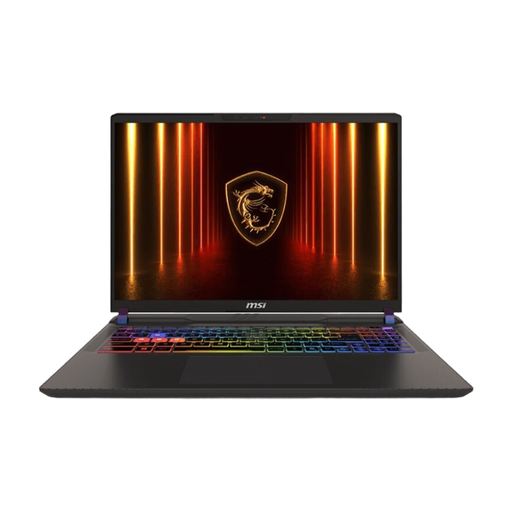
MSI Vector 16 HX AI A2XWHG-476, RTX 5070 Ti, 16 GB/1 TB
An option to compare if you’re considering a 16-inch laptop with dedicated graphics for the size of your projects.
16-inch QHD+ display, Intel Core Ultra 9 275HX, RTX 5070 Ti, 16 GB of RAM and 1 TB SSD. Windows 11 is listed as the operating system.
Joybuy
Frequently asked questions
Do I definitely need 32 GB of RAM for occasional holiday videos?
No, not as a general rule. Adobe recommends 32 GB or more for Premiere on Windows or Intel Mac systems; check the requirements for the software and projects you actually use. Apple recommends 16 GB of RAM for Final Cut Pro.
How do I transfer camera files to my editing laptop?
Check that your camera’s memory card type is compatible with the laptop’s card reader or a suitable external reader. Apple also explains how to import media into Final Cut Pro from connected storage devices and memory cards.
Is a large SSD enough to back up my holiday videos?
No. The internal SSD is used for project and working files, among other things. Germany’s Federal Office for Information Security recommends an additional data backup so you can restore files after damage or loss.
What happens if a laptop I bought as a consumer in Germany is faulty?
For a faulty new product, you generally have statutory consumer rights against the seller for two years. A voluntary manufacturer or retailer’s guarantee is separate; if you have a specific issue, check the conditions for making a claim for repair or replacement.
Is CE marking relevant for laptops in Germany?
It may be relevant if the specific device is covered by EU rules that require CE marking. The European Union lists electrical and electronic equipment among the product groups that may be subject to these rules. Check the requirements for the specific device; CE marking is not a video-editing or quality certification.


