What to consider when choosing
Windows laptop
A good fit if: you want to use the installed version of PowerPoint for Windows. Check the licence and ports on the specific configuration.
Consider: An HDMI port may save you needing an adapter with a compatible screen, but it doesn’t guarantee compatibility with every monitor or projector.
MacBook
A good fit if: your slide-making workflow works with macOS and the features you need in PowerPoint for Mac or your preferred editor.
Consider: HDMI isn’t listed among the ports on the documented MacBook Air with M5, so check how you’ll connect it to your existing screen.
Chromebook
A good fit if: you create slides in a browser and have checked that PowerPoint for the web has the features you need.
Consider: Microsoft says the Windows and Mac desktop versions of Microsoft 365 or Office cannot be installed on a Chromebook.
For presentations at home, the key things to consider are the software you need and how you’ll connect an external screen. The points below will help you check which configuration suits your workspace.
| Priority |
What to check before you buy |
Who it matters most to |
| Software and features |
Check that the operating system supports the version of the software you need and see which licence is included. |
If I need features from the installed version of PowerPoint, I want to check the operating system and licence in advance. Around 33% of consumers put the right desktop software first. |
| Workspace |
Compare the screen size and resolution of the specific model with your desk and any monitor you already have. |
If I work on slides and notes on my laptop for long periods, a screen that suits my workspace is important. Around 25% of consumers prioritise screen space for working on slides. |
| External screen |
Check that the video output, cable and screen input are compatible, and test the extended display before an important presentation. |
If I want to show slides on a second screen and keep my notes separate, the connection to my monitor needs to work. Around 25% of consumers prioritise the connection for presenting. |
| Overall cost and portability |
Factor in the software licence and any accessories you need; check the weight and what’s included with the specific model. |
If I sometimes move my laptop around or take it with me, I want to consider everything I’ll need. Around 17% of consumers focus first on overall cost and portability. |
Joybuy products for presentations
The devices below include Windows laptops for workflows using installed desktop software, as well as a MacBook with macOS. Check that the software, ports and what’s included with the specific model suit your workspace.
 No image available
Acer Nitro V 16 AI ANV16-42-R1HB
This model could suit a Windows desktop workflow with a compatible external screen.
16-inch display, R7, 16 GB RAM, 1 TB SSD, RTX 5060 and Windows 11 Home are listed in the product name; the description specifies HDMI 2.1.
View at Joybuy
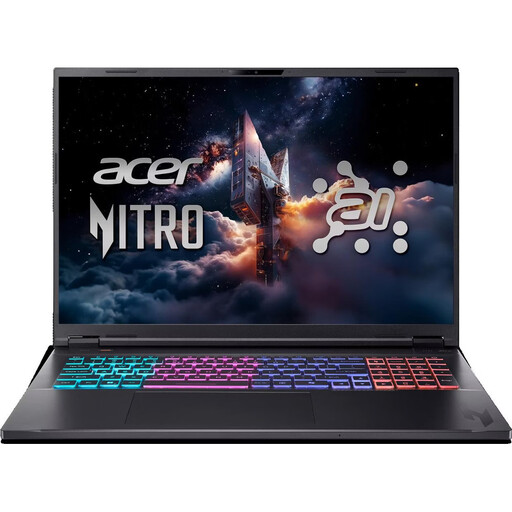 No image available
Acer Nitro 18 AI AN18-61-R40J
The 18-inch model could be worth considering if you want to work on slides directly on your laptop screen, provided it suits your workspace.
Ryzen AI 7, 16 GB RAM, 1 TB SSD, RTX 5070 and Windows 11 Home are listed; the description specifies a WQXGA display and HDMI 2.1. It also states that the keyboard has an English International layout.
View at Joybuy
 No image available
Acer TravelMate TMP216-41-TCO
For editing slides on Windows, compare this model’s display and port specifications with your workspace.
16-inch WUXGA, AMD Ryzen 3 PRO 7335U, 16 GB DDR5, 512 GB SSD and Windows 11 Pro Education are listed; the description specifies HDMI 2.1.
View at Joybuy
 No image available
Lenovo ThinkPad E16 Gen 3 21ST
If you use PowerPoint for Windows and want to work on slides on a larger screen, check that this configuration is compatible with your monitor connection.
16-inch WUXGA, 32 GB RAM, 1 TB SSD, AMD Ryzen 7 250 and Windows 11 Pro are listed; the description specifies HDMI 2.1.
View at Joybuy
 No image available
Apple 13-inch MacBook Neo (A18 Pro, 2026), indigo blue (English QWERTY keyboard)
This MacBook could suit you if your slide-making workflow works with macOS and you can connect an external screen via USB-C.
13-inch display, 8 GB RAM and 256 GB SSD are listed; the description specifies macOS, DisplayPort support via USB-C and a weight of 1.23 kg. It also states that a power adapter isn’t included and must be purchased separately.
View at Joybuy
Frequently asked questions
Is a Chromebook enough for PowerPoint presentations?
A Chromebook can be a good fit for creating and editing presentations in PowerPoint in a browser. According to Microsoft, the Windows and Mac desktop versions can’t be installed on Chromebooks, so check that the web version has the features you need.
How can I show slides and private speaker notes on separate screens?
Presenter View can show slides and private notes on separate screens. Microsoft recommends using a supported, connected second screen. Set the displays to extended mode and check in advance which screen will show your slides and notes.
Does a laptop automatically come with a full, ongoing PowerPoint licence?
No, it depends on the specific configuration. Lenovo lists an Office trial with the IdeaPad Slim 3 15ARP10, model 83K7008VGE; before you buy, check the software details and the terms of the licence you need.
What are my rights when buying online as a private customer in Germany?
The Verbraucherzentrale explains that consumers generally have a 14-day right to cancel online contracts, subject to the applicable conditions and exceptions. If a product is faulty, you have statutory rights against the seller; these are separate from any voluntary guarantee.
What should I check to make sure a laptop sold in Germany complies with regulations?
For products covered by relevant EU harmonisation legislation, the Bundesnetzagentur describes a requirement for CE marking. Check the product identity, the responsible supplier and the required information for the specific listing. A shop description alone is not an independent check of the individual device.


