What should you look for when buying?
First, check whether the keyboard, software and screen layout suit the way you work. If you regularly move between workspaces, factor in carrying and charging the laptop too.
| Consideration |
What to check when buying |
Who it matters most to |
| Typing comfort and screen space |
Check the keyboard layout and feel, and make sure you can comfortably read a document and its source side by side. |
When I’m editing longer interview transcripts, I want to type comfortably and read my notes alongside the source. Around 26 % of consumers put typing comfort and a clear workspace at the top of their list. |
| Portability and power supply |
Check the dimensions and weight of the specific configuration, along with the charging port and what’s included in the box. |
If I move between workspaces often, I want to carry my device and the charging equipment I need without unnecessary extra weight. Around 21 % of consumers prioritise portability and power supply. |
| Confidentiality of notes |
Check the requirements for access, storage location and secure data transfer. |
If my notes contain confidential information, I want to know who can access them and how they’re transferred. Around 21 % of consumers put protecting their notes first. |
| Software and workspace |
Check your team software’s system requirements and whether the connections work with your existing monitors and devices. |
If my team software or existing devices require a particular system, I want to check compatibility before buying. Around 16 % of consumers prioritise compatibility with their existing work setup. |
| Total cost and service |
Check whether the power adapter and any necessary adaptors are included, as well as the warranty and service terms. |
If I want a device that’s ready to use straight away, I need to factor in any accessories and service requirements. Around 16 % of consumers put the total cost first. |
Joybuy products for shared workspaces
This selection includes compact laptops for people who move between workspaces, as well as a larger 16-inch model with more screen space. The key question is whether easy portability or being able to view notes and sources side by side matters more in your day-to-day work.
 No image available
Lenovo ThinkPad E16 Gen 3 21ST
The 16-inch design could suit you if you have more space at your workstation for viewing notes and sources.
AMD Ryzen 7 250, Windows 11 Pro, 32 GB RAM and a 1 TB SSD. The anti-glare 16-inch WUXGA display and German QWERTZ keyboard are features suited to working with text; the stated weight is 1,71 kg.
If your notes contain personal data, the responsible organisation should set rules for storage, access and secure transfer.
Joybuy
 No image available
Lenovo Yoga Slim 7i Aura Edition 14-inch
Its compact design and stated weight of 1,14 kg could make it a good fit if you regularly move between workspaces.
2.8K OLED display, Core Ultra 7 355, 16 GB RAM, 1 TB SSD and Windows 11 Home. The product description lists a backlit German keyboard and USB-C charging.
Check that the smaller screen gives you enough space for the way you usually arrange your windows.
Joybuy
 No image available
HP OmniBook Ultra Flip 14-fh0670ng
This 14-inch convertible could suit you if you want to switch between laptop and tablet modes and are happy with the screen size.
Intel Core Ultra 7 258V, 32 GB RAM, 1 TB SSD, 2.8K OLED touchscreen and Windows 11 Home. The product description lists a weight of 1,34 kg and two Thunderbolt 4 ports.
You’ll have less screen space for viewing notes and sources side by side than with a larger display.
Joybuy
 No image available
Apple MacBook Air 13 (M5, 2026), 16 GB/512 GB SSD
At 13,6 inches and a stated weight of 1,23 kg, this could suit you if you move between workspaces often and don’t mind the more compact screen.
10-core CPU, 8-core GPU, 16 GB RAM, 512 GB SSD and a German QWERTZ keyboard in Midnight.
The product description says that a power adapter is not included. Before buying, also check that the team software you need is compatible with macOS.
Joybuy
 No image available
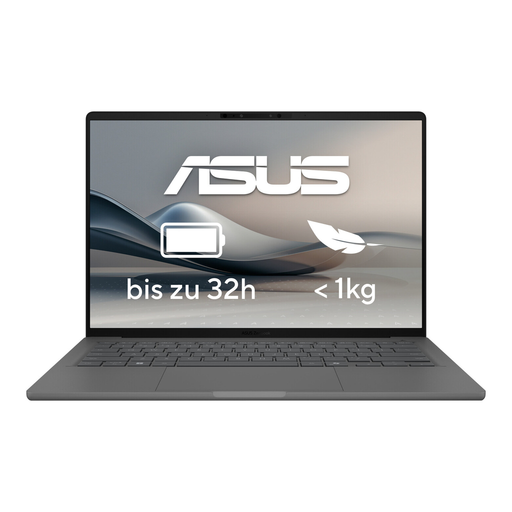
ASUS Zenbook A14 OLED UX3407RA-QD011W
The stated weight of 1,20 kg could be useful if you move between workspaces; check that the screen size suits the way you work.
14-inch OLED display, 16 GB RAM, 512 GB SSD, two Thunderbolt 4 ports and HDMI 2.1.
Check that the ports work with your existing monitors and other devices.
Joybuy
Frequently asked questions
Is a small screen big enough for interview notes?
A compact device could work if you only edit one document at a time. If you need to keep notes and sources open side by side, check that this layout is easy to read; a larger display will take up more space.
What should I set up first in a shared workspace?
Start by checking access protection, approved storage and data backup with the responsible organisation. For confidential data on an unfamiliar or public Wi-Fi network, Germany’s Federal Office for Information Security recommends secure data transfer. Don’t rely on the network name alone.
Does a new laptop always come with a power adapter?
No, it depends on the specific offer: HP lists a power adapter for the ProBook 4 G2i DM9H7EA#ABD as available separately. The European Commission gives 28 April 2026 as the date when requirements for affected laptops begin to apply; this doesn’t mean every older or second-hand device is covered. Check what’s included and the charging power you need.
Can I simply work on personal interview notes in any cloud service?
Not necessarily. When processing personal data, technical and organisational safeguards must be appropriate to the level of risk; the European Data Protection Board stresses that these depend on the processing context. The responsible organisation must decide which service and settings are approved for the specific use.
What are my rights if something is faulty or I buy online in Germany?
Statutory rights relating to faulty goods are generally claims against the seller and are separate from a voluntary warranty. Online consumer purchases usually come with a 14-day right to cancel; for a specific business purchase, check the contract and buyer status separately. The Verbraucherzentrale explains the differences.


