What should you look for when buying?
First decide whether extended writing, reading several documents at once or frequent changes of location matter most for your work. Then check privacy features and the specifications of the exact version.
| Buying consideration |
What to check |
Who it matters most to |
| Writing longer texts |
Check the keyboard layout and specifications of the exact version; for longer sessions, make sure your work surface, chair, keyboard and screen are well matched. |
I edit long sections of interviews and want a keyboard that suits extended writing. Around 33% of consumers say extended writing is their top buying priority. |
| Reading transcripts and sources |
Try viewing documents side by side at your usual text size, and weigh up screen space against the room available on your table. |
If I want to read a transcript and sources side by side, I need enough visible screen space without losing sight of how much room I have at the kitchen table. Around 27% of consumers prioritise this kind of side-by-side reading. |
| Protecting confidential files |
Check which backup and encryption options you can set up for your files and programmes; separately establish the legal basis for the specific data processing. |
When handling personal notes, I want to know how to back up files and protect them from unauthorised access. Around 20% of consumers put protecting confidential interview content first. |
| Working in different places |
Compare the weight of the exact configuration, including the charger you’ll carry, and check that it has the ports you need. |
If I take my laptop with me often, the overall weight of my work equipment matters, but I don’t want to compromise on screen space. Frequent mobility is a priority for around 20% of consumers. |
Joybuy laptops for taking interview notes
This selection includes traditional laptops, a touchscreen convertible and models with different screen sizes for editing interview notes and reading several documents at once.
 No image available
HP ZBook 8 G1i 14, Ultra 9 285H, 64 GB RAM, 1 TB SSD
For extended writing and reading several documents at once, the matt, anti-glare 14-inch IPS screen in a 16:10 format is a useful feature to note.
2,560 × 1,600 pixels; 1.43 kg; Windows 11 Pro.
View at Joybuy
 No image available
HP OmniBook Ultra Flip 14-fh0670ng, Core Ultra 7 258V, 32 GB RAM, 1 TB SSD
If you want to mark up passages directly on screen or use your laptop in different positions, this version has a touchscreen and comes with a stylus.
14-inch OLED touchscreen; 2,880 × 1,800 pixels; 1.34 kg; laptop, tablet, stand and tent modes; Windows 11 Home.
View at Joybuy
 No image available
Apple 15.3-inch MacBook Air M5, 16 GB RAM, 512 GB SSD, German QWERTZ keyboard
If you need to see your transcript and sources at the same time, the larger screen gives you more room to work.
2,880 × 1,864 pixels; 1.51 kg; Starlight. The product listing states that no power adapter is included.
View at Joybuy
 No image available
Apple 13.6-inch MacBook Air M5, 16 GB RAM, 512 GB SSD, German QWERTZ keyboard
If you’re looking for a more compact laptop to use in different places, the stated screen size and weight are useful points of comparison.
2,560 × 1,664 pixels; 1.23 kg; macOS.
The product listing states that no power adapter is included.
View at Joybuy
 No image available
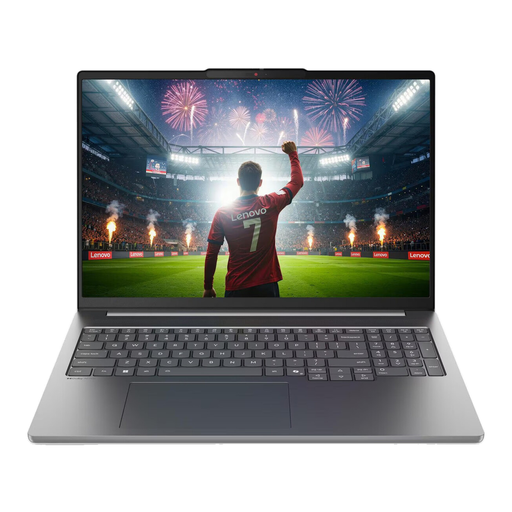
Lenovo IdeaPad Pro 5i 16IPH11, Ultra 9 386H, 32 GB RAM, 1 TB SSD
For writing longer texts in German and reading documents at the table, the listed backlit German keyboard and matt screen are useful features to note.
16-inch screen; 2,880 × 1,800 pixels; 1.82 kg; RTX 5060; Windows 11 Pro.
View at Joybuy
Frequently asked questions
How should I set things up for longer sessions at the kitchen table?
Set up your work surface, chair, keyboard and screen to support a comfortable posture. The BAuA describes this arrangement as important for ergonomic working; it doesn’t mean you’re required to buy any particular accessories.
How can I protect interview notes I’ve already edited?
Back up your document files regularly, and check encryption and access controls when working with confidential content. The BSI explains data backup and encryption; a product feature on its own is no substitute for setting up backups or checking the legal requirements for processing the data.
What are my rights if I buy a faulty laptop from a business seller?
According to information from Your Europe, consumer purchases in the EU come with a legal guarantee of at least two years from the date you receive the goods; you should contact the seller. Any additional manufacturer’s warranty doesn’t replace these rights. The terms of your specific purchase apply, including whether it counts as a consumer purchase.
Can I return a laptop bought online without giving a reason?
For online consumer purchases covered by the rules, you generally have a 14-day right to cancel from the date of delivery, as explained by Your Europe for EU purchases. Check the terms of your specific contract; cancelling a purchase is different from making a claim about a fault.
Is laptop encryption enough to let me process personal interview content?
No. The Federal Commissioner for Data Protection and Freedom of Information (BfDI) explains that processing personal data requires a legal basis under Article 6 of the GDPR. Consent is one possible basis, but it isn’t the only one. The legal basis for your interview or recording depends on the details of your project, so it can’t be determined in general terms.


