What should you look for?
First, check that your writing and editing software is compatible. Then consider the keyboard and screen for the places where you usually work. For sensitive drafts, you should also decide how to back up your files and restrict access.
| Consideration |
What to check before buying |
Who is this important to? |
| Keyboard and working position |
Check the German keyboard layout and key feel. For longer sessions at a fixed workstation, consider the connections available for external input devices and a monitor. |
If I write lengthy drafts, I want to type comfortably and find a suitable working position. That’s why around 33% of consumers put typing comfort first. |
| Comments and edits |
Use a sample document of your own to check that the software, commenting features and Track Changes fit your workflow. |
If I regularly compare versions and notes side by side, I want a clear view of revisions. Around 27% of consumers prioritise this overview. |
| Working on the move |
Check the specific design, charging accessories and offline features of the software you use. |
If I move between different places to write, I want to be able to edit drafts while I’m out and about. Around 20% of consumers prioritise portability. |
| Backing up and protecting files |
Check how regular backups, access protection and, where appropriate, encryption can fit into your workflow. |
If I don’t want my interview files to be lost or accessed by unauthorised people, I make sure to plan for backups and access protection. Around 20% of consumers put file protection first. |
Joybuy product selection
This selection includes compact and larger Windows laptops for drafting and editing directly on your device.
 No image available
HP ZBook 8 G1i 14, Ultra 9 285H, 64 GB, 1 TB
This compact Windows configuration could suit you if you’re looking for a 14-inch laptop to use in different locations.
Listed in the product name: Ultra 9 285H, 64 GB and 1 TB.
View at Joybuy
 No image available
HP ZBook 8 G1i 16, Ultra 7 265H, 64 GB, 2 TB
The 16-inch configuration is an option if you’d rather review edits on a larger laptop screen.
Listed in the product name: Ultra 7 265H, 64 GB and 2 TB.
View at Joybuy
 No image available
Microsoft Surface Laptop 8, Core Ultra 5, 24 GB, 512 GB, Platinum
This Windows configuration is a compact option if you want to continue your existing workflow on a laptop.
Listed in the product name: Core Ultra 5, 24 GB, 512 GB and Platinum.
View at Joybuy
 No image available
Microsoft Surface Laptop 8, Core Ultra 5, 24 GB, 1 TB, Platinum
This compact Windows configuration could suit a mobile writing setup if you want to keep using your existing software.
Listed in the product name: Core Ultra 5, 24 GB, 1 TB and Platinum.
View at Joybuy
 No image available
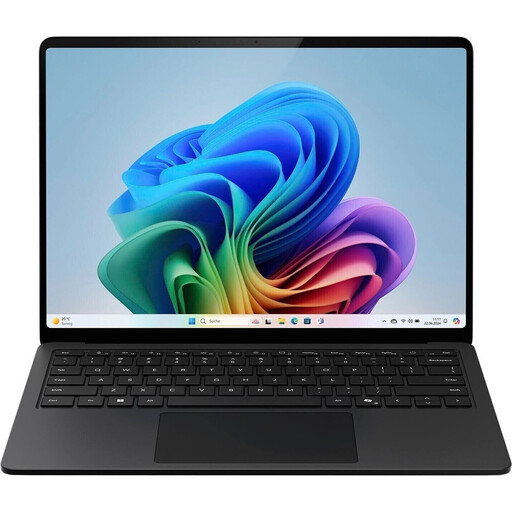
Microsoft Surface Laptop for Business, 7th Edition, Core Ultra 7 266V, 16 GB, 512 GB, 15-inch
This larger Windows model could suit you if you prefer to review text and editing notes on a laptop screen.
Listed in the product name: Core Ultra 7 266V, 16 GB, 512 GB and 15-inch.
View at Joybuy
Frequently asked questions
Do I need a particular laptop brand for editing notes?
No. The software you use is the first thing to consider. Microsoft Support documents Track Changes in supported versions of Word, including Mac versions; Google Docs supports Suggesting mode and comments. Test the workflow with a file of your own and the format you actually use to share documents.
How can I set up for longer writing sessions?
If you regularly work at a fixed desk, consider a separate monitor, external keyboard and mouse. The German Social Accident Insurance lists this equipment as one option for mobile screen-based work.
Can I work on a draft on a Chromebook without an internet connection?
Google explains how to edit certain Drive files, including Google Docs, offline. Set up offline access in advance and check that the file has synced. Not every app works offline.
What should I set up to protect my drafts?
Plan regular backups and decide which documents to back up and where to store them. The German Federal Office for Information Security recommends regular data backups and describes encryption as one possible way to protect personal information.
Are a manufacturer’s guarantee and statutory rights the same thing?
No. For purchases by consumers, the German consumer advice centre explains that statutory rights against the seller generally apply for two years; any additional guarantee comes with its own terms and conditions. Check the guarantee terms and what’s included in the box for the specific offer separately.
Can I simply record interviews for my collection of transcripts?
Buying a laptop doesn’t give you permission to record. For telephone conversations, the Data Protection Conference stated in its resolution of 23 March 2018 that recording is generally permissible under data protection law only with the consent of the other party, including an external participant. This does not provide a definitive answer on the conditions under which a specific in-person interview or its subsequent publication may be permitted.


