What should you look for?
The W3C Web Accessibility Initiative treats keyboard accessibility, visible focus and the prevention of keyboard traps as properties of the content being tested – not as proof that a particular laptop is suitable.
Windows laptop
A good choice if: Your test requires Windows or Windows Narrator.
Keep in mind: Business models are available in different configurations, so check the layout and ports on the specific device.
Mac with macOS
A good choice if: macOS, VoiceOver or Mac-specific controls are part of your test.
Keep in mind: Apple notes that the Tab key on a Mac doesn’t reach every focusable item in every app. Make sure you use the appropriate keyboard navigation setting.
| What matters |
What to check before buying |
Who it matters most to |
| Keyboard and focus testing |
Check the layout on the specific configuration; test the focus order, visible focus and ability to move out of components without a mouse. |
If I test repeatedly using a keyboard, I need a clear layout and a consistent testing process; around 36% of consumers prioritise keyboard and focus. |
| Operating system and screen reader |
Note the operating systems and assistive technologies required for the test, then check that they match the configuration on offer. |
If my test requires Windows with Narrator or macOS with VoiceOver, I need the right test environment; around 29% of consumers prioritise the target platform. |
| Ports at your testing desk |
Compare the ports on the individual model with your keyboard, monitor and, if needed, dock. |
If I want to keep using my external keyboard and display at a fixed desk, the connections need to work; around 21% of consumers focus on their workspace setup. |
| What’s included and support |
Check the power adapter, any necessary adaptors and the support available for the specific configuration. Distinguish statutory rights from voluntary warranties. |
If I use the device regularly as a testing station, I want to know what’s included and what support is available beforehand; around 14% of consumers prioritise ongoing costs and service. |
Windows laptops at Joybuy
This selection features Windows laptops for tests that require a Windows environment. Compare the keyboard layout, operating system and ports for each specific configuration.
 Image unavailable
Lenovo ThinkPad E16 Gen 3 21ST, AMD Ryzen 7 250, 32 GB RAM, 1 TB SSD
A Windows option if your test requires Windows.
The product details list Windows 11 Pro and a German QWERTZ keyboard; check that the layout suits the characters you need to type.
View at Joybuy
 Image unavailable
HP ZBook Power 16, Ryzen 7 8845HS, 32 GB RAM, 1 TB SSD
A Windows laptop for tests that require a Windows environment.
The product details list Windows 11 Professional. Check that the ports you need match the keyboard and monitor at your testing desk.
View at Joybuy
 Image unavailable
HP ZBook X G1i 16, Ultra 7 255H, 32 GB RAM, 1 TB SSD
A Windows laptop for tests that require a Windows environment.
The product details list Windows 11 Professional. Check the port list for the configuration on offer to make sure it suits your fixed workspace.
View at Joybuy
 Image unavailable
HP ZBook 8 G1i 16, Ultra 7 265H, 64 GB RAM, 2 TB SSD
A Windows laptop for tests that require a Windows environment.
The product details list Windows 11 Professional. Check the ports on the specific variant against the peripherals you already have.
View at Joybuy
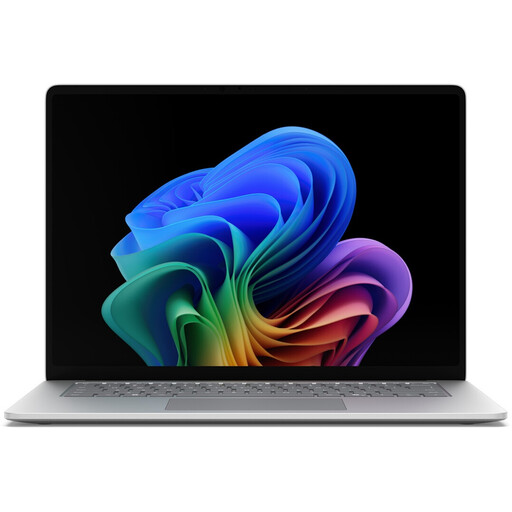 Image unavailable
Microsoft Surface for Business, 8th Edition, Intel Core Ultra 5 335, 16 GB RAM, 512 GB SSD
A Windows laptop for tests that require a Windows environment.
This configuration is listed with Windows 11 Professional and a 15-inch touchscreen. Check that the ports and input options suit your testing desk.
View at Joybuy
Frequently asked questions
How do I start a keyboard navigation test?
Test the features without a mouse, move forwards and backwards through the focus order, and check that focus is visible and that you can leave components using the keyboard. The W3C criteria apply to the content being tested, not to a general feature of the laptop.
Do I need to change a setting for Tab navigation on a Mac?
Possibly. Apple describes a keyboard navigation setting for controls and notes that Tab doesn’t reach every focusable item in every Mac app. Record the setting you use during the test.
What should I check when using an external keyboard and monitor?
Check that the connectors on your existing devices match the ports on the specific laptop variant. Lenovo lists USB-A, USB-C and HDMI for the ThinkPad E14 Gen 7; Apple lists two Thunderbolt 4 USB-C ports for the MacBook Air M5. Only plan for the adaptors your actual setup needs.
What are my rights if a laptop bought from a business is faulty?
For a consumer purchase, European Union consumer information states that you have a statutory guarantee claim against the seller for at least two years from receiving the goods. This is separate from a voluntary manufacturer’s warranty. The same consumer rule doesn’t necessarily apply to a business purchase.
Are WCAG, BITV and BFSG the same thing – and does my testing laptop need WCAG certification?
No. They don’t mean the same thing, and they don’t imply that every testing laptop needs general WCAG certification. WCAG sets out requirements for accessible web content; the German Federal Accessibility Agency explains BITV 2.0 for the relevant federal public bodies. According to the agency, BFSG, which has applied since 28 June 2025, also covers laptops as products, subject to its scope and timing requirements. The rules that apply to your web project and a particular device depend on the relevant scope.


