Who is this laptop guide for?

Developers focused on keyboard testing

You build booking forms and controls, and want to test the process repeatedly without a mouse. A practical test process and visible focus on the website are what matter – not the assumption that a particular laptop will make the finished site accessible. The W3C Web Accessibility Initiative describes keyboard accessibility and visible focus as requirements for the user interface.

Developers with a local project environment

You may use an editor, browser tools and local containers at the same time. Check the operating system and processor architecture against the specific tools and dependencies you use. MDN Web Docs explains how to use browser developer tools; whether your project environment will run also depends on the support available for its components.

Developers working in different locations

You work on the move as well as at a desk with a monitor or extra input devices. Compare the ports and display on the exact laptop configuration with your setup, and check which adapters or chargers you’ll actually need.

What should you look for when buying a laptop?

Windows laptop

A good fit if: your development or testing tools require a compatible Windows environment, or you’re looking for a particular keyboard and ports on a specific model.

Things to consider: You’ll need to check the feel of the keyboard and compatibility with all your tools for the exact configuration.

MacBook with macOS

A good fit if: the editors, browsers and project tools you need are available for macOS, and the laptop suits your workspace.

Things to consider: Check the keyboard, ports and what’s included with the specific offer; the technical specifications don’t tell you how long the battery will last during your development work.

Windows-on-Arm laptop

A good fit if: compatible Arm versions or explicitly supported ways to run all your essential applications, containers and dependencies are confirmed.

Things to consider: Docker’s installation documentation labels its Windows Arm download as Early Access; this doesn’t confirm compatibility with your entire development environment.

What matters What to check before buying Who should consider this?
Keyboard and keyboard testing Check the keyboard layout and usability of the exact variant, then test the complete booking process without a mouse, making sure focus remains visible. If I want to test forms and controls repeatedly without a mouse, I need a suitable keyboard and a clear testing process. Around 36% of consumers say keyboard testing is their main purchase concern.
Development environment Check that your essential software, operating system, processor architecture and project dependencies are compatible, including any containers you may need. If you use an editor, browser tools and local project components together, you need to make sure your specific toolchain is supported. The processor name alone isn’t enough to confirm compatibility; around 29% of consumers cite this as their main concern.
Working on the move and display Compare the display size and specification of the exact configuration with where you work and how much screen space you need. If I work in different locations, I want a device with a screen that suits working on the move. Around 21% of consumers say working on the move is their main concern.
Ports and charging setup Check that the ports on the exact variant suit your monitor and input devices, and see what charging accessories are included on the product page. If you want to connect your existing workspace devices and have everything you need to charge your laptop, compare the ports and included items carefully. Around 14% of consumers cite this as their main concern.

Laptop and keyboard-testing buying pitfalls

  • Assuming a good laptop keyboard makes a booking website accessible

    The hardware can’t tell you whether every feature on the website is accessible by keyboard or whether focus remains visible.

    Go through the forms, controls and complete booking process without a mouse, and check that focus is visible.

  • Treating Windows-on-Arm as a drop-in replacement for your existing development environment without checking first

    Processor architecture and operating system can be crucial for containers and other project dependencies. Being able to run individual applications doesn’t confirm that your entire toolchain is supported.

    Before buying, check that every essential application, container and relevant dependency is supported.

  • Assuming every configuration in a model range is the same

    The keyboard, ports, storage and included items can vary between specific variants.

    Check the full model number and configuration, and see what accessories are included on the relevant product page.

Brands to help you choose

Lenovo

The ThinkPad E14 Gen 7, variant 21SX000RGE, is a Windows option with a documented German keyboard layout.

  • For the 21SX000RGE, Lenovo lists a backlit German keyboard, a matt 14-inch WUXGA display, 16 GB RAM and a 512 GB SSD, among other features.
  • These manufacturer specifications apply to the variant listed and aren’t an independent keyboard or performance test. Check the ports and make sure the keyboard suits your preferences on the actual device.

Apple

The 13-inch MacBook Air with M5 is a macOS option.

  • Apple lists 16 GB of unified memory and a 512 GB SSD for the stated base configuration.
  • The specifications don’t tell you how long the battery will last during development work or whether all your project tools are compatible. The keyboard, ports and included items depend on the specific offer.

HP

The ProBook 4 G1a 14 in configuration CB4M5EA#ABD is a Windows business laptop option.

  • HP lists 16 GB RAM, a 1 TB SSD, HDMI, USB-A and two USB-C ports for this variant.
  • These specifications apply to CB4M5EA#ABD and don’t necessarily apply to other ProBook configurations. Check that the ports suit your workspace.

Dell

The Latitude 5455 offers a Windows-on-Arm option for development environments whose architecture compatibility can be checked in advance.

  • Dell lists Snapdragon configurations and Windows 11 Pro.
  • That alone doesn’t confirm support for every container and project dependency. Docker labels its Windows Arm download as Early Access.

Joybuy laptops for development

The Joybuy models below include Windows laptops and MacBooks. For each device, check that the operating system, keyboard layout and ports suit your development and testing environment.

Lenovo Yoga Slim 7i Aura Edition with 14-inch 2.8K OLED display

Lenovo Yoga Slim 7i Aura Edition 14-inch, 2.8K OLED, Core Ultra 7 355, 16 GB/1 TB, Win11 Evo

Could be suitable if your development tools are compatible with the Windows environment listed in the product name; check your complete toolchain before buying.

Listed in the product name: Core Ultra 7 355, 16 GB RAM and 1 TB SSD.

Display listed in the product name: 14-inch, 2.8K OLED. Check the keyboard layout of the specific variant.

View at Joybuy

Lenovo ThinkBook 16 G9 AHP 21UT with matt 16-inch WUXGA display

Lenovo ThinkBook 16 G9 AHP 21UT, Ryzen 5 220, 32 GB RAM, 1 TB SSD

A Windows 11 Pro configuration for local development, provided your required programmes and project dependencies are supported.

Listed specifications include AMD Ryzen 5 220, Radeon 740M, 32 GB RAM and 1 TB SSD.

The 16-inch WUXGA display is described as matt. Compare the listed USB and HDMI ports with your workspace.

View at Joybuy

HP ZBook 8 G1i 14 with Core Ultra 9 285H, 64 GB RAM and 1 TB SSD

HP ZBook 8 G1i 14, Core Ultra 9 285H, 64 GB RAM, 1 TB SSD

Could be suitable for a Windows development environment if your required tools and project dependencies will run on this specific configuration.

This configuration is listed with Windows 11 Pro, 64 GB RAM and a 1 TB SSD.

Listed features include a 14-inch WQXGA display, HDMI 2.1 and Thunderbolt 4. Check that these ports suit your devices.

View at Joybuy

Lenovo ThinkBook 16 Gen 9 with Intel Core Ultra 5 325 and 16-inch WUXGA IPS display

Lenovo ThinkBook 16 Gen 9, Intel Core Ultra 5 325, 32 GB RAM, 512 GB SSD, Windows 11 Pro

A Windows 11 Pro option if your development tools are compatible with the Intel configuration listed.

Listed specifications include Intel Core Ultra 5 325, 32 GB DDR5 and a 512 GB PCIe SSD.

The listed features include a 16-inch WUXGA IPS display, HDMI 2.1 and Thunderbolt 4. Check that the ports suit your external display and accessories.

View at Joybuy
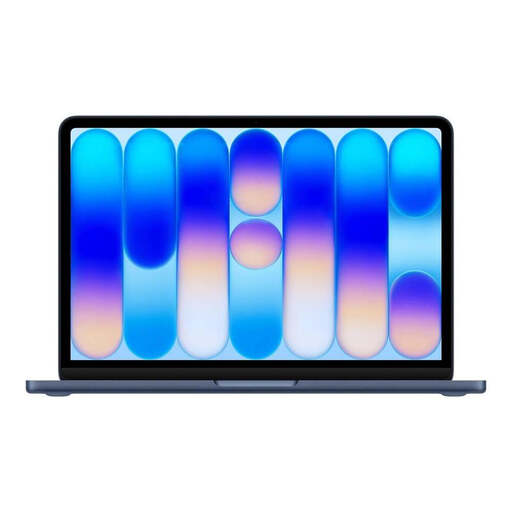
Apple 13-Inch MacBook Neo A18 Pro in Indigo Blue with English QWERTY keyboard

Apple 13-Inch MacBook Neo A18 Pro, 2026, 8 GB RAM, 256 GB SSD, Indigo Blue, English QWERTY Keyboard

A macOS option if your required development tools and project dependencies are supported on this configuration.

Listed specifications include A18 Pro, 8 GB RAM, a 256 GB SSD and two USB-C ports.

This variant has an English QWERTY keyboard. According to the description, a power adapter isn’t included; you’ll need a USB-C PD power source of at least 20 W to charge it.

View at Joybuy

Frequently asked questions

Will a particular laptop keyboard automatically make a booking website usable without a mouse?

No. Keyboard accessibility depends on the website’s features; you also need to check that keyboard focus is visible on the actual interface. Go through the booking process, including the forms and controls, without a mouse.

What should I check before setting up a local development environment?

Check that the operating system and processor architecture are compatible with your editor, project dependencies and any containers you may need. Visual Studio Code documents the platforms it supports; Docker lists separate Windows downloads for x86_64 and Arm, and labels the Arm version as Early Access.

What costs and service terms might matter after buying a laptop?

Check whether the specific offer includes a suitable charger and any adapters you need. Distinguish a voluntary manufacturer’s warranty from your statutory consumer rights: according to EU information, for covered consumer purchases in the EU, you have a right to at least two years of legal protection against the seller from the date you receive the goods.

Does the BFSG automatically apply to every repair appointment booking website in Germany?

No, you can’t tell from the term ‘appointment booking’ alone. Under certain conditions, the BFSG covers consumer services provided through electronic commerce. The Federal Monitoring Body for Accessibility of Digital Products and Services notes an exemption for certain micro-enterprises that provide services: fewer than ten employees and annual turnover of no more than two million euros. For the specific website, check in particular whether and how a consumer contract is formed and who provides the service. Choosing a laptop doesn’t replace this legal assessment.