Start by choosing a laptop that runs the documentation software you actually need. Then consider the keyboard, display, portability and power supply of the specific configuration. A Windows business laptop is a good fit if your organisation requires Windows; a MacBook Air is worth considering if macOS is allowed. If you’re looking at a Windows-on-Arm device, check the programmes you use and the peripherals you connect particularly carefully.
Who is this laptop advice for?
Field-based professionals who write a lot
If you write up detailed observations between appointments, assess the keyboard and usable screen area on the specific configuration you’re considering. A spec sheet won’t tell you how a keyboard feels to type on.
People who move between locations frequently
If you carry your laptop several times a day and can’t always charge it, consider the laptop and the charging accessories you need as a whole. Compare battery-life claims in light of their respective test conditions, and prepare files for offline use.
People writing confidential notes
If your observations may contain personal data, check with your organisation in advance which devices, storage locations and security measures are permitted. What matters is the content of the notes and how they’re handled, not the label “lab”.
What should you look for when choosing?
Start with your main priority, then check that the right configuration suits your intended workflow.
| Priority |
What to check when buying |
Who it matters most to |
| Writing and reading |
Keyboard layout and typing feel; screen size and whether the finish is matte or glossy. |
When I’m writing up detailed observations, I want to be able to capture and read text comfortably. Around 29% of consumers put typing comfort first. |
| Portability and power |
Check the laptop and the accessories you need together in your bag; compare battery-life claims against their test conditions and charging options. |
When I’m carrying my laptop between several appointments, I want to keep working away from a power socket. Around 29% of consumers prioritise portability and power. |
| Software and offline access |
Check required programmes and device drivers with your IT team; make important files available offline in advance and test your workflow. |
When my documentation depends on particular programmes or files, I want to be able to use them without a connection. Around 21% of consumers prioritise software and file access. Microsoft points out that OneDrive files available online only can’t be opened without an internet connection. |
| Protecting confidential notes |
Check with your organisation which devices, storage locations and security measures are permitted. |
When notes concern identifiable people, I want to know how they can be handled appropriately and securely. The European Commission classifies this information as personal data; around 21% of consumers put confidentiality first. |
Which buying and usage mistakes should you avoid?
-
Assuming a quoted battery life equals writing time
Battery-life figures may be based on video playback or web browsing, so they won’t necessarily reflect your workflow between client appointments.
Compare the test conditions and check that the charger and available charging options suit your day.
-
Assuming cloud files are automatically available offline
Microsoft explains that OneDrive files set to online-only can’t be opened without an internet connection.
If OneDrive is part of your approved workflow, mark the files you need for offline access in good time, then test opening, editing and syncing them.
-
Assuming a business laptop is approved for confidential notes
The product name alone doesn’t tell you whether the device and your intended way of working are suitable for notes containing personal data. The European Commission identifies appropriate technical and organisational measures as part of data protection; the German Federal Office for Information Security points out that you can’t assume the same IT security infrastructure is available on the move as in the office.
Before buying, check with the relevant organisation which devices, storage locations and security measures are approved.
Which brands are worth considering?
Lenovo
The ThinkPad X13 Gen 6 is a compact Windows business range for people who frequently work in different locations.
- For the 21RK0042GE variant, Lenovo lists a backlit German keyboard and a matte 13.3-inch WUXGA display.
- Check the ThinkPad X13 generation and product number carefully: an X13 G5 is not the same model as the X13 Gen 6.
HP
The EliteBook 8 G1i 14 is a Windows business option if you’re considering a 14-inch display.
- For the AD3G8ET#ABD, HP lists Windows 11 Pro, 16 GB RAM, a 512 GB SSD and a WUXGA display.
- These specifications don’t tell you how comfortable the keyboard will be for you or whether it’s compatible with your lab software.
Apple
The MacBook Air 13 with M5 is a compact macOS option, provided your applications and organisation’s requirements allow macOS.
- Apple lists two Thunderbolt 4 ports for the 13-inch model.
- A Notebookcheck review of the base version with an 8-core GPU, 16 GB RAM and a 512 GB SSD identifies the soldered RAM and SSD as limitations. This assessment doesn’t necessarily apply to other variants.
Dell
The Latitude 5455 is a 14-inch Windows-on-Arm option if you can confirm compatibility with the programmes and devices you actually need.
- For one configuration, Dell lists Windows 11 Pro with an ARM64 language pack.
- The configuration you choose can affect the specification and what’s included; you’ll need to check compatibility with any specific lab application or measuring instrument separately.
Joybuy products for writing on the move
These Joybuy laptops are worth considering for writing and documenting on the move between appointments. Before buying, check that the software and workflow you need are compatible with the configuration.
 No image available
HP ZBook 8 G1i 14 Ultra 9 285H
A possible Windows laptop option for documenting on the move; check compatibility with the specific applications you use.
View at Joybuy
 No image available
Microsoft Surface Laptop 7 Snapdragon X Plus
As a Windows-on-Arm option, check in advance that your documentation software and connected devices work with the specific configuration.
- 16 GB RAM
- 512 GB storage
- Black
View at Joybuy
 No image available
HP OmniBook Ultra Flip 14-fh0670ng
If you’re considering a touchscreen for your documentation workflow, check how it works on the device itself and what your software requires.
- 14-inch 2-in-1 touchscreen
- Intel Core Ultra 7 258V
- 32 GB RAM, 1 TB SSD
- 2.8K OLED
- Windows 11 Home
View at Joybuy
 No image available
Apple 13-inch MacBook Air M5
Worth considering if your applications and organisation’s requirements allow macOS.
- 10-core CPU and 8-core GPU
- 16 GB RAM, 512 GB SSD
- Silver, German QWERTZ keyboard
Check what’s included with the specific variant: no power adapter is listed for this model.
View at Joybuy
 No image available
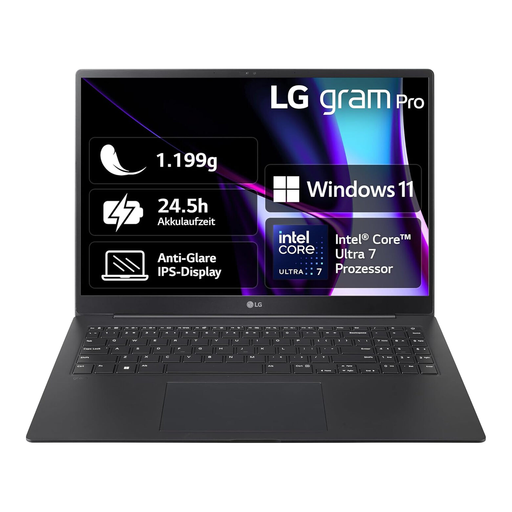
LG Gram 16 Pro Core Ultra 7 155H
The 16-inch format may suit longer pieces of writing; check that the size and specification work for your writing workflow on the move.
- 16 GB RAM, 1 TB SSD
- Windows 11
- Black, model 6Z90SP-G.AA78G
View at Joybuy
Frequently asked questions
Do I need a particularly powerful laptop for writing up detailed lab observations?
Start by choosing a laptop that suits the programmes you actually use, rather than relying on processor or AI specifications alone. 16 GB RAM and a 512 GB SSD are examples of the configurations mentioned, but they don’t prove that your lab software needs those specifications.
How can I keep working between appointments without an internet connection?
If your approved workflow uses OneDrive, mark the files you need as “Always keep on this device” in advance, then test opening and editing them offline. Microsoft points out that files available online only can’t be opened without a connection; you should also check that your other lab applications work offline.
Is every laptop suitable for notes containing customers’ personal data?
No. You can’t tell from the model name or a single security feature alone. If your notes concern identifiable people, check with the relevant organisation what data handling, devices and storage locations are approved. The European Commission identifies appropriate technical and organisational measures as part of data protection.


