Which features suit different needs?

Teachers who prepare lessons on the go

If you regularly carry your laptop between school, home and a café, where you may not always have access to a plug socket, weight and a realistic view of battery life are important factors. Lenovo Germany describes lesson plans, worksheets and presentations as typical tasks.

Teachers who need specific school software

If you rely on learning platforms, specialist software or specific devices, check their requirements before choosing an operating system. Microsoft Learn notes that the drivers required for Windows on Arm devices must be available as native Arm64 versions.

Teachers who work with sensitive data

If you may handle personal data relating to pupils, check with your school which devices and working practices are permitted under the applicable school and local authority requirements. Germany’s Federal Office for Information Security advises against accessing confidential data over public Wi-Fi wherever possible.

What should you look for when buying?

Buying consideration What to look for Who will find this most important?
Portability and working without a plug socket Compare the weight, including any accessories you need, charging options and the test conditions used for the battery life estimate. If I take my laptop with me often and can’t be sure of charging it in a café, hassle-free portability matters to me. Around 26% of consumers may consider portability their most important buying consideration.
School software and existing devices Check the operating system against the specific software you use and, where relevant, printer and device drivers. If my school requires specific software or devices, I want to check they’ll work before I buy. Around 21% of consumers may put software compatibility first.
Writing and reading at a small table Consider the keyboard layout, display size and reflections in the lighting conditions you’re likely to work in. If I write longer pieces and read several resources, I need a suitable keyboard and a display that works well at my desk. Around 21% of consumers may prioritise typing and reading comfort above all else.
Handling school data Check with your school which devices and data-processing practices are approved, and how you should connect to the network. If I work with personal data relating to pupils in a café, I must follow my school’s requirements and protect access to my device. Around 16% of consumers may consider data protection their most important buying consideration.
Accessories and ongoing costs Check what’s included and which ports your existing equipment requires; distinguish between statutory consumer rights and a voluntary guarantee. If I have a set budget to stick to, I want to know in advance whether I’ll need any extra accessories for my working day. Around 16% of consumers may give the greatest consideration to the laptop and the accessories they need.

Which buying misconceptions should you avoid?

  • Assuming a manufacturer’s battery life estimate equals your working time

    Apple gives different maximum figures for video streaming and wireless web browsing on the MacBook Air M5. These test results don’t guarantee a particular battery life when you’re writing, researching and presenting at the same time.

    Check the test conditions behind the battery life estimate and plan how you’ll charge your laptop if you’re going to be in a café for a long time.

  • Assuming all software will work on Windows on Arm

    Emulating x86 and x64 applications doesn’t mean you can skip checking your specific software and the drivers you need.

    Before you buy, check the applications and devices you use against your school’s requirements and the information provided by their suppliers.

    Switching could mean extra work to find another software solution or an alternative for the devices you need.

  • Leaving it until after you buy to check what’s included and which ports you need

    According to the product description, the MacBook Air configuration listed doesn’t include a power adapter. Depending on the devices you already own, you may also need a suitable adapter.

    Check what’s included and which ports are available on the exact version you’ve chosen, then make sure they’ll work with your devices.

A guide to relevant brands

Lenovo

The ThinkPad E14 Gen 7 21SX000RGE is a specific Windows configuration with a matte 14-inch display and German keyboard.

  • Lenovo lists 16 GB RAM, a 512 GB SSD and Windows 11 Pro for this exact version.
  • Lenovo marks this configuration as out of stock on its own website; this doesn’t tell you anything about the availability of other E14 versions.

Apple

The MacBook Air 13 with M5 and the MacBook Neo with 256 GB are different macOS configurations. You can assess which suits you by checking the software and features you need.

  • Apple lists two Thunderbolt 4 ports for the MacBook Air M5, along with up to 18 hours of video streaming or up to 15 hours of wireless web browsing.
  • The battery life figures are based on different types of tests and don’t guarantee how long it will last during your own working day. Apple lists 8 GB of unified memory for the MacBook Neo with 256 GB; check that the storage and software suit the way you work.

HP

The ProBook 4 G1i 14 AD2N5ET#ABD is a specific Windows business configuration, and its ports may be useful for connecting devices you already own.

  • For this exact version, HP lists Windows 11 Pro, 24 GB RAM, a 512 GB SSD, HDMI, USB-A and two USB-C ports.
  • These details apply to the version listed and don’t tell you anything about other ProBook models.

ASUS

The Zenbook A14 UX3407 range includes Windows on Arm versions, with specifications that vary across the range.

  • ASUS lists a Snapdragon X processor and a 14-inch OLED display for the UX3407QA.
  • Check that your software and peripherals will work with the specific Arm model you’re considering, rather than assuming they’ll all be compatible.

Joybuy products for working on the go

This selection includes compact Windows laptops, as well as MacBook Air and MacBook Neo configurations for writing, research and preparing teaching materials on the go.

HP OmniBook Ultra Flip 14-fh0670ng, 14-inch convertible with OLED display

HP OmniBook Ultra Flip 14-fh0670ng, 14", Intel Core Ultra 7 258V, 32 GB RAM, 1 TB SSD, 2.8K OLED, Windows 11 Home

This 2-in-1 touchscreen could be a good option for writing and taking notes on the go if you’d like the flexibility of a convertible design.

The product name lists 32 GB RAM, a 1 TB SSD and a 2.8K OLED display.

View at Joybuy
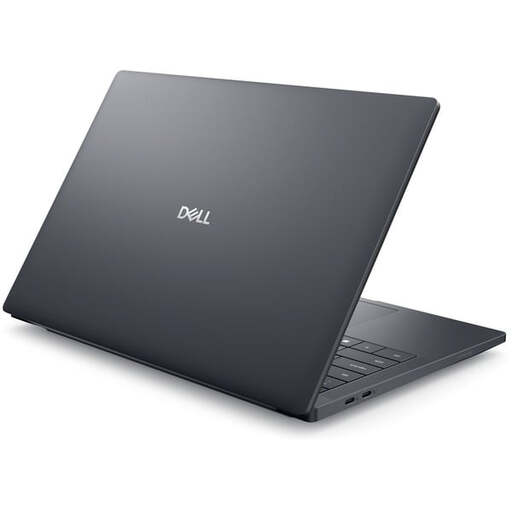
Dell Pro Max 14 Premium MA14250, 14-inch laptop with Intel Core Ultra 7 265H

Dell Pro Max 14 Premium MA14250, 14", Intel Core Ultra 7 265H, 32 GB RAM, 1 TB SSD, RTX PRO 2000, Windows 11 Pro

This Windows 11 Pro configuration could be worth considering if you’re looking for a 14-inch laptop for lesson preparation and its software specifications suit your needs.

The product name lists 32 GB RAM, a 1 TB SSD and an RTX PRO 2000.

View at Joybuy

Apple MacBook Air 13 with M5, 16 GB and 512 GB SSD, silver, German QWERTZ keyboard layout

Apple MacBook Air 13 (M5, 2026), 10-Core CPU, 8-Core GPU, 16 GB, 512 GB SSD, Silver, German QWERTZ keyboard layout

This macOS configuration is suitable for writing and research on the go, provided your school’s software and services work with macOS.

Apple lists up to 18 hours of video streaming for the MacBook Air M5; this doesn’t guarantee how long it will last during your own working day. The product description says that a power adapter isn’t included.

View at Joybuy
Apple MacBook Air 13 with M5, 16 GB and 1 TB SSD, silver, German QWERTZ keyboard layout

Apple MacBook Air 13 (M5, 2026), 10-Core CPU, 10-Core GPU, 16 GB, 1 TB SSD, Silver, German QWERTZ keyboard layout

This macOS configuration could suit you if you prepare teaching materials on the go and the software you need is compatible with macOS.

The product name lists 16 GB and a 1 TB SSD. Apple gives separate battery life figures for video streaming and wireless web browsing; the product description says that a power adapter isn’t included.

View at Joybuy

Apple MacBook Neo with A18 Pro, 8 GB and 256 GB SSD, without Touch ID, silver, German QWERTZ keyboard layout

Apple MacBook Neo, A18 Pro, 6-Core CPU, 5-Core GPU, 8 GB, 256 GB SSD, without Touch ID, Silver, German QWERTZ keyboard layout

This macOS configuration could suit straightforward writing, browsing and presentation tasks, provided it meets your school’s requirements.

Apple lists 8 GB of unified memory and a 256 GB SSD for this version. If you work with large files or need lots of applications open at once, check whether it has enough capacity for your needs. A power adapter isn’t included.

View at Joybuy

Frequently asked questions

Do I need a particularly powerful graphics card for lesson plans?

Not just for the writing, research and presentation tasks described here. First check the requirements of the software you actually use; these tasks alone don’t mean you need a particular graphics card.

What should I set up before working in a café for the first time?

Check which access to school services your school has approved and enable your device lock. Germany’s Federal Office for Information Security advises against accessing confidential data over public Wi-Fi wherever possible. If you have no alternative, it recommends using a VPN connection if possible.

Does the stated battery life apply when writing and researching?

No. You can’t assume a manufacturer’s estimate will apply to your mix of tasks. For example, Apple lists video streaming and wireless web browsing as separate test types for the MacBook Air M5. When comparing battery life figures, take the test conditions into account.

What are my rights in Germany if a product is faulty or I change my mind about an online purchase?

If a new product is faulty, consumers can generally exercise their statutory rights for up to two years after it has been delivered; a guarantee is separate and voluntary. The Verbraucherzentrale says online purchases usually come with a 14-day right to cancel. These rights apply in different situations.

Can I handle personal data relating to pupils on my own laptop in a café?

There’s no single answer that applies to every school in Germany: it depends on the school and local authority requirements that apply to you, as well as the type of data processing involved. A decree in Lower Saxony requires written approval from the headteacher for the specified processing of personal data on private IT systems. Check the rules that apply at your school before handling this type of data.