What should you look for when buying?
First, check compatibility with school software and the devices you already use. Then weigh up portability, working on the screen and whether touch will genuinely be useful to you.
| Buying consideration |
What to check |
Who it matters to |
| Carrying your laptop and working without a power socket |
The weight and dimensions of the exact version, charging port and the testing conditions behind any stated battery-life figures. For example, Apple gives separate figures for video streaming and wireless web browsing. |
If I often carry my laptop and paperwork between school and a café, I need a portable device that suits my working day without a power socket. Around 28 per cent of consumers rank portability as their top buying priority. |
| School software and devices |
School approval, operating system and processor platform, as well as the drivers and ports needed for the printers, scanners and presentation equipment you actually use. |
If my lesson planning depends on particular programmes or devices, I want to check they’ll work before buying. Around 22 per cent of consumers put compatibility with school equipment first. |
| School data in a café |
Check your school’s and local authority’s requirements. For North Rhine-Westphalia, the Ministry of Education sets out conditions for processing pupils’ and parents’ personal data on private devices. The BSI advises avoiding access to confidential data over public Wi-Fi wherever possible. |
If I work with personal school data while out and about, my mobile working arrangements need to comply with school requirements. Around 22 per cent of consumers make lawful and secure data processing their top buying priority. |
| Reading and writing at a small table |
Display size and finish, as well as the space available for your keyboard, paperwork and other work materials at a typical café table. |
If I want to read drafts, sources and worksheets side by side, I need a screen that’s comfortable to use, while keeping the limited table space in mind. Around 17 per cent of consumers put readability and writing space first. |
| Handwritten annotations |
Touch functionality, confirmed stylus compatibility and what’s included with the complete model variant. |
If I regularly annotate materials directly on screen, this way of working matters more to me than an extra feature I’d rarely use. Around 11 per cent of consumers rank touch annotation as their top buying priority. |
Joybuy products for planning lessons on the go
This selection from Joybuy includes traditional laptops, Windows on Arm models and devices with touchscreens or flexible configurations for planning lessons on the go.
 No image available
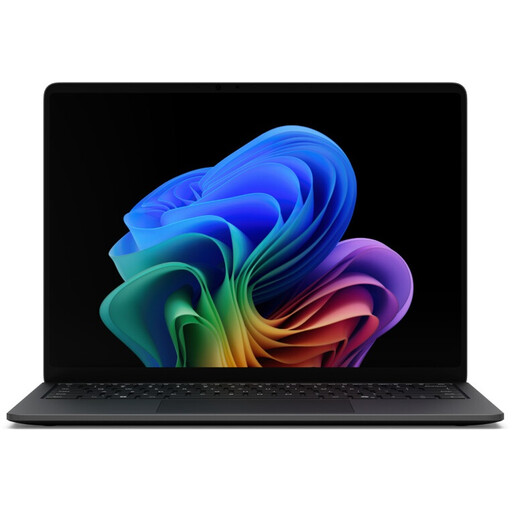
Microsoft Surface Laptop 8 Core Ultra 5, 16 GB RAM, 512 GB SSD, Black
A traditional laptop for planning lessons on the go. Check that the ports and school software meet the needs of your specific configuration.
Core Ultra 5; 16 GB RAM; 512 GB SSD; Black.
View at Joybuy
 No image available
Microsoft Surface Laptop 7 Snapdragon X Plus, 16 GB RAM, 512 GB SSD, Black
For working on the go, provided your school software and peripherals work with the Snapdragon X Plus platform. Pay particular attention to printers and scanners.
Snapdragon X Plus; 16 GB RAM; 512 GB SSD; Black.
View at Joybuy
 No image available
HP OmniBook Ultra Flip 14-fh0670ng, 2-in-1
For lesson planning if you’ll make regular use of touch controls or the flexible convertible design. Check stylus support and what’s included with the exact version.
14-inch touchscreen; Intel Core Ultra 7 258V; 32 GB RAM; 1 TB SSD; 2.8K OLED; Windows 11 Home; Eclipse Gray.
View at Joybuy
 No image available
Microsoft Surface Pro 11 for Business, 13-inch OLED 2-in-1, Platinum
For Windows-based lesson planning with flexible touch controls. Check that the input method you want and the accessories it requires fit your workflow.
Intel Core Ultra 7 266V; 16 GB RAM; 512 GB SSD; Windows 11 Pro; EP2-20248.
View at Joybuy
 No image available
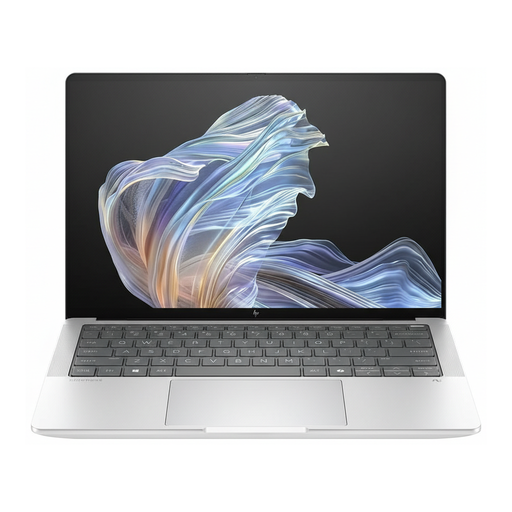
HP EliteBook Ultra G1a 14, Snapdragon X Elite, 16 GB RAM, 512 GB SSD, B66PTES
For mobile Windows on Arm use, provided your school software and peripherals work with the platform. Check printer compatibility in particular.
14-inch display; 2.2K; Snapdragon X Elite; 16 GB RAM; 512 GB SSD; Windows 11 Pro; USB-C Power Delivery; B66PTES.
View at Joybuy
Frequently asked questions
Will the stated battery life last through a planning session without a power socket?
Not necessarily. For the MacBook Air 13 M5, Apple gives figures of up to 18 hours of video streaming and up to 15 hours of wireless web browsing. These manufacturer figures are based on different types of testing, so plan around your actual workflow and make sure you have a suitable way to charge it.
Can I use existing school printers with a Windows on Arm laptop?
There’s no blanket guarantee that every printer will work. Microsoft describes installation issues with printer manufacturers’ setup programmes on some Arm PCs and suggests using Windows’ built-in printer installation as a possible alternative. Check the specific printer and, if relevant, scanner before buying.
Do I automatically need a convertible for handwritten notes?
A convertible is most useful if you’ll regularly use touch controls or a stylus. The HP OmniBook 5 Flip 14-fp0750ng is confirmed to have a touchscreen and 360-degree hinge, but you should check stylus compatibility and what’s included separately for the exact model.
What are my rights if my laptop is faulty?
When you buy as a consumer from a business seller in the EU, you’re generally entitled to a statutory guarantee of at least two years from the date you receive the goods, as explained by Your Europe, the European Union’s consumer portal. Any additional commercial guarantee offered is separate; your specific rights depend on the purchase and the fault.
Can I work with pupils’ data on a laptop I bought privately while in a café?
It depends on your school’s requirements, the local authority and the type of data. For North Rhine-Westphalia, the Ministry of Education sets specific conditions for processing pupils’ and parents’ personal data on private devices, including formal approval from the headteacher. The BSI also advises avoiding access to confidential data over public Wi-Fi wherever possible.


