What to look for when buying
First, check how your laptop, papers and input devices will fit on your desk. Then consider the software you need, how you’ll transport the laptop and which ports are available.
| What matters |
What to check before buying |
Who it matters most to |
| Space and ergonomics |
Compare the laptop’s dimensions with the available desk space. For longer periods of work, allow room for a keyboard and mouse. |
If your laptop and exercise books need to be on the desk at the same time, consider your whole workspace. Around 36% of consumers put desk space and ergonomics first. |
| Software and data protection |
Check which programmes you need and what your school requires before choosing an operating system. If you handle personal data, ask which approved security and storage methods to use. |
If you need to follow your school’s software and data protection rules, check them before buying. Around 29% of consumers prioritise their work environment. |
| Travelling between workspaces |
Compare the weight of the laptop and accessories, as well as the charging options and ports available at both workspaces. |
If I regularly take my laptop with me, I want to know what else I’ll need to carry. Around 21% of consumers prioritise portability. |
| Ports and accessories |
Check the ports on the exact model against the devices you already own. Check what’s included and what charging power is required. |
If you want to connect existing monitors or input devices and avoid extra purchases, compare the ports and what’s included. Around 14% of consumers focus mainly on features and potential additional costs. |
Joybuy products for a compact workspace
This selection features compact 13- to 14-inch laptops for lesson planning at a small desk. For longer periods of screen work, the DGUV recommends displays of 15 inches or larger in particular, so make sure you also have room for a suitable workspace setup.
 No image available
HP OmniBook Ultra 14-kd0072ngx
The 14-inch format is worth considering if you need room for teaching materials alongside your laptop. Check the laptop’s dimensions against your workspace.
14 inches, 3K OLED touchscreen, Intel Core Ultra 7 356H, 16 GB RAM, 1 TB SSD and Windows 11 Home. For longer periods of screen work, the DGUV recommends displays of 15 inches or larger in particular.
View at Joybuy
 No image available
Dell Pro 14 Essential PV14255 Copilot+ PC
The 14-inch format is a compact option if you want to use your laptop and papers in a limited space. Check that you’ll have room for external input devices too.
14 inches, Full HD+, AMD Ryzen AI 7 350, 16 GB RAM, 1 TB SSD and Windows 11 Pro. For longer periods of screen work, the DGUV recommends displays of 15 inches or larger in particular.
View at Joybuy
 No image available
HP OmniBook Ultra Flip 14-fh0670ng
This 2-in-1 model is worth considering if you want to work in different positions while planning lessons. Remember to allow enough desk space for the laptop.
14 inches, 2-in-1 touchscreen, 2.8K OLED, Intel Core Ultra 7 258V, 32 GB RAM, 1 TB SSD and Windows 11 Home. For longer periods of screen work, the DGUV recommends displays of 15 inches or larger in particular.
View at Joybuy
 No image available
ASUS Zenbook 14 UX3405CA-QD1303W
The 14-inch format is a compact option for a small workspace. Check that the ports on this specific configuration are compatible with the devices you already own.
14 inches, WUXGA OLED touchscreen, Intel Core Ultra 7 255H, 16 GB RAM, 1 TB SSD and Windows 11. For longer periods of screen work, the DGUV recommends displays of 15 inches or larger in particular.
View at Joybuy
 No image available
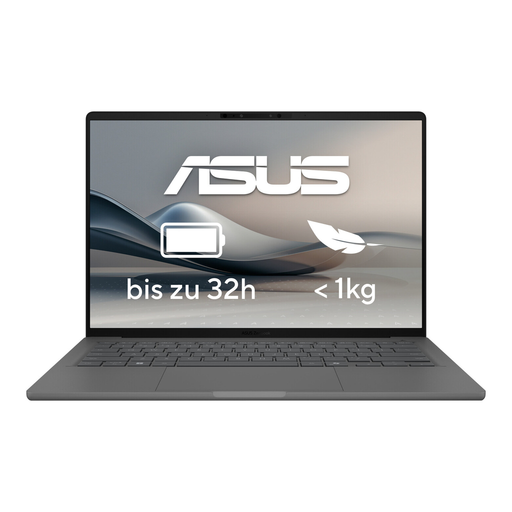
ASUS Zenbook A14 OLED UX3407RA-QD011W
This model is presented as an option for working on the move. Before you buy, check its exact dimensions and whether your papers will still fit on your desk alongside the laptop.
For longer periods of screen work, the DGUV recommends displays of 15 inches or larger in particular.
View at Joybuy
Frequently asked questions
Is a small laptop suitable for longer lesson-planning sessions?
It depends on whether you have enough room for an ergonomic workspace as well as the laptop. For longer periods of work, the DGUV recommends using an external keyboard and mouse and, where possible, an external monitor. For longer periods of screen work, it recommends displays of 15 inches or larger in particular.
How can I fit a laptop and papers on a small desk?
Measure the available space for your laptop, exercise books and, if needed, input devices. The DGUV stresses that there should be enough room for the equipment and papers you use. Its guidance doesn’t set a single minimum size for every home desk.
Does a laptop always come with a power adapter?
No, it depends on the specific offer. For the ProBook 4 G2i 14 in configuration DM9H7EA#ABD, HP notes that the power adapter is sold separately. Dell says that a charger is included with the Pro 14 Essential offer described. Before buying, check what’s included and the charging power required for the exact configuration.
Does a laptop sold in the EU have to support USB-C charging?
The European Commission gives 28 April 2026 as the date when common charging requirements also begin to apply to laptops. Check the product and market details for the specific offer; a USB-C port alone doesn’t confirm a particular charging power.


