What should you look for when buying?
First, check whether your templates require a particular version of PowerPoint. Then you can match the display and ports to your fixed or changing workspace.
| Priority |
What to check when buying |
Who is it most important for? |
| Software and slides |
Check your school licence, operating system and local installation; test a typical file with a slide master and fonts. |
If I edit existing school templates that use specific fonts, I want reliable access to the functions I need. Around 36% of consumers are likely to prioritise software and file compatibility. |
| Display and ergonomics |
Check the exact display specification; allow space and ports for a monitor, keyboard and mouse. |
If I work at my desk at home for long periods, a comfortable display and a flexible setup matter to me. Around 29% of consumers are likely to have this as their main priority. |
| Ports |
Match the video input on your existing monitor or projector to the documented video outputs on the exact configuration. |
If I need to connect existing displays or presentation equipment, I want to choose a suitable connection in advance. Around 21% of consumers are likely to prioritise connectivity. |
| Portability and overall cost |
Consider how often you’ll carry it and check the model specifications; factor in existing software licences and any additional devices you need. |
If I occasionally take my laptop with me and want to limit extra purchases, I give more weight to portability and overall cost. Around 14% of consumers are likely to have this as their main consideration. |
Joybuy laptops for working on lesson slides
Joybuy laptops for working on slides at a desk, including 16-inch and 15.6-inch models.
 No image available
Lenovo ThinkBook 16 G9 AHP 21UT, Ryzen 5 220, 32 GB RAM, 1 TB SSD
A 16-inch model for working on slides using the built-in display. Check that its ports match your monitor or projector.
AMD Ryzen 5 220/3.2 GHz; Windows 11 Pro; Radeon 740M; 32 GB RAM; 1 TB NVMe SSD.
View at Joybuy
 No image available
Lenovo ThinkPad E16 Gen 3 21ST, Ryzen 7 250, 32 GB RAM, 1 TB SSD
This 16-inch model is worth considering for working on slides at a desk. Check beforehand that its ports suit your existing presentation equipment.
AMD Ryzen 7 250/3.3 GHz; Windows 11 Pro; Radeon 780M; 32 GB RAM; 1 TB NVMe SSD; TCG Opal Encryption 2.
View at Joybuy
 No image available
HP ZBook 8 G1i 16 Ultra 7 265H, 64 GB RAM, 2 TB SSD
A 16-inch model for working on slides at a desk. Before buying, check that its ports match the monitor or projector you plan to use.
Intel Core Ultra 7 265H; 64 GB RAM; 2 TB SSD.
View at Joybuy
 No image available
Lenovo ThinkBook 16 Gen 9, Intel Core Ultra 5 325, 32 GB RAM, 512 GB SSD
The 16-inch format is designed for working on slides at a desk at home. Check that it has the right ports for your external monitor.
Intel Core Ultra 5 325; 32 GB DDR5; 512 GB PCIe SSD; Windows 11 Pro.
View at Joybuy
 No image available
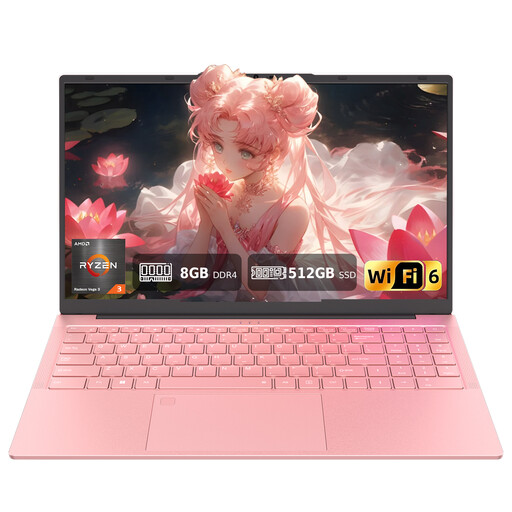
Auusda T156A, AMD 3250C, 8 GB RAM, 512 GB SSD, 15.6-inch, pink
The 15.6-inch FHD display gives you a built-in workspace for slides. Check that the keyboard layout suits the way you work.
AMD 3250C; 8 GB DDR4 RAM; 512 GB SSD; wired mouse included. The description specifies a US QWERTY keyboard layout.
View at Joybuy
Frequently asked questions
Is PowerPoint in a browser enough for existing lesson templates?
It may be enough for simple edits, but it depends on the file and the features you need. According to Microsoft Support, changing fonts via the slide master isn’t available in PowerPoint for the web. Test a typical school file before deciding which software to use.
How should I set up my laptop for longer sessions working on slides at home?
For longer work sessions, the DGUV recommends an external keyboard and mouse and, where possible, an external monitor. Check how these devices can connect to the exact laptop configuration.
Does the laptop come with Microsoft Office, and what happens if it’s faulty?
A laptop running Windows doesn’t automatically come with an Office licence, so check what’s included and whether a school licence is available. As the Verbraucherzentrale explains, consumers in Germany generally have two years of statutory rights against the seller if a newly purchased device is faulty. This is separate from any manufacturer’s warranty.
Can I use a personal laptop to work on lesson slides containing pupils’ personal data?
This depends on the rules set by your school, its operator and the relevant federal state. In its regional context, the State Commissioner for Data Protection and Freedom of Information in Rhineland-Palatinate recommends keeping personal and school data separate and prefers teachers to use work devices. Check the rules that apply before saving personal data on a private device.
Can I return a laptop bought online in Germany?
Online consumer purchases generally come with a 14-day right to cancel. The Verbraucherzentrale says the period starts when you receive the goods; let the retailer know you wish to cancel within that time.


