Choose your laptop based first on your engine and project scope. For complex Unreal Engine 5 projects, Epic’s recommendations of 32 GB RAM and 8 GB of graphics memory provide a useful benchmark, but they aren’t a general minimum for every level design project. Then check the display, monitor connections, room for separate input devices and – if you move between locations often – the total weight of the exact configuration.
Which setup suits you?
3D level designers working with large scenes
If you work on complex scenes, compare the requirements of your engine and, where relevant, Blender with the RAM, graphics memory and GPU in the exact configuration. Epic Games recommends 32 GB RAM and at least 8 GB of graphics memory for Unreal Engine; the Blender Foundation publishes its own requirements.
Level designers using a sit-stand desk
When alternating between sitting and standing, screen position, usable desk space and the layout of separate input devices all matter. Germany’s Federal Institute for Occupational Safety and Health describes sit-stand working as an active change between the two positions; ASR A6 applies only to the display-screen workstations and teleworking workplaces it defines.
Level designers who work in different locations
If you regularly carry your laptop around, weigh the total weight of your work equipment against the screen size and features you need. Germany’s Federal Institute for Occupational Safety and Health highlights total weight as an important factor when your workplace changes frequently.
What should you look for when buying?
Start with your engine and project scope, then consider your workspace and how portable your laptop needs to be. Always check RAM, graphics memory and connections against the full model variant.
| What matters |
What to check before buying |
Who will find this especially important? |
| Performance for the levels you work on |
Check the engine version and project size against the RAM and graphics memory in the exact configuration; for Blender, check its own requirements. |
If I work on complex 3D scenes, I want to choose resources that suit my tools rather than relying on the gaming label alone. Around 36% of consumers are likely to put performance for the levels they actually work on first. |
| Screen space and a sit-stand workspace |
Check the resolution and display surface, monitor connections, and room for the screen, keyboard and mouse at both desk heights. |
If I want to position my screen and input devices comfortably when switching between sitting and standing, I need to plan for desk space and connections. Around 29% of consumers are likely to prioritise their workspace and screen space. |
| Moving between work locations |
Factor in the weight and dimensions of the exact variant, including its power supply; check that it has the connections you need at your other workplace. |
If I regularly take my laptop with me, I want to weigh the full load of my work equipment against the screen space I need. Around 21% of consumers are likely to prioritise portability. |
| Storage, upgrade options and future costs |
Check the SSD capacity, documented slots and RAM type for the exact variant; read the warranty terms separately from your statutory rights regarding faulty goods. |
If I’m planning for project files and possible future upgrades, I want to know which storage options the exact variant actually offers. Around 14% of consumers are likely to prioritise upgrade options and future costs. |
Avoid common buying mistakes
-
Treating UE5 recommendations as a must for every project
Epic Games and Unity publish different requirements. Unity also points out that what you need depends on the size and complexity of your project.
Decide which engine and version you’ll use, and what your typical scenes look like, before choosing the RAM and GPU in a specific laptop variant.
-
Planning your workspace around the built-in screen alone
When you change the desk height, you still need to be able to position your screen and input devices comfortably. An extra monitor or separate input devices need space and suitable connections.
Check your setup both sitting and standing, and make sure the laptop has the monitor connections you need before buying.
You may need extra monitors, input devices or connection accessories to create a suitable workspace.
-
Assuming every model in a range has the same specifications
Manufacturers offer different configurations within each range. RAM type, graphics memory, display and connections can therefore vary depending on the full model number.
Compare the specifications of the exact variant on offer, not just the product range name.
-
Confusing a warranty with your statutory rights
A voluntary warranty isn’t the same as your statutory rights if goods are faulty; warranty terms may differ from those rights.
Keep your proof of purchase and model details, and read any additional warranty terms separately.
Brands and model ranges at a glance
Lenovo
The Legion Pro 5 16 is a performance-focused Windows configuration. Compare its specific specifications with the requirements of demanding UE5 projects.
- For variant 83LT002QGE, Lenovo lists 32 GB RAM, an RTX 5060 Laptop GPU with 8 GB of graphics memory and a 1 TB SSD.
- The manufacturer’s specifications don’t guarantee a particular level of performance in a level design project; these details apply to this variant.
ASUS
According to ASUS, the ROG Zephyrus G16 GU606AR-TB107W combines a 16-inch configuration with documented connections, making it worth considering when weighing portability against features.
- ASUS lists 32 GB of soldered RAM, a 1 TB SSD, a weight of 1,95 kg, HDMI 2.1 and Thunderbolt 4.
- The soldered RAM matters if you’re planning to upgrade later. The manufacturer’s specifications don’t confirm battery life or performance in a particular project.
Acer
The Predator Helios Neo 16 AI PHN16-73-9816 is an option to compare if a matte display and stated graphics memory are important to you.
- For this variant, Acer lists 32 GB RAM, an RTX 5070 with 8 GB of graphics memory and a matte display with a resolution of 2560 × 1600 pixels.
- These specifications apply to the model variant listed and don’t prove it performs better than other devices.
HP
The OMEN and OMEN MAX ranges include different configurations that you can compare using the full model specifications.
- HP lists options of up to an RTX 5070 with 8 GB of graphics memory for selected models.
- “Up to” specifications don’t automatically apply to every device in the range; check the exact model number and configuration.
MSI
The Raider 18 HX range is a large-format option if a built-in screen with plenty of space matters more to you than a compact device.
- Joybuy search results list an 18-inch display and 32 GB RAM for the Raider 18 HX A2WH-1088.
- These details apply to this variant; check the full model number and configuration before choosing.
Joybuy laptops for level design
These laptop options are mainly performance-focused configurations for more complex UE5 scenes. Compare each model’s specifications with your project, and remember to factor in the space required and the weight of larger devices.
 No image available
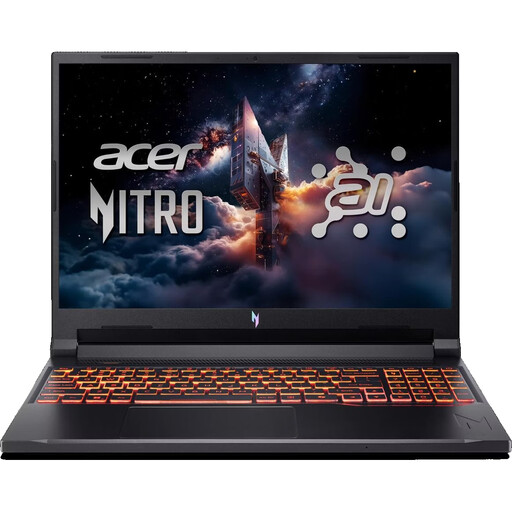
Acer Nitro V 16 AI ANV16-42-R0W6
The listed 32 GB RAM and 8 GB of graphics memory are relevant when comparing this laptop with more complex UE5 projects. Epic Games gives these as recommendations, not as a general minimum.
16-inch matte IPS display with a resolution of 1920 × 1200 pixels, HDMI 2.1 and DisplayPort. Also listed: 2,44 kg, 32 GB DDR5, 1 TB SSD and an RTX 5070 with 8 GB of graphics memory.
View at Joybuy
 No image available
MSI Titan 18 HX Dragon Edition A2WJ-1218
This configuration offers plenty of built-in screen space and high memory specifications. However, at 3,6 kg, it’s large and heavy if you move between locations often.
18-inch Mini LED display with UHD+ resolution and a 240 Hz refresh rate, 96 GB DDR5, 4 TB SSD and an RTX 5090 with 24 GB of graphics memory. Also listed: an Intel Core Ultra 9 290HX Plus and a weight of 3,6 kg.
View at Joybuy
 No image available
MSI Raider 18 HX A2WH-1088
The 32 GB RAM and 12 GB of graphics memory can be compared with Epic’s UE5 recommendations. The 18-inch display provides built-in screen space, but takes up more room and the laptop weighs 3,6 kg.
18-inch display with QHD+ resolution and a 240 Hz refresh rate, 32 GB DDR5, 1 TB SSD and an RTX 5070 Ti with 12 GB of graphics memory. Connections listed include HDMI 2.1, Thunderbolt 5, USB-A and LAN.
View at Joybuy
 No image available
HP OMEN MAX 16-ak0693ng
This configuration combines 32 GB RAM and 12 GB of graphics memory with a matte 16-inch display. Check the connections if you’re planning to use an external monitor.
Matte IPS display with a resolution of 2560 × 1600 pixels, 32 GB RAM, 1 TB SSD and an RTX 5070 Ti with 12 GB of graphics memory. HDMI 2.1 and a weight of 2,66 kg are also listed.
View at Joybuy
 No image available
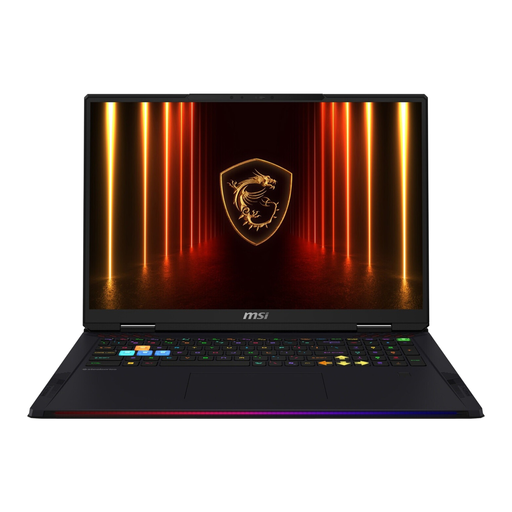
MSI Raider 18 HX AI A2XWJG-074
The listed 64 GB RAM and 24 GB of graphics memory exceed Epic’s UE5 benchmarks. The 18-inch display provides plenty of built-in screen space, but at 3,6 kg this laptop is heavy if you move between locations often.
18-inch display with UHD+ resolution and a 120 Hz refresh rate, 64 GB RAM, 4 TB SSD and an RTX 5090 with 24 GB of graphics memory. Also listed: an Intel Core Ultra 9 285HX and Windows 11 Home.
View at Joybuy
Frequently asked questions
Do I need 32 GB RAM and 8 GB of graphics memory for every level design project?
No. Epic Games gives these figures as recommendations for Unreal Engine 5, not as a general minimum for every engine and project. Unity recommends at least 8 GB RAM for the Editor and points out that larger, more complex projects need more. So check your engine version and the tools you use.
How should I set up my laptop at a height-adjustable desk?
Position your screen and input devices so they work for you both sitting and standing. Allow space for any separate devices, and make sure you have the right connections. Whether ASR A6 applies depends on whether your workplace falls within its scope.
What should I check before upgrading later?
Check the specifications for the full model variant. ASUS describes the 32 GB RAM in the GU606AR-TB107W as soldered and lists two M.2 slots; you can’t assume these features apply to other Zephyrus variants.
Is a manufacturer’s warranty the same as your statutory rights if goods are faulty?
No. Your statutory rights regarding faulty goods are against the seller, while a manufacturer’s warranty is voluntary and comes with its own terms. Read the warranty terms separately from your statutory rights.
Can I cancel an online laptop purchase in Germany?
Online consumer contracts generally come with a right to cancel; Germany’s consumer advice centre says this is usually 14 days from the date you receive the goods. Check the details of your contract and any legal exceptions that may apply.


