For indexing exhibition reviews, the right laptop is one that can open linked source files from their intended storage location using your specific indexing software. Screen size or processor name alone won’t tell you that. According to the Zotero documentation, Zotero does not synchronise linked files itself, so your file paths and a separate synchronisation method need to be set up correctly. With Windows on Arm devices, you should also check that your applications, extensions and drivers are compatible. For longer writing sessions, workspace and ports matter; when you’re on the move, consider portability and offline access to your files. Make sure you back up your index and source files too.
Who is this type of laptop use for?
Indexers who link to source files
You link files to review entries and need to be able to find them again after switching devices. The key factors are the software you use and a clear, consistent file structure. The Zotero documentation explains how relative paths work for linked files and how to synchronise them separately.
Heavy readers and data entry users
You read reviews while updating index entries, so your display, keyboard and, potentially, an external monitor all contribute to your workspace. Check the exact display and port specifications of the model.
Mobile researchers
You often work in different places and need selected source files to be available offline. Compare the device’s portability and ports, and check whether files in your file service are available offline. Microsoft notes that OneDrive files stored online only can’t be opened without an internet connection.
Which buying criteria matter?
| Criterion |
What to check before buying |
Who is it important to? |
| Software and file links |
Test whether a typical index entry opens its linked file in the application you use. If you use Zotero across multiple computers, the base directory and separate file synchronisation need to work together. |
If I need to link entries reliably to source files, I check the whole software and file path first. Around 33% of consumers say working file links are their top priority. |
| Reading and data entry |
Compare the display size and aspect ratio, as well as the keyboard and ports, on the exact configuration. An external monitor may be an option for a permanent workspace. |
If I read reviews while updating index entries, having a suitable workspace matters to me. For around 27% of consumers, viewing and entering text comes first. |
| File storage and backups |
Estimate how much space you need for files that should be available locally or offline, then compare this with the SSD in the exact configuration. Back up your index and source files separately to another storage device. |
If I want to keep lots of source files locally, I plan storage and backups together. Around 20% of consumers put local file storage and a practical backup method first. |
| Portability and offline access |
Check the weight and dimensions of the exact device. Mark any cloud files you need for offline use in advance and test that you can open them without an internet connection. |
If I work in different places, I need to take my laptop and important sources with me, and may need to access them offline. For around 20% of consumers, portability and offline access take priority. |
Common misconceptions when buying a laptop
-
The same series name doesn’t mean the same specifications
RAM, SSD and display specifications can vary within a laptop series. Dell lists different SSD configurations for the Latitude 3450, while ASUS specifies different displays and memory configurations for the Vivobook S16 range.
Compare the full model number and the exact configuration you’ve selected, not just the product family name.
-
Cloud files aren’t automatically available offline
Microsoft explains that OneDrive files stored online only can’t be opened without an internet connection.
Mark the source files you need for offline use in advance, then check that you can open them without a connection.
-
Linked files aren’t automatically backed up
According to the Zotero documentation, Zotero does not synchronise linked files itself. The German Federal Office for Information Security recommends regular data backups to help prevent data loss. If files are lost, finding and linking them again can take extra work.
Back up your index and source files separately, then check a few links after restoring them.
-
Windows 11 alone doesn’t guarantee compatibility with Windows on Arm devices
Microsoft says that Windows 11 on Arm can emulate x86 and x64 applications, but can’t run drivers this way.
Before buying, check that your specific indexing software, its extensions and any peripherals you need work with the Arm device in question.
Brands and documented configurations to consider
Lenovo
The documented ThinkPad E14 Gen 8 is a 14-inch Windows configuration for mobile writing and file management.
- For model 21Y6006BGE, Lenovo lists a matt WUXGA display, 32 GB RAM and a 512-GB SSD.
- These specifications apply to the configuration listed and don’t necessarily apply to other variants.
Dell
The Latitude 3450 shows how much the choice of a 14-inch business laptop can depend on its configuration.
- Dell lists SSD options of 256 GB and 512 GB for this model, among others.
- A configuration with 8 GB RAM, a 256-GB SSD and an HD display describes one specific version, not the entire range.
HP
The ProBook 4 G1a 14 is a documented 14-inch Windows option for buyers comparing local storage and different types of ports.
- For configuration CB4M5EA#ABD, HP lists 16 GB RAM, a 1-TB SSD, and HDMI, USB-A and USB-C ports.
- These specifications apply to this configuration and shouldn’t be assumed to apply to other variants.
ASUS
The ExpertBook B1 B1403CVA is a 14-inch work laptop with several types of ports, while the Vivobook S16 S3607QA is a larger Windows on Arm range.
- ASUS lists USB-A, USB-C and HDMI ports for the B1403CVA.
- For the S3607QA range, check that the software and drivers work with the specific variant; range-level specifications don’t guarantee that every product has the same features.
Acer
The documented TravelMate P4 configuration is a 14-inch Windows option to compare if you need more local file storage.
- For NX.BC2EG.002, Acer lists Windows 11 Pro, 32 GB RAM, a 1-TB SSD and a matt WUXGA display.
- These specifications apply to the model number listed and don’t necessarily apply to other TravelMate P4 variants.
Joybuy laptops for research and writing
The laptops below include compact models for working in different places and larger displays for longer writing sessions. Before buying, check that the software and file setup you use works with the model in question.
 No image available
Lenovo Yoga Slim 7i Aura Edition, 14-inch
The compact display may suit working in different places; check whether there’s enough screen space for your writing.
Specifications in the product name: 2.8K OLED display, Core Ultra 7 355, 16 GB RAM, 1 TB SSD and Windows 11 Evo.
View at Joybuy
 No image available
Acer TravelMate TMP216-41-TCO, 16-inch
A larger display may be a good choice for longer writing sessions; compare its actual dimensions with your workspace and portability needs.
Specifications in the product name: WUXGA display, AMD Ryzen 3 PRO 7335U, 16 GB DDR5, 512 GB SSD and Windows 11 Pro Education.
View at Joybuy
 No image available
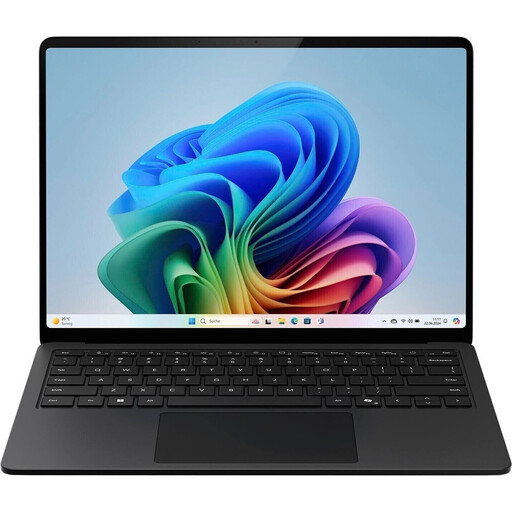
Microsoft Surface Laptop for Business, 7th Edition, 15-inch
The larger display may be useful for working with a review and index side by side; check how your specific applications appear on it.
Specifications in the product name: Intel Core Ultra 7 266V, 16 GB RAM, 512 GB SSD and Windows 11 Pro.
View at Joybuy
 No image available
HP OmniBook Ultra Flip 14-fh0670ng
This 14-inch convertible may suit mobile research; check that it works with your software and preferred workflow.
Specifications in the product name: 2-in-1 touchscreen, Intel Core Ultra 7 258V, 32 GB RAM, 1 TB SSD, 2.8K OLED display and Windows 11 Home.
View at Joybuy
 No image available
Ruzava 14-inch laptop, 8 GB RAM, 256 GB SSD
If you’re comparing compact options, check that the listed specifications suit your indexing software and file collection.
Specifications in the product name: N5095 processor up to 2.9 GHz, FHD display, 256-GB SSD expandable up to 1 TB, stereo speakers, USB 3.0 and Type-C.
View at Joybuy
Frequently asked questions about laptops and linked source files
Do I need a particularly large SSD for linked files?
Not necessarily. What matters is which reviews and source files you need to have available locally or offline. Compare the space they require with the SSD in the exact configuration. OneDrive files stored online only save local storage, but can’t be opened without an internet connection.
How can I keep Zotero links working on a second computer?
Zotero describes a base directory that can be used to keep paths for linked files relative across computers. Zotero doesn’t synchronise linked files itself, so you’ll need a separate method for synchronising them.
Is cloud synchronisation enough to back up my index?
You should also schedule regular backups of your index and source files. The German Federal Office for Information Security recommends backing up data to help prevent data loss. After restoring your files, check that the links still work.
Who should I contact about a faulty laptop I bought as a consumer?
If you buy as a consumer from a retailer in the EU, your statutory rights for faulty goods are against the seller, not automatically the manufacturer. The EU’s Your Europe portal explains that you’re entitled to at least two years’ legal protection from the date you receive the goods. Any additional manufacturer’s guarantee does not replace these rights.
Can I cancel an online laptop purchase in Germany?
For a standard distance purchase from a trader, you generally have 14 days from delivery to withdraw from the contract, as explained by the EU’s Your Europe portal. Before buying, check the terms of the specific contract and any statutory exceptions that may apply.


