What should you look for when buying?
First check that the specification suits your combined workload, then consider storage and backups, followed by how you’ll set up at a shared workstation.
| What matters when buying |
What to check |
Who should consider this? |
| RAM for multitasking |
Check the installed RAM and available slots for the exact model number. Factor in the database and all the programmes you’ll be running at the same time. |
If I’m running a database, editor and other programmes together, I want to choose memory based on my actual workload. Around 28% of consumers are likely to prioritise RAM as their main buying consideration. |
| SSD capacity and backups |
Check the SSD capacity and documented replacement options against the data you’ll be storing. Plan for a separate, approved backup location. |
If I need to plan for local data and a separate way to restore it, I should consider both together. Around 22% of consumers are likely to see local storage and backups as their main concern. |
| Access controls |
Check with your IT team whether local storage is permitted and what measures apply to access, device locking and backups. |
If I’m handling sensitive or personal data, I want to know in advance whether it’s permitted to store it on the device and how access will be controlled. Around 22% of consumers are likely to put the protection of local data first. |
| Changing workstations |
Check the available desk space, screen requirements, monitor and network ports, and power supply for the exact configuration. Look for relevant measurements to assess noise under load. |
If I regularly move between desks, the screen and ports need to suit each workstation. Around 17% of consumers are likely to prioritise workstation comfort and connectivity. |
| Software compatibility |
Check that the operating system and database environment suit your workflow. If you plan to use Docker Desktop, check the latest system requirements and licence terms. |
If I want to use a particular database or container environment, I should check that it’s compatible with the device before buying. Around 11% of consumers are likely to consider software compatibility their main concern. |
Joybuy products for working with local databases
These models combine local database use with other work programmes. Specifications and ports vary by configuration.
 No image available
HP OmniBook Ultra 14-kd0072ngx
The listed specification gives you room for local data and work programmes. Check whether 16 GB RAM will suit your combined workload.
Intel Core Ultra 7 356H, 16 GB RAM, 1 TB SSD and Windows 11 Home. 14-inch display, three Thunderbolt 4 ports, 1.27 kg.
Joybuy
 No image available
HP ZBook Power 16, Ryzen 7 8845HS
The listed configuration has 32 GB RAM for database work alongside programmes running at the same time.
AMD Ryzen 7 8845HS, 32 GB DDR5 RAM, 1 TB SSD and Windows 11 Professional. 16-inch display, HDMI, Thunderbolt 4 and Gigabit Ethernet.
Joybuy
 No image available
Dell Pro 14 Essential PV14255
The 1 TB SSD gives you space for local data. Check whether 16 GB RAM will be enough for your database and other programmes running together.
AMD Ryzen AI 7 350, 16 GB RAM, 1 TB SSD and Windows 11 Pro. 14-inch display with USB-C, USB-A and HDMI.
Joybuy
 No image available
ASUS Zenbook 14 UX3405CA-QD1303W
According to the product specifications, this 14-inch device weighs 1.22 kg, making it an option for moving between desks. The description says the RAM can’t be upgraded.
Intel Core Ultra 7 255H, 16 GB LPDDR5X RAM and 1 TB SSD. WUXGA OLED display and two Thunderbolt 4 ports.
Joybuy
 No image available
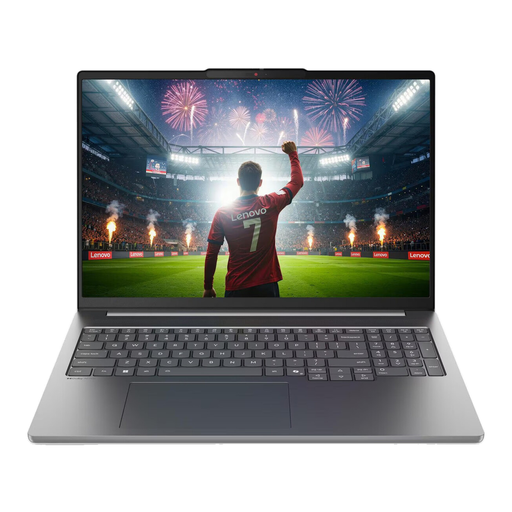
Lenovo IdeaPad Pro 5i 16IPH11
The listed specification includes 32 GB RAM and a 1 TB SSD for local database work alongside other programmes.
Intel Core Ultra 9 386H, 32 GB LPDDR5X RAM and 1 TB NVMe SSD. 16-inch display, Thunderbolt 4, USB-A, HDMI and Windows 11 Pro.
Joybuy
Frequently asked questions
Do I always need 32 GB RAM for a local database?
No. There’s no general rule that you must have 32 GB. Plan around your database configuration and all the applications you’ll run at the same time. Check whether the exact laptop configuration has enough RAM installed or can be upgraded.
What should I check before setting up Docker Desktop on Windows?
If Docker Desktop is part of your workflow, check the Windows version, architecture and intended backend against Docker’s latest system requirements. For business use, also check the licence terms that apply to your organisation. Docker Desktop isn’t a blanket requirement for every local database.
Is a large internal SSD enough to back up my database?
No. Plan for a separate backup and check that you can restore your data. Extra internal storage won’t protect you if your laptop is lost or fails. Agree the backup location for work data with your IT team.
What data protection rules apply to personal data on an office laptop?
The Federal Commissioner for Data Protection and Freedom of Information explains that controllers and processors must take appropriate technical and organisational measures under Art. 32 GDPR, with the measures chosen according to the level of risk. This doesn’t mean that one particular laptop model or the same encryption settings are suitable for every situation. Germany’s Federal Office for Information Security recommends locking your device when you leave your workstation and following your organisation’s policies.
Are a manufacturer’s warranty and statutory rights for faulty goods the same thing?
No. Statutory claims for defects under § 437 BGB are separate from a voluntary manufacturer’s warranty. For ordinary sales of goods, § 438 BGB generally sets a two-year limitation period from delivery; the rights available in an individual case also depend on the type of purchase and the relevant legal requirements. Source: Federal Ministry of Justice and Federal Office of Justice.


