For a local history portal, your laptop should suit the way you work. When coding and browsing at the same time, a practical display, the right ports and enough memory all matter. If you work with large image collections, SSD capacity and upgradeability become more important. A high-resolution laptop display is no substitute for testing at different viewport sizes: MDN Web Docs explains how to do this using browser developer tools and suitable view sizes.
Which features suit your work?
Portal developers
If you work on layouts and code, and check pages in different browsers and viewport sizes, consider the display, ports and operating system alongside the tools you already use. MDN Web Docs explains responsive views and how to test them with browser developer tools.
Image archive managers
If you prepare historical images and documents, consider how many files you plan to store locally and what image editing you’ll be doing. The storage you need and the display features that suit you will depend on the work involved.
Contributors researching on location
If you work away from a permanent desk, consider the size of the laptop as well as the ports you need, its power supply and how it will fit into your existing workspace.
What to look for when buying
| Your priority |
What to check |
Who it matters most to |
| Development and testing |
Check the display size, external monitor connections and whether the operating system is compatible with the tools you plan to use. |
If I use code, a browser and development tools at the same time, I want the display and ports to suit my workspace. Around 36% of consumers prioritise development and testing. |
| Working with local images and files |
Estimate how many files you’ll store and check the SSD capacity and upgrade options for the specific model. |
If I manage original and edited image files locally, I need enough storage. For judging colour, there’s more to consider than resolution, too. Around 29% of consumers prioritise this. |
| Working in different locations |
Compare the weight, the ports you actually need and what’s included with the power supply. |
If I move between research locations and my desk, the laptop’s portability and ports need to work with the peripherals I already have. Around 21% of consumers prioritise working on the move. |
| Maintenance and purchase costs |
Check which components can be upgraded, what’s included and the warranty terms. Consider these separately from your statutory rights. |
If I’m maintaining the portal and its files over the long term, I want to factor in maintenance and any accessories I’ll need. Around 14% of consumers prioritise maintenance and overall costs. |
Avoid common buying mistakes
-
Assuming screen resolution is enough to test a site on a phone
Responsive rules can react to viewport width, among other things. A large or high-resolution laptop display won’t automatically show you how a page works at other screen sizes.
Plan to test with browser developer tools and, where needed, on suitable devices, whatever display you choose.
-
Comparing model names instead of exact configurations
Specifications and ports can vary within the same model range. According to the manufacturer, the ASUS variant mentioned here doesn’t include a power supply. It requires a compatible USB-C power supply rated at least 45 W and no more than 65 W.
Check the full model number, memory, ports and what’s included in the specific offer.
If a power supply isn’t included, you may need to buy one separately. Before purchasing, check whether you already have a compatible power supply.
-
Confusing a voluntary warranty with your statutory rights
Verbraucherzentrale distinguishes between your statutory rights against the seller and a voluntary warranty.
Make a note of who you’re buying from and check any additional warranty terms separately from information about your statutory rights.
A guide to relevant brands
Lenovo
The ThinkPad E14 Gen 7 is a documented 14-inch Windows option for coding and working in different locations.
- The 21SX000RGE variant lists 16 GB RAM, a 512-GB SSD, a matt WUXGA display and a German keyboard. Lenovo highlights replaceable parts as an advantage of the range.
- The stated colour gamut coverage for this variant is 45% NTSC. Check the display specifications separately if you edit images where colour accuracy matters.
HP
The ProBook 4 G1a 14 is a documented Windows configuration for multitasking and working with existing peripherals.
- For the AD2M8ET#ABD variant, HP lists 24 GB RAM, a 512-GB SSD, a WUXGA display, HDMI, USB-A and USB-C.
- These specifications apply to this configuration. Check the model number and ports in the specific offer.
ASUS
The Zenbook 14 OLED UX3405CA-QL205W is a documented option if local storage and display features are important to you.
- ASUS lists 32 GB of onboard RAM, a 1-TB SSD and an OLED touchscreen for this variant.
- According to ASUS, no power supply is included. This variant requires a compatible USB-C power supply rated at least 45 W and no more than 65 W.
Apple
The 13-inch MacBook Air with M5 is a macOS option for anyone whose software and peripherals are compatible with the system.
- Apple lists a configuration with 16 GB of unified memory, a 512-GB SSD and two Thunderbolt 4 ports.
- Check that your software and existing peripherals work with the system you choose and have the ports you need.
Dell
The Dell Pro 14 PC14250 is a configurable Windows option for a mainly fixed workspace.
- One listed configuration includes 16 GB DDR5, a 512-GB SSD and a 14-inch IPS display with a resolution of 1920 × 1200 pixels.
- Dell notes that images may vary by configuration. No charger is listed for the configuration shown, so check the final specification you select.
Joybuy products
The laptops below are suited to coding, local files and working in either a fixed or flexible location. The selection includes Windows and macOS models. You’ll need to test responsive views separately from the laptop display.
 No image available
Lenovo Yoga Slim 7i Aura Edition 14-inch laptop
For coding and local image files if you’re looking for a compact laptop with a 1-TB SSD.
14-inch OLED display, 2.8K, Intel Core Ultra 7 355, 16 GB RAM, 1-TB SSD and Windows 11 Evo. The description lists a weight of 1.14 kg and a German keyboard.
View at Joybuy
 No image available
Lenovo ThinkPad E16 Gen 3 21ST
An option if you need a larger display, upgradeable memory and ports for connecting different devices.
16-inch WUXGA display, AMD Ryzen 7 250, 32 GB RAM, upgradeable memory, 1-TB SSD and Windows 11 Pro. The listed ports include HDMI, USB-A, USB-C and RJ45. The description gives a weight of 1.71 kg.
View at Joybuy
 No image available
Lenovo ThinkBook 16 Gen 9
Suited to a fixed workspace if you need a 16-inch display and ports for transferring files.
16-inch WUXGA IPS display, Intel Core Ultra 5 325, 32 GB DDR5 RAM, 512-GB SSD and Windows 11 Pro. The description lists an SD card reader, HDMI 2.1, Thunderbolt 4, USB 4.0 and Gigabit Ethernet. Weight: 1.7 kg.
View at Joybuy
 No image available
HP OmniBook Ultra Flip 14-fh0670ng
A 2-in-1 option if you want a touchscreen and more memory for running several programmes at once.
14-inch OLED touchscreen, Intel Core Ultra 7 258V, 32 GB RAM, 1-TB SSD and Windows 11 Home. The description gives a weight of 1.34 kg and lists a power supply and USB-C-to-HDMI adapter as included.
View at Joybuy
 No image available
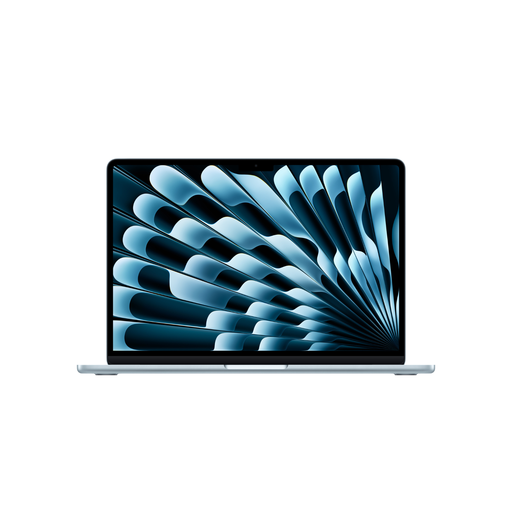
Apple MacBook Air 15-inch (M5, 2026)
A macOS option if your software and peripherals are compatible and you’d prefer a larger display.
15.3-inch display, M5 chip, 16 GB of unified memory and a 512-GB SSD. It has two Thunderbolt 4 ports, supports up to two external displays and weighs 1.51 kg. The description states that no power supply is included.
View at Joybuy
Frequently asked questions
Do I need a particularly high-resolution laptop for responsive layouts?
No. Display resolution alone won’t let you test different viewports. Use the sizing features in your browser’s developer tools and, if needed, test on suitable devices too. MDN Web Docs explains how to do this.
Are Visual Studio Code’s minimum requirements enough to choose a laptop?
Not if you’re considering your whole workflow: the published requirements apply to the editor. Also consider your browser, image files and any other tools you use locally, and check their individual requirements. Microsoft recommends a processor of at least 1.6 GHz and 1 GB RAM for Visual Studio Code.
What should I plan for when working with historical images?
Plan where to store the originals and how to create smaller image versions for different views. MDN Web Docs explains that responsive images can prevent mobile devices from having to load unnecessarily large desktop files.
Are a manufacturer’s warranty and statutory rights the same thing?
No. Verbraucherzentrale distinguishes between your statutory rights against the seller and a voluntary warranty. Check any additional warranty terms separately from information about your statutory rights.


