What should you look for?
First, check that your writing software offers the outline navigation you need and works with your reference manager. Then choose a display, keyboard and laptop format to suit whether you’ll mostly be writing at a desk or in different places.
| What matters |
What to check before buying |
Who will find this especially important? |
| Chapter structure |
Test heading navigation in the version of the software you plan to use; don’t assume Word for Windows works the same as Word for Mac or the web version. |
If I often reorganise chapters, I want to check the outline directly in my writing software. Around 33% of consumers put chapter structure first. |
| Writing comfort |
Check the keyboard layout and display on the exact model; if possible, try writing a longer paragraph on it. |
For long writing sessions, I want a comfortable keyboard and text that’s easy to read. Around 27% of consumers prioritise writing comfort. |
| Working with sources |
Check screen space and ports against your monitor, scanner and storage devices; test Zotero with the writing software you plan to use. |
If I work on my manuscript and sources at the same time, I want to be able to set up my devices and reference manager to suit. Around 20% of consumers put working with sources first. |
| Working in different places |
Check the format, whether a power adapter is included, and the conditions behind the stated battery life for the exact configuration. |
For writing in an archive or on the move, I want a format that suits where I’ll be working and the power sockets available. Around 20% of consumers prioritise working in different places. |
Joybuy products for writing and working with sources
This selection features Windows laptops with larger displays, suited to drafting chapters and working with a manuscript and sources.
 No image available
HP ProBook 4 16 G1i AI Notebook
Windows 11 Pro is listed for drafting chapters in Word for Windows; the 16-inch display may be useful when working with a manuscript and sources.
Intel Core Ultra 7 255U/2 GHz; 32 GB RAM; 1 TB SSD NVMe; 16-inch IPS display with 1,920 × 1,200 pixels; Wi-Fi 7.
View at Joybuy
 No image available
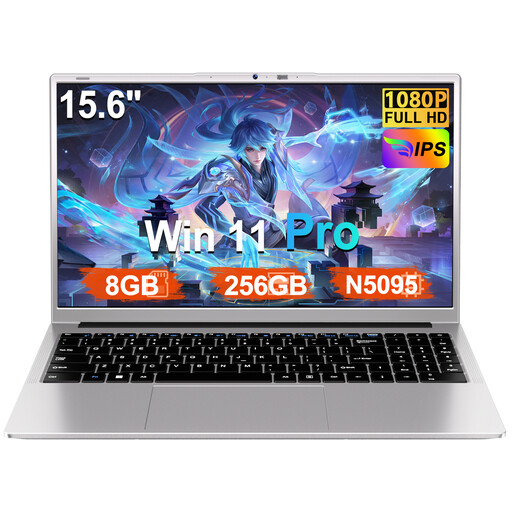
Ruzava 15.6-inch laptop
A 15.6-inch FHD display is listed for writing with a larger built-in screen; Windows 11 Pro is mentioned in the title.
8 GB RAM; 256 GB SSD, expandable to up to 1 TB according to the title; N5095 processor up to 2.9 GHz; USB 3.0, Type-C and numeric keypad.
View at Joybuy
 No image available
16-inch laptop with FHD display
Windows 11 Pro is listed for drafting chapters; the 16-inch format is an option for writing with a larger built-in screen.
Intel Core i5-8210Y; 16 GB RAM; 512 GB SSD; FHD display; RJ45 port.
View at Joybuy
 No image available
HP ProBook 4 G1a 16 business laptop
A 16-inch display is listed for writing with a larger built-in screen; Windows 11 Pro supports the documented Word navigation for Windows.
AMD Ryzen 5 230; 16 GB DDR5 RAM; 512 GB SSD; WUXGA IPS display; AMD Radeon 760M Graphics.
View at Joybuy
 No image available
YOGA 11.6-inch laptop with 360° touchscreen
The compact format may suit working in different places; you’ll have less built-in screen space when viewing your manuscript and digital sources at the same time.
Intel Pentium Gold 6500Y; 8 GB RAM; 256 GB SSD; Windows 11 Pro; 360° touchscreen.
View at Joybuy
Frequently asked questions
Do I need a particularly powerful laptop to create a chapter outline?
The right software matters more than any general minimum requirement for a processor or memory. Microsoft Support describes heading navigation in Word for Windows, while LibreOffice Help explains how headings appear in the Writer Navigator. Check the features in the version you plan to use.
How can I avoid losing reference links when switching software?
Try the switch on a copy of your manuscript before opening the original in another word processor. Zotero documents integrations for Word and LibreOffice and notes that active citation links can be lost when switching between them.
How can I back up my manuscript and collected sources?
Make backup copies and check that you can open them. The German Federal Office for Information Security explains that, without backups, a fault, theft or malware could lead to the loss of your documents.
What are the rules in Germany for online returns and faulty goods?
Consumers generally have a 14-day right to cancel an online purchase, although exceptions apply and the specific contract should be checked. According to the Verbraucherzentrale, if newly purchased goods are faulty, you may have statutory rights against the seller for up to two years after delivery. A voluntary warranty is separate from these rights.


