Choose a laptop based on your development environment and whether you’re more likely to work on the move or at a desk with several windows open. A 14-inch model is a compact option, while a 16-inch display gives you more screen space to work with. For a single stock tracker, SQLite can store data locally; make sure you also keep a separate backup and test that you can restore it. If you use Visual Studio 2026, check the requirements set out by Microsoft Learn rather than assuming they apply to every development project.
Who is this solution for?
Developers working with local stock data
You’re developing a tracker for a single computer and want to store data without needing a central database server. Plan to keep a separate backup: the Federal Office for Information Security recommends backing up data regularly.
Developers who work on the move
You work in different places and need to weigh up how much screen space you need for code and previews against how compact you want your laptop to be. The Lenovo and HONOR configurations featured here are examples of 14- and 16-inch displays.
Users of a full-featured Windows IDE
If you’re specifically planning to use Visual Studio, check the requirements for that development environment against the information from Microsoft Learn. The requirements for a full-featured IDE don’t automatically apply to a simple editor or every stock tracker.
What should you look for when buying?
Compact Windows laptop
Best suited to: Developing on the move and using tools that run on Windows. Compare specific 14-inch configurations.
Trade-off: A smaller display leaves less room to view your code, database and preview side by side.
Larger laptop for desk-based work
Best suited to: Viewing your code and tracker interface at the same time, usually without an external monitor. A 16-inch model could suit your workflow.
Trade-off: The larger built-in display comes in a less compact form.
| Buying consideration |
What to look for |
Who is this important for? |
| Backing up local data |
Check where the application stores data and how it backs it up. Look for a suitable port for a separate backup drive, and test that you can restore your data. |
If I don’t want to lose my only local copy of the data, I need a separate backup method and want to be able to test the restore process. Around 33% of consumers put keeping local data safe and restoring it at the top of their list. |
| Development tools |
Decide on your operating system, editor or IDE and, if needed, local testing tools before comparing memory and processors. Visual Studio 2026 has its own requirements, as set out by Microsoft Learn. |
If I want to use a particular IDE or testing tools, I want to check their requirements before buying a laptop. Around 27% of consumers prioritise compatibility with their development tools. |
| Space for code and previews |
Compare the display size and resolution of the specific model with your preferred window layout, and consider whether you might use an external monitor. |
If I want to see my code and tracker interface at the same time, built-in screen space matters more to me than having the most compact design possible. Around 20% of consumers prioritise space for code and previews. |
| Working on the move |
Check the dimensions and keyboard layout, and confirm whether a suitable power adapter is included with the specific offer. |
If I regularly take my laptop between different places of work, I want to know its size and what’s included before I buy. Around 20% of consumers consider portability their top priority. |
Which buying pitfalls should you avoid?
-
Mistaking a local SSD for a backup
If your laptop is damaged or stolen, you could lose both the device and your only copy of the data. A local database is no substitute for a separate backup.
Plan an independent backup and test that you can restore your tracker data. The Federal Office for Information Security recommends regular backups.
-
Assuming IDE requirements apply to every tracker project
Microsoft describes a configuration on which Visual Studio 2026 runs best. This isn’t a general minimum requirement for a stock tracker.
First decide which development tools you’ll actually use, then check the system requirements for each one.
-
Taking the product title and individual specifications at face value
The keyboard layout details differ for the HONOR configuration listed. The Dell configuration reviewed doesn’t include a power adapter, while HP marks the power adapter for the listed model as sold separately.
Confirm the keyboard layout, display and full contents of the box for the specific model.
Key brands to consider
Lenovo
The ThinkPad E14 Gen 7 AMD is a specifically configured 14-inch Windows laptop for developing on the move.
- For variant 21T00022GE, Lenovo lists 16 GB RAM, a 512-GB SSD, a matte 1920 × 1200-pixel display and a German keyboard.
- Upgrade information is based on the manufacturer’s details; check the specific model before making any changes.
Dell
The Dell 14 Plus DB14250 is available in a range of 14-inch configurations.
- The configurations listed differ in several ways, including 16 GB RAM with a 512-GB SSD, or 32 GB RAM with a 1-TB SSD.
- The offers reviewed are marked as not including a charger. Make sure the specification and what’s included match the configuration you choose.
HP
The HP EliteBook 6 G2i is a Windows Pro option in the business laptop segment.
- For variant DN6R1EA#ABD, HP lists 16 GB RAM, a 512-GB SSD and a WUXGA display.
- The display size is listed inconsistently: the specifications section says 14 inches, while another section says 16 inches. Confirm the size of the specific model; the power adapter is sold separately.
HONOR
The MagicBook X16 AMD 2025 is a 16-inch option if built-in screen space matters more to you than a compact design.
- The product details list a Ryzen 5 6600H, 16 GB RAM and 512 GB storage.
- The keyboard layout details differ between the title and the specifications. Check the layout before buying; the product details aren’t an independent performance test.
Joybuy laptops for your stock tracker
The models below include compact 14-inch laptops and options with a 16-inch display. Choose based on whether portability or more built-in screen space matters more for your day-to-day work.
 No image available
HP ZBook 8 G1i 14, Ultra 9 285H, 64 GB RAM, 1 TB SSD
A compact option if you want to work on your tracker and project files while on the move.
The product name lists a 1-TB SSD for local files.
View at Joybuy
 No image available
Lenovo ThinkBook 16 Gen 9, Core Ultra 5 325, 32 GB DDR5, 512 GB SSD, Windows 11 Pro
A 16-inch option if you’d prefer to view your code and tracker interface side by side on the built-in display.
The product name lists 32 GB DDR5 and a 512-GB SSD.
View at Joybuy
 No image available
Samsung Galaxy Book6 Enterprise Edition 16-inch, Core Ultra 7 355, 16 GB RAM, 512 GB NVMe SSD, Windows 11 Pro
A larger built-in display could suit you if you want to use several windows on your laptop.
The product name lists a touchscreen and a 512-GB NVMe SSD.
View at Joybuy
 No image available
HP OmniBook Ultra Flip 14-fh0670ng, Core Ultra 7 258V, 32 GB RAM, 1 TB SSD, 2.8K OLED, Windows 11 Home
A 14-inch option if you’ll be carrying your laptop around more often while working on your tracker and project files.
The product name lists a 2.8K OLED touchscreen and a 1-TB SSD.
View at Joybuy
 No image available
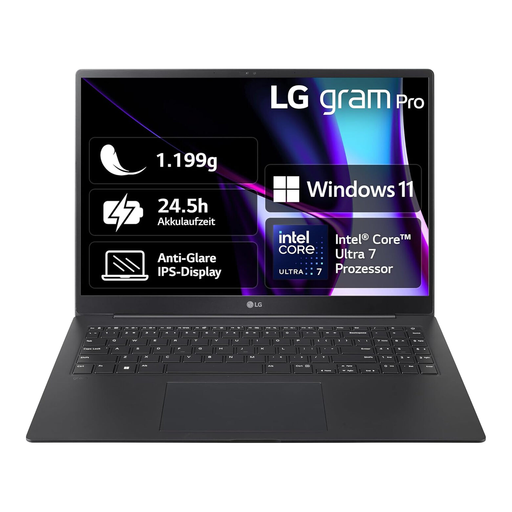
LG gram 16 Pro, Core Ultra 7 155H, 16 GB RAM, 1 TB SSD, 6Z90SP-G.AA78G
A 16-inch option if you’d prefer more built-in screen space for your code and previews.
The product name lists 16 GB RAM and a 1-TB SSD.
View at Joybuy
Frequently asked questions
Do I need a database server for a stock tracker that stores data locally?
Not necessarily: according to the SQLite project documentation, SQLite is suitable for local application data. If you later need a shared, centrally managed data archive, you should review the architecture again.
How do I back up an open SQLite database?
SQLite documents an online backup API that lets you create a consistent copy of the database. Keep a backup separate from your laptop and test that you can restore it; the Federal Office for Information Security recommends backing up application data regularly.
Who is responsible if a consumer laptop bought in Germany is faulty?
If you buy from a commercial seller, you should make a claim under the statutory warranty against the seller. The EU consumer information service Your Europe describes a minimum of two years’ protection from the date you receive the goods; an additional manufacturer’s guarantee doesn’t replace these rights.
Does the GDPR apply to my personal stock tracker?
Your Europe notes an exemption for individuals processing data solely for personal or household activities. This exemption doesn’t automatically apply to business use or to an organisation processing personal data; the actual purpose of the processing is what matters.


