Layout designers without an external monitor
If you work on spreads and panels directly on your laptop, check the usable screen area of the specific model variant.


When choosing a laptop for magazine layout work from home, start by considering your layout software, the workspace you need and your home-office setup. For InDesign, Adobe recommends 16 GB of RAM and a screen resolution of 1920 × 1080 pixels; these are recommendations for this software, not general minimum requirements for every layout programme. A larger laptop screen can be useful if you work without an external monitor, while a more compact device with the right ports may suit a permanent desk setup.
If you work on spreads and panels directly on your laptop, check the usable screen area of the specific model variant.
If you regularly switch between your layout and image assets while working, compare the RAM and local storage capacity with the requirements of your software version. Adobe recommends 16 GB of RAM for InDesign.
If you can use an external monitor, check the ports on the specific laptop and make sure they’re compatible with your existing devices.
First, check which layout programme and version you use. Then choose a display, RAM and ports to suit your workspace.
| Consideration | What to check | Who is this most important to? |
|---|---|---|
| Workspace and layout view | Check the screen size, native resolution and display surface of the specific model variant; also consider your colour and print workflow. | If I want to see pages and panels clearly on my laptop, the built-in workspace matters most to me. Around 36% of consumers put it at the top of their list of buying priorities. |
| RAM and multiple files | Compare the RAM and SSD capacity of the exact configuration with the requirements of the software version you use. | If I regularly switch between large image files and documents while working on layouts, I pay particular attention to RAM and local storage. Around 29% of consumers put this consideration first. |
| Ports for your workspace | Check that the video ports and external display support work with your monitor and other existing devices. | If my laptop needs to work with the devices at my permanent desk, the right ports are essential. Around 21% of consumers prioritise how well a laptop fits into their workspace. |
| Overall cost and portability | Check what’s included, which peripherals you already own and the RAM and SSD configuration you actually need; for some offers, check whether a charger is included too. | If I want to take my laptop with me occasionally while keeping an eye on the cost of my overall setup, I compare it with the devices I already own. Around 14% of consumers put cost and portability at the top of their list. |
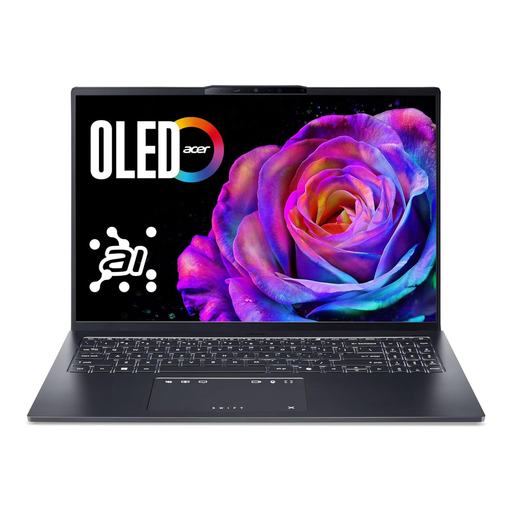
An Acer Swift 16 AI SF16-51T isn’t automatically the same variant as the SF16-71T with the code NX.JU1EG.007.
Before you buy, compare the full model and variant code, along with the key specifications.
A display specification alone doesn’t prove that colours can be judged reliably for print. For an InDesign print PDF, Adobe recommends checking details including up-to-date links, available and licensed fonts, bleed, margins and a preflight check.
Ask your printer for their requirements and check the exported PDF before sending it off.
Unchecked print files can mean extra rounds of corrections or having to produce the material again.
What’s included and which ports are available vary by model and variant. For example, Acer explicitly states that the Acer Swift 16 AI NX.JU1EG.007 doesn’t include a charger.
Before ordering, check that the charger, monitor connection and any adapters you need will work with your existing setup.
Depending on what’s included and the devices you already own, you may need additional connectivity equipment or a compatible charger.
The Swift 16 AI range includes Windows models with a larger built-in display.
The MacBook Air M5 could suit a macOS workflow, provided the screen size, storage choice and external monitors work for your setup.
ThinkPad P workstations are a Windows option if your needs extend beyond page layout to other storage or specification requirements.
The ProArt P16 range includes Windows creator laptops. Check that the display and ports on the specific model suit your workspace.
The Dell Pro Precision 5 Series 16 is a configurable Windows workstation for setups with additional requirements.
The following Joybuy models are 16-inch laptops with features for layout work directly on the laptop or on a connected monitor.
 No image available
The 16-inch display and listed ports are useful features to consider for layout work on the laptop or with a connected monitor.
AMD Ryzen 5 220 at 3.2 GHz, 32 GB RAM and a 1 TB NVMe SSD. The IPS display is listed as anti-glare with a resolution of 1920 × 1200 pixels; HDMI 2.1 and USB4-C with display output are also listed.
 No image available
The listed display and video ports are relevant for layout work on the laptop or on an external monitor.
AMD Ryzen 7 250 at 3.3 GHz, 32 GB RAM and a 1 TB NVMe SSD. The anti-glare IPS display is listed with a resolution of 1920 × 1200 pixels; ports include HDMI 2.1, USB4-C and USB-C.
 No image available
The 16-inch display and listed video ports may be useful for layout work at your desk.
32 GB RAM and a 512 GB SSD. The matte 16:10 IPS display is listed at 400 cd/m² with a resolution of 1920 × 1200 pixels; Thunderbolt 4, USB 4.0 and HDMI 2.1 are also listed.
 No image available
The listed memory and display specifications are relevant for layout work directly on the laptop; check the requirements of the software version you use.
Intel Core Ultra 7 255H, 16 GB RAM and a 1 TB SSD. The 16-inch OLED display is listed with a resolution of 2048 × 1280 pixels; HDMI 2.1 and Thunderbolt 4 are also listed as ports.
 No image available
The convertible display and listed ports are useful for layout work on the laptop or with an external monitor.
Intel Core Ultra 7 155U, 16 GB RAM and a 512 GB SSD. The 16-inch WUXGA IPS display is listed with a resolution of 1920 × 1200 pixels and 100% sRGB; HDMI 2.1 and Thunderbolt 4 are also listed.
A dedicated graphics card isn’t a general requirement for standard InDesign page layout. Adobe specifies separate GPU and display requirements for optimal GPU performance on Windows. Check the needs of any additional image, video or 3D programmes separately before choosing a particular graphics card.
For an InDesign print PDF, Adobe recommends checking details including up-to-date links, available and licensed fonts, bleed, margins and a preflight check. You should also follow the requirements of the printer you’ve chosen; a good laptop display doesn’t replace these checks.
First, check your version of the programme and its system requirements, and see whether the problem occurs with just one particular file. Adobe also lists local storage, page thumbnails and ongoing preflight checks as possible areas to investigate; that doesn’t automatically mean you need a new laptop.
Check the specific offer to see whether it includes a charger and whether you need adapters for your monitor. When you buy as a consumer from a business seller in the EU, you’re entitled to a statutory minimum guarantee of two years; this is separate from any additional manufacturer’s warranty. For a standard online consumer purchase, you generally have a 14-day right to cancel from the date of delivery. Whether consumer rights apply depends on the type of purchase and can’t be determined just from the fact that you’ll use the laptop at home.
A preparatory study published in September 2026 doesn’t mean that a new label has been introduced. The European Commission lists ecodesign requirements for computers, including laptops, under Regulation (EU) No 617/2013 and describes work on a possible new energy label.