Start by choosing a device that runs the software you need for formulas and mathematical graphics. If you often need to view tasks, solutions and sources at the same time, usable screen space matters. If you’ll be carrying it around regularly, weigh this against size and connectivity rather than focusing solely on high processor or graphics performance.
Who this laptop is for
Creators of complex maths worksheets
If you often add formulas to documents or create graphs and geometric diagrams, the software you need should suit your workflow. LibreOffice Math is the formula editor in the LibreOffice suite, while GeoGebra offers tools for graphs and geometry.
A desk set-up in a student room
If you mostly work at a desk and want to view tasks, solutions and sources side by side, screen size and the space available on your desk are important factors to consider.
Creating worksheets on the move
If you regularly move between your room and other places to work, weigh the screen format against your transport needs and the connections you need for your devices.
What to look for when buying
First, check that your preferred software workflow will work. Then decide how much built-in screen space you need at your desk and how often you’ll be carrying the device around.
| Buying priority |
What to check |
Who this matters most to |
| Formulas and graphics |
Check whether the operating system and applications you need support your workflow with formulas, graphs or geometry. |
If I’m setting formulas and also creating graphs or geometry, the software needs to support that exact workflow. Around 36% of consumers prioritise their maths workflow. |
| Desk workspace |
Compare screen size and resolution. Check whether you can connect an extra monitor if you’d like to use one. |
If I need to view tasks, solutions and sources side by side at my desk, the built-in screen space matters. Around 29% of consumers prioritise screen space. |
| Specifications and cost |
Compare the full model number and specifications of the exact version. Also check what’s included and whether you’ll need any adapters. |
If I want to choose a device that fits my budget without paying for unnecessary extras, I’ll compare the specifications carefully. Around 21% of consumers put total cost first. |
| Portability and connectivity |
Check the size and weight of the exact version, along with its ports and connection options for your printer. |
If I regularly take my laptop with me and work in different places, portability and device connections are essential. Around 14% of consumers prioritise portability. |
Avoid common buying mistakes
-
Assuming the range description applies to every version
Screen, storage and other features can vary within a laptop range. The range name alone doesn’t necessarily describe the exact configuration.
Compare the full product or model number with the specifications of the device you’re planning to buy.
-
Assuming your current printer will be compatible
Connection and set-up depend on the printer model and the laptop’s ports. Microsoft also notes that some ARM PCs may have installation issues.
Check your printer model, connection type and laptop ports before buying.
Depending on the connection, you may need an additional adapter or extra set-up.
-
Confusing the manufacturer’s guarantee with your statutory rights
An additional manufacturer’s guarantee may have its own terms and conditions, and doesn’t replace your statutory rights with the seller. Your Europe, the European Union’s consumer portal, distinguishes this guarantee from your legal rights.
Read the terms separately and keep your proof of purchase.
Relevant brands at a glance
Lenovo
The IdeaPad Slim 5i 14, model 83HR002PGE, is a compact Windows laptop with a matte 14-inch screen, suited to working with documents and taking on the move.
- Lenovo lists Windows 11 Home, 16 GB RAM and a 512-GB SSD for this version.
- Screen or processor specifications for other configurations in the range don’t automatically apply to this model.
Acer
The Aspire Go 15 NX.J7WEG.007 is a traditional 15.6-inch option for a mostly fixed work set-up.
- Acer lists Windows 11 Home, 16 GB RAM and a 512-GB SSD for this version.
- Specifications for other Aspire Go screen or storage options can’t necessarily be applied to this model.
Apple
The MacBook Air M5 is available in 13- and 15-inch versions. It’s worth considering if the applications you need work with macOS.
- Apple lists 16 GB of unified memory and a 512-GB SSD for the 13-inch base model.
- Check that the two listed Thunderbolt 4 ports are suitable for the devices you want to connect. Apple’s claim of up to 18 hours refers to video streaming, not a worksheet session.
Joybuy laptops for maths worksheets
This selection includes a traditional 15.6-inch laptop for your desk, as well as compact 14-inch models for when you need to carry your device around more often.
 No image available
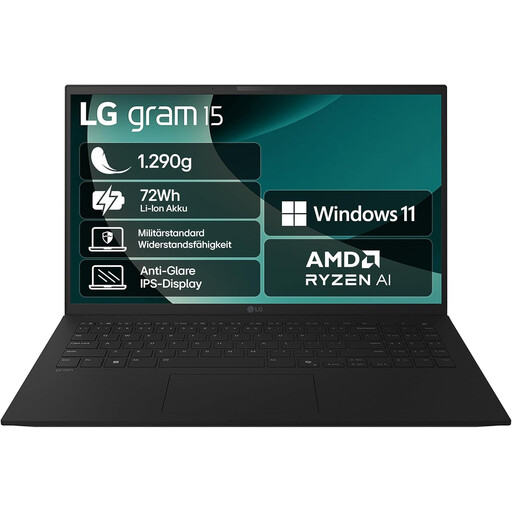
LG Gram 15.6-inch, Ryzen AI 7 350
The 15.6-inch format gives you built-in screen space for viewing tasks and sources at your desk.
15.6-inch FHD IPS display, 16 GB RAM, 1 TB SSD, AMD Radeon 860M, Windows 11 Home, Bluetooth 5.3 and Thunderbolt 4.
View at Joybuy
 No image available
HP OmniBook Ultra Flip 14-fh0670ng
The 14-inch 2-in-1 format is a good fit if you’re looking for a more compact device for working in different places. It offers less built-in screen space for viewing documents side by side than 15.6-inch models.
14-inch 2.8K OLED touchscreen, Intel Core Ultra 7 258V, 32 GB RAM, 1 TB SSD and Windows 11 Home.
View at Joybuy
 No image available
Ruzava 14-inch laptop, N5095
The compact 14-inch format may suit worksheet work at your desk or on the go. Consider whether the smaller built-in screen gives you enough room to view everything you need at once.
FHD display, 8 GB RAM and 256 GB SSD; the product title states that storage can be expanded to 1 TB.
View at Joybuy
 No image available
ASUS Zenbook 14 UX3405CA-QD1303W
This 14-inch laptop is a compact option for documents and mathematical graphics if Windows suits the software you need.
14-inch WUXGA OLED display, Intel Core Ultra 7 255H, 16 GB RAM, 1 TB SSD and Windows 11.
View at Joybuy
Frequently asked questions
Do I need a separate app to add formulas to a worksheet?
If you use LibreOffice Writer, you can create formulas with LibreOffice Math and insert them into your document. GeoGebra offers tools for graphs and geometric constructions.
How do I check whether my current printer will work with a laptop?
Check your printer model, connection type and the ports on the specific laptop before deciding. Microsoft notes that installation can be difficult on some ARM PCs.
How can I back up my worksheets in Windows?
Windows File History can save copies of personal files to an external drive or network location. Set up the backup and check that it includes the folder containing your worksheets.


