If you want to use your laptop display and an external monitor, first check that your monitor’s connections are compatible with the exact laptop configuration, and that your software can create the formulas you need. To use two external monitors as well as the laptop display, check the display support explicitly stated for the model in question: Lenovo documents support for multiple external displays on the ThinkPad E14 Gen 7 (Intel), while Apple specifies support for up to two on the MacBook Air with M5. You’ll still need to check the connections, cables and software for each setup.
Who is this selection for?
Using worksheets at a fixed desk
If you write on your laptop and keep questions or reference materials open on an external screen, check that your laptop’s video ports match the monitor’s input. Microsoft Support explains how to arrange multiple displays in Windows and use them in extended mode.
Creating materials with lots of formulas
If your worksheets include editable fractions, equations or other formulas, first decide which application you’ll use. Microsoft Support distinguishes between Word for desktop and Word for the web; LibreOffice Writer can also insert formula objects.
Moving between workspaces
If you use your laptop at different desks with existing monitors, compare the inputs on each monitor with the video outputs on the exact laptop variant. Lenovo, Apple and ASUS list different port configurations across their model ranges.
What should you look for when buying?
First decide whether you want to use the laptop display with one external monitor, or connect two external monitors as well as the laptop display. Then check the ports and formula software.
| Priority |
What to check before buying |
Who it matters most to |
| Connecting two screens |
Decide whether you mean one or two external monitors; check the monitor inputs, video outputs and display limit for the exact laptop variant. |
If I want to see a worksheet and its questions or templates at the same time, my planned setup needs to be supported. Around 42% of consumers prioritise connecting screens for simultaneous use. |
| Editing formulas |
Try a typical formula in the software you plan to use and take the file formats you need into account. |
If my worksheets include editable equations or fractions, the formula features in my chosen application are essential. Around 25% of consumers prioritise being able to create and edit formulas. |
| Moving between workspaces |
Note the inputs on the monitors you use and compare them with the video outputs on the exact laptop configuration. |
If I work at several desks, I need a connection that works with the monitors available at each one. Around 17% of consumers place particular importance on using their laptop at different workspaces. |
| Planning for all your needs |
Consider the cables you already have, any adapters or dock you might need, and the required software alongside the laptop. |
If I still need to put together the right connections and software, I want to understand everything I’ll need before placing an order. Around 16% of consumers prioritise their overall connection and software requirements. |
Common misconceptions
-
“Two screens” always means two external monitors
Using the laptop display plus one external monitor is different from connecting two external monitors as well as the laptop display.
Before choosing a model, decide how many displays you want to use at the same time, then check that against the manufacturer’s specification for the exact configuration.
-
Any USB-C port can connect a monitor
The port name alone doesn’t confirm that it supports video output. The video output and monitor input also need to be compatible.
Before choosing a cable or adapter, check that the specific laptop port supports video output and that it matches the monitor’s input.
-
Word for the web is enough for creating new formulas
According to Microsoft, Word for the web can display existing formulas, but can’t create new ones.
Try a typical worksheet in the application you plan to use and check whether Word for desktop or another programme suits the way you work.
Key brands to consider
Lenovo
The ThinkPad E14 Gen 7 (Intel) is a documented Windows option with HDMI and, depending on the configuration, USB-C and Thunderbolt ports.
- Lenovo PSREF states that the documented platform supports multiple independent displays.
- Check the port specifications and processor variant on the exact device. This information doesn’t replace checking compatibility with your monitors and software.
Apple
The MacBook Air with M5 is a macOS option if the worksheet software you need works on it and your monitors can be connected appropriately.
- Apple specifies support for up to two external displays and Thunderbolt 4/USB-C ports.
- If you have HDMI monitors, check the connection, cable or adapter separately. The display specification doesn’t confirm compatibility with specific educational software.
ASUS
The ExpertBook B1 (B1503) is a business laptop range where you can check the details of a specific Windows configuration.
- ASUS lists USB-C ports among the connections available across the product range.
- The operating system and processor vary by model. For the configuration you choose, this doesn’t confirm a specific number of external monitors that can be used at the same time.
Joybuy product selection
This selection includes Windows laptops and a MacBook Air for worksheets and use with external displays. Check how many displays the specific variant supports at the same time, and which application can create your formulas.
 No image available
Acer TravelMate TMP216-41-TCO, 16-inch
For a Windows workspace with an external monitor: the product description lists HDMI 2.1 as a connection.
16-inch WUXGA IPS display, 16 GB DDR5, 512 GB SSD and Windows 11 Pro Education. Check the display limit for the exact configuration and video output on any additional ports before buying.
Joybuy
 No image available
Ruzava 14-inch laptop, 8 GB RAM, 256 GB SSD
For a mobile workspace with one external screen, the description lists a Mini HDMI port.
FHD IPS display and N5095 processor. USB-C is described as a data port; the Mini HDMI port is the one to use for a monitor. Check simultaneous display support before buying.
Joybuy
 No image available
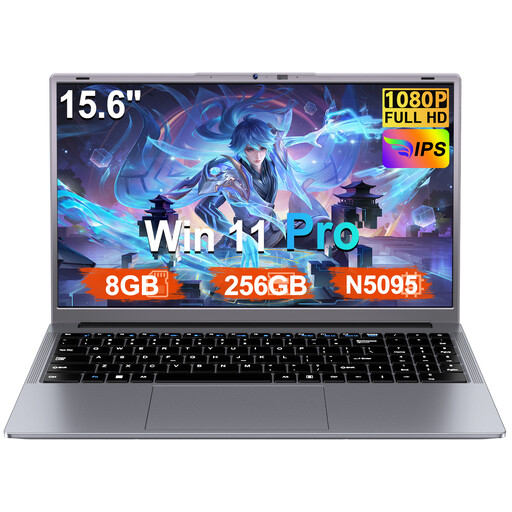
Ruzava 15.6-inch laptop, Windows 11 Pro
For worksheets on Windows with an external monitor, the description lists a Mini HDMI port.
8 GB RAM, 256 GB SSD and N5095 processor. USB-C is described as a data port; check the display limit for the exact configuration before buying.
Joybuy
 No image available
HP ProBook 4 G1a, 16-inch
For a Windows workspace with an external monitor, the product description lists HDMI 2.1.
WUXGA IPS display, 16 GB DDR5, 512 GB SSD and Windows 11 Pro. Check the video output on the exact ports and the number of supported displays before buying.
Joybuy
 No image available
Apple 13-inch MacBook Air (M5, 2026), 16 GB, 1 TB SSD
For macOS workflows with external displays, the product description specifies support for up to two external displays via Thunderbolt 4.
13.6-inch display and German QWERTZ keyboard layout. According to the product description, a power adapter isn’t included. Also check that the worksheet software you need works with macOS.
Joybuy
Frequently asked questions
How do I set up a second screen in Windows?
Connect the monitor and check in Windows display settings that both displays are recognised. You can arrange their positions there and set up an extended desktop. If Windows doesn’t detect a display, Microsoft Support recommends checking the connection and display detection settings.
Is Word in a browser enough for creating new mathematical formulas?
No. According to Microsoft, Word for the web can display existing formulas but can’t create new ones. For that, consider Word for desktop or another suitable application such as LibreOffice Writer.
What should I check when working at different desks?
At each workspace, compare the monitor inputs with the video outputs on your specific laptop. If a display isn’t detected, first check the cables and dock connections, as well as the display settings.
What rights apply when buying a laptop online in Germany for personal use?
When you buy as a consumer from a business seller, you’re generally entitled to a statutory warranty of at least two years from the date you receive the goods. This claim is against the seller and is separate from any voluntary manufacturer’s guarantee. For ordinary online purchases, you generally have a 14-day right to cancel from the date of delivery, subject to statutory requirements and exceptions.
What else should I consider buying before placing my order?
Check whether you can connect your existing monitor directly, or whether you’ll need a compatible cable, adapter or dock. Also make sure your current application can create the formulas you need before budgeting for additional software.


