If you mainly check viewports and breakpoints in your browser, you can choose your laptop platform based on the rest of your toolkit. For Apple’s documented Safari Web Inspector workflow with a connected iPhone or iPad, you’ll need a Mac. Also plan to test on real smartphones: Chrome’s Device Mode simulates a mobile view, but doesn’t run the code on the mobile device itself. Check the exact specifications, the ports you need and what’s included in the box.
Which debugging approach is right for you?
Students testing on a real smartphone
If you need to investigate an issue on your Android device or in iPhone Safari, choose your laptop based on the documented debugging workflow you need: Google explains how to debug remotely on Android, while Apple’s inspection workflow uses a connected Mac.
Students on a tight device budget
If you mainly check mobile layouts in browser DevTools, choose specifications to suit the tools you actually use rather than assuming you’ll need an emulator.
Students using several development tools
If you’re planning to use Android Studio or an emulator alongside your browser and code editor, compare those programmes’ requirements with the exact laptop configuration.
What matters when choosing a laptop?
Browser DevTools for views and breakpoints
A good fit if: you mainly check responsive views in a desktop browser and don’t plan to use an additional device in your workflow.
The trade-off: Chrome’s Device Mode is an approximation; the code doesn’t run on real mobile hardware.
Windows laptop for Android remote debugging
A good fit if: you want to inspect a page in Chrome on your Android smartphone and use Windows for your studies and projects. Google documents this workflow on Windows too.
The trade-off: You’ll need to enable USB debugging on your smartphone to connect it by USB. Android Studio with an emulator has additional system requirements.
Mac for iPhone Safari
A good fit if: you want to inspect a page open on a connected iPhone or iPad using Apple’s Safari Web Inspector.
The trade-off: Apple’s documented inspection workflow requires a connected Mac. For basic CSS checks, a viewport simulation may be enough.
| Buying priority |
What to check before buying |
Who is this important to? |
| Testing on real mobile devices |
Decide whether you want to test Android or iPhone Safari, then check the right platform and the ports you need. |
If I need to find an issue on my Android device or in iPhone Safari, I’ll choose a laptop based first on the right debugging workflow. Around 33% of consumers put testing on a real smartphone first. |
| Spend that suits your workflow |
Compare the full device configuration and what’s included with the tools you actually need. |
If I mainly use browser DevTools, I don’t want to plan for extra emulator or performance requirements without a specific need. Around 27% of consumers prioritise spending in line with their actual workflow. |
| Several development tools |
Check your programmes’ requirements, as well as the RAM and SSD in the exact model. |
If I also want to use Android Studio or an emulator, I’ll compare their requirements with the laptop’s specifications. Around 20% of consumers prioritise using several development tools at once. |
| Workspace and portability |
Compare the screen size and footprint with your desk space and how often you need to carry your laptop. |
If my desk is small or I want to take my laptop with me, the visible work area needs to fit the space available. Around 20% of consumers prioritise workspace and portability. |
Common buying assumptions to avoid
-
A simulated smartphone view is treated as a full device test
Google explains that code doesn’t run on a mobile device in Chrome’s Device Mode. So it can’t give you a complete picture of device-specific issues.
Use the simulation for initial layout checks, then investigate issues that only occur on a smartphone using the affected device.
An unsuitable configuration could mean you need a different device for your workflow.
-
A power adapter is assumed to be included
The listed offers for a MacBook Neo and an HP OmniBook don’t include a power adapter, or it’s sold separately.
Check what’s included with the specific offer and, if needed, confirm whether a compatible power adapter comes with it.
If one isn’t included, you may need to buy a compatible power adapter separately.
Brands worth considering
Apple
The MacBook Neo and MacBook Air are worth considering if you need Apple’s documented workflow for inspecting iPhone Safari.
- Apple lists 8 GB of unified memory for the 256 GB MacBook Neo; the MacBook Air M5 configurations shown start at 16 GB.
- These manufacturer specifications describe the configurations, not their suitability for a particular development project.
Lenovo
The IdeaPad Slim 5i 14 bundle reviewed here is an example of a compact Windows device for browser and coding work.
- Lenovo lists 16 GB RAM, a 512 GB SSD and a 14-inch display for this bundle.
- Other IdeaPad configurations and bundles may differ.
Acer
The Aspire Go 15 NX.J7WEG.007 is an option with a larger display for a mainly fixed workspace.
- Acer lists a 15.6-inch display, 16 GB RAM and a 512 GB SSD for this version.
- These specifications apply to the NX.J7WEG.007, not the Aspire Go range as a whole.
HP
The OmniBook 3 14-hu0750ngx is another 14-inch Windows configuration to compare for workspace and specifications.
- HP lists 16 GB RAM and a 512 GB SSD for this model.
- According to HP, the power adapter is sold separately.
Dell
The Dell 14 DC14250 is available in several Windows configurations; to compare them, check the order code for each one.
- The versions Dell shows in this model range include configurations with 8 GB and 16 GB RAM.
- The range name alone doesn’t tell you the specifications of the version you choose.
Joybuy laptops for mobile layout debugging
This selection includes Windows laptops for browser and coding work, as well as Google’s documented Android remote debugging workflow from Windows. A Mac is required to inspect iPhone Safari using Apple’s documented workflow.
 Image unavailable
Microsoft Surface Laptop 7 Snapdragon X Plus, 16 GB, 512 GB, Black
As a Windows laptop, this model could suit Google’s documented Android remote debugging workflow from Windows.
The product title lists 16 GB RAM and a 512 GB SSD.
View at Joybuy
 Image unavailable
HP OmniBook Ultra Flip 14-fh0670ng, 14-inch 2-in-1, 32 GB, 1 TB
This Windows model could suit browser work and additional development tools; compare your programmes’ requirements with the configuration you choose.
The product title lists 32 GB RAM, a 1 TB SSD and a 2.8K OLED display.
View at Joybuy
 Image unavailable
Ruzava 14-inch laptop, N5095, 8 GB RAM, 256 GB SSD
For browser views and basic coding work, check whether the listed specifications suit the tools you actually use.
The product title lists an N5095 processor, 8 GB RAM, a 256 GB SSD and an FHD display.
View at Joybuy
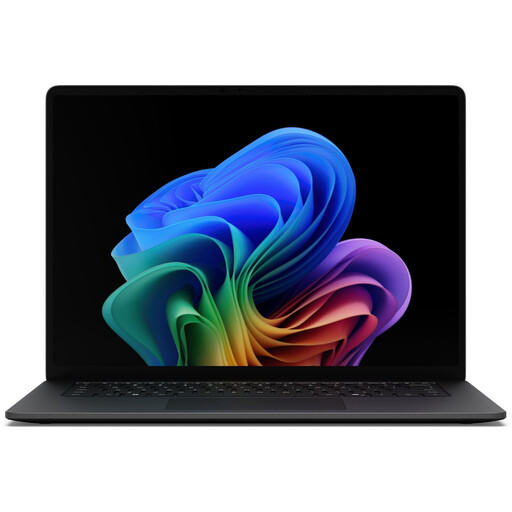 Image unavailable
Microsoft Surface Laptop 8 Core Ultra 7, 16 GB, 512 GB, Black
As a Windows laptop, this model could suit Google’s documented Android remote debugging workflow from Windows.
The product title lists 16 GB RAM and a 512 GB SSD.
View at Joybuy
 Image unavailable
HP OMEN MAX 16-ak0693ng, Ryzen AI 9 HX 375, 32 GB, 1 TB
This Windows model could suit Android remote debugging and several development tools. Check whether the larger 16-inch format works for your desk and how you plan to carry it.
The product title lists 32 GB RAM, a 1 TB SSD and a GeForce RTX 5070 Ti with 12 GB.
View at Joybuy
Frequently asked questions
Is Chrome’s device view enough to test a mobile layout?
It’s a good starting point for checking viewports and breakpoints, but it isn’t a full test on a smartphone. Google describes Device Mode as an approximation: the code doesn’t run on a mobile device. So if an issue only occurs on a smartphone, test it on the affected device.
How do I inspect a page on my Android smartphone?
Google documents remote debugging from Windows, Mac or Linux. For the USB workflow described, enable USB debugging on Android, connect the device and confirm the debugging request on your smartphone.
Do I need a particular laptop for iPhone Safari?
Apple’s documented workflow for inspecting a page open on a connected iPhone or iPad with Safari Web Inspector uses a connected Mac. A viewport simulation isn’t a substitute for this inspection.
Do I need to install Android Studio for layout debugging?
No, not just to simulate viewports in Chrome DevTools or to remotely debug a page on an Android device using the documented workflow. If you also want to use Android Studio and its emulator, check the relevant system requirements.


