What should you look for in a laptop for nature essays?
First, check whether your preferred writing software supports outlining on the operating system you’ve chosen. Then compare the keyboard and display with your writing style, and the laptop’s size and power supply with the places where you work.
| What you need |
What to check before buying |
Who it matters to |
| Finding and rearranging sections |
Check whether your chosen software lets you navigate headings on your preferred operating system. Microsoft Support’s Word guidance is for Windows; LibreOffice Writer documents how to rearrange sections in the Navigator. |
When I often rearrange chapters, I want to be able to edit headings and their associated sections quickly. Around 29% of consumers put outlining first. |
| Typing and reading comfort |
Check the keyboard layout, display size and screen finish of the specific variant. Consider how much room there is for your text when the outline is open. |
During long writing sessions, I want to type comfortably and see my text clearly alongside the outline. Around 23% of consumers prioritise typing and reading comfort. |
| Portability and power supply |
Compare the size and weight of the specific model, along with whether a power adapter is included. Apple’s claim of up to 18 hours is a manufacturer’s estimate; the Dell 14 Plus configuration considered here doesn’t include a charger. |
When I write in different places, the laptop’s portability and power supply need to suit my day-to-day routine. Around 18% of consumers prioritise portability and power supply. |
| Backing up and finding drafts |
Check where your files are stored, how you save your work and what recovery features your writing software offers. Microsoft Support explains how to recover documents after an unexpected closure; this doesn’t replace a separate backup method. |
For a substantial manuscript, I want to be able to find saved versions and not rely solely on a recovery feature to protect my changes. Around 18% of consumers prioritise backing up their drafts. |
| Device and software costs |
Compare the specific configuration, what’s included and the writing software you actually need. Dell Germany lists the DB14250 configuration considered here as not including a charger. |
When I want to keep my spending in check, I need to consider the laptop, required software and accessories together. Around 12% of consumers put the total cost first. |
Joybuy laptops for longer writing projects
Here are Joybuy laptops with specifications you can compare for writing longer texts and carrying out research. The key factors are the specific display size, configuration and your own writing routine.
 No image available
Acer TravelMate TMP216-41-TCO, 16-inch, WUXGA
The 16-inch configuration may appeal to writers who prefer a larger view of their text when editing.
The product name lists an AMD Ryzen 3 PRO 7335U, 16 GB DDR5, a 512 GB SSD and Windows 11 Pro Education. According to the product description, the device is intended for indoor use.
View at Joybuy
 No image available
Lenovo ThinkBook 16 G9 AHP 21UT
The 16-inch configuration could be a good fit if you’d like a larger view of your text while writing and researching.
The product name lists an AMD Ryzen 5 220 at 3.2 GHz, Windows 11 Pro, 32 GB RAM and a 1 TB NVMe SSD.
View at Joybuy
 No image available
Lenovo ThinkPad E16 Gen 3 21ST
If you’d like to see your text and outline together on a larger display while editing, compare the 16-inch configuration with your workflow.
The product name lists an AMD Ryzen 7 250 at 3.3 GHz, Windows 11 Pro, 32 GB RAM and a 1 TB NVMe SSD.
View at Joybuy
 No image available
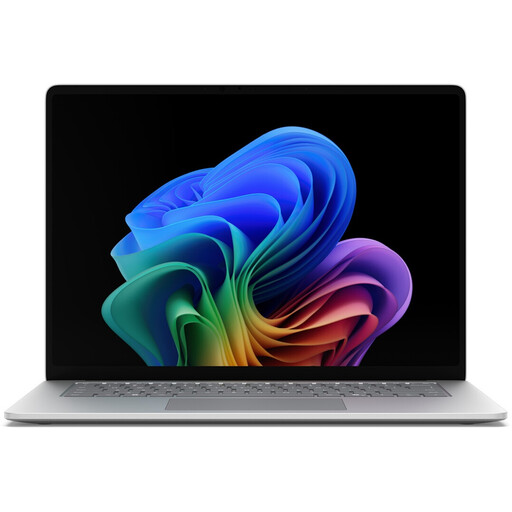
Microsoft Surface for Business, 8th Edition
The 15-inch touchscreen may appeal to writers who prefer a larger display when working with text and an outline.
The product name lists an Intel Core Ultra 5 335, Windows 11 Pro, 16 GB RAM, a 512 GB SSD and a display with a resolution of 3270 × 2180 pixels at 120 Hz.
View at Joybuy
 No image available
Samsung Galaxy Book6 Enterprise Edition, 14-inch
The 14-inch configuration offers a more compact display size to compare if you also need to consider carrying your laptop around.
The product name lists an Intel Core Ultra 7 355, 32 GB LPDDR5X RAM, a 512 GB NVMe SSD and Windows 11 Pro.
View at Joybuy
Frequently asked questions
Do I need a particularly powerful laptop to organise sections?
For the workflow described, choosing the right writing software is the first priority. Microsoft Support explains how to use the Navigation pane in Word for Windows, while LibreOffice Writer documents how to rearrange sections in the Navigator. Then check whether the keyboard and specifications of the specific laptop suit your other tasks too.
How do I create an essay outline and back up my drafts?
Use heading styles rather than simply enlarging the text, so your software’s outlining features can recognise the headings. Regularly check where your files are saved and set up a separate backup method. The document recovery feature described by Microsoft Support may help after an unexpected closure, but it doesn’t guarantee that every change will be restored.
What extra costs should I budget for before buying a laptop?
For the specific configuration, check whether a charger is included and which writing software you plan to use. Dell lists the DB14250 configuration considered here as not including a charger. Compare any accessories and software you need with your workflow, rather than looking only at the laptop’s configuration.
Can I cancel an online laptop purchase in Germany, and how long are statutory rights for faulty goods valid?
For a qualifying distance purchase from a trader, you generally have a 14-day right to cancel from the date of delivery; exceptions may apply, and you should check who the seller is. The European Union’s Your Europe website states that, as a general rule, sellers are liable for faulty goods for two years from receipt. These rights are separate from any additional voluntary manufacturer’s warranty.


