For newsletter work at a shared desk, check the keyboard, display and connections to your monitor or dock first; the processor usually comes further down the list. Depending on the configuration, a Windows business laptop may offer the ports you need, while the MacBook Air could suit quiet, mobile working but will need the right connection solution for devices with HDMI or USB-A. If you handle personal data for newsletters, your organisation’s permissions and locking the device should also factor into your choice and how you use it.
Who is a laptop for newsletter work suited to?
Newsletter teams doing lots of writing
If you write, edit and proofread longer issues, pay particular attention to the keyboard, touchpad and display usability. Notebookcheck identifies input devices and a display with as little glare as possible as important criteria for office laptops.
Teams working at different desks
If you regularly connect existing monitors or input devices, check the ports on the exact laptop configuration you’re considering. At a shared desk, you should also lock the device whenever you step away; this is recommended by the German Federal Office for Information Security.
Layout and image teams
If you review newsletter images and layouts directly on your laptop, compare the screen size, aspect ratio and display type of the specific configuration. Huawei lists a 14,2-inch OLED display with a 3:2 aspect ratio for the MateBook 14 Core Ultra.
What should you look for when buying?
The right choice depends on which challenge you need to solve first in your work. Compare the specific model configuration rather than relying on the product range name alone.
| Buying priority |
What to look for |
Who will find this most important? |
| Typing comfort and clear overview |
Try the keyboard and touchpad; check the screen size, aspect ratio and anti-glare finish of the specific configuration. |
If I write longer issues and check edits directly on the device, I need a comfortable keyboard and an easy-to-read preview. Around 28 % of consumers put typing comfort first. |
| Connecting at your desk |
Check that your dock, monitor input and power supply are compatible with the ports on the exact laptop configuration. |
If you often connect your laptop to existing displays and devices, you’ll want to avoid switching cables and buying extra connection solutions. Around 22 % of consumers who need to connect at their desk prioritise this. |
| Privacy at a shared desk |
Check which devices and software are approved with your IT team; set up a screen lock and use it whenever you step away. |
If I work with work accounts or personal email addresses, other people at a shared desk shouldn’t be able to access my open session. Around 22 % of consumers put privacy at a shared desk first. |
| Upfront and ongoing costs |
Compare only configurations with similar specifications; check which accessories you need and what any additional service plans cover. |
If you have a fixed budget, you’ll want to consider the accessories you need alongside the specifications that are actually necessary. Around 17 % of consumers give total cost the highest priority. |
| Portability and noise |
Check the weight of the specific model, including accessories, and look for noise-level information for that device. |
If I often move between desks or work in a shared space, I need a device that’s easy to carry and makes an appropriate amount of noise. Portability and quiet operation are the top priority for around 11 % of consumers. |
Pitfalls when buying for a shared desk
-
A USB-C connector won’t necessarily work with your dock
The monitor signal, power supply and connected devices all need to work with both your laptop and dock. You may also need a compatible dock or adapter.
Make a note of the ports at your desk and compare them with the full specifications of the laptop configuration on offer.
If the available ports aren’t compatible, you may need a suitable dock or adapter.
-
A product range doesn’t mean every model has the same specifications
Displays, memory and ports can vary between configurations in the same range. One example from a product family won’t necessarily tell you about every version on offer.
Compare the full model number, as well as the display, memory and ports listed on the product page for the specific configuration.
-
A security feature doesn’t replace data protection procedures
A sensor or other sign-in feature doesn’t prove that your newsletter software or the way you handle recipient addresses complies with your organisation’s requirements.
Check software approvals and your organisation’s requirements with your IT team, and lock the device whenever you leave your desk.
Key brands at a glance
Lenovo
The ThinkPad E range is a Windows option for writing tasks and connecting devices at your desk.
- Lenovo lists USB-A, USB-C and HDMI for a ThinkPad E14 Gen 7 configuration sold in Germany.
- The specific configuration described, 21SX000RGE, has a matt 14-inch WUXGA display, 16 GB RAM and a 512-GB SSD. Other configurations may differ, and Lenovo’s specifications aren’t a substitute for independent real-world testing.
Apple
The 13-inch MacBook Air M5 is a macOS option, provided it’s compatible with your editorial software and desk equipment.
- Apple lists two Thunderbolt 4 ports for the range; Notebookcheck describes the tested 13-inch base model as fanless.
- The choice of ports is limited. Apple’s battery life claim of up to 18 hours isn’t a guarantee of performance in your day-to-day editorial work.
ASUS
The ExpertBook PM3 is a Windows option for professional use; if you work at different desks, the display finish is one factor to consider.
- ASUS describes the PM3 as having an anti-glare 14-inch display.
- Check the specifications of the particular model using its full model number. Manufacturer information doesn’t confirm that the security of your specific working environment has been independently verified.
Huawei
The MateBook 14 Core Ultra is a Windows option for teams that review images and layouts directly on their laptop.
- Huawei lists a 14,2-inch OLED display with a 3:2 aspect ratio and a weight of 1,31 kg.
- The model is listed with one USB-C port for data, charging and DisplayPort. Check that it suits your planned dock and charging setup; manufacturer specifications aren’t an independent display test.
HP
The EliteBook 840 G11 is a Windows business option for teams that need conferencing and management features.
- The researched German configuration, A26QBEA#ABD, is listed with Windows 11 Pro, 32 GB RAM and a 1 TB SSD.
- This configuration doesn’t represent the specifications of the entire EliteBook range. Check the model number and product details for the configuration you choose.
Laptops for newsletter work
This selection includes Windows business laptops for writing and connecting to devices at a shared desk, as well as a MacBook Air for frequently moving between workspaces. For each model, check that your editorial software is approved and that it’s compatible with your monitor and dock.
 No image available
Lenovo ThinkBook 16 G9 AHP 21UT, Ryzen 5 220, 32 GB RAM, 1 TB SSD
An option if you’re looking for a Windows business laptop for extended writing sessions at different workspaces.
AMD Ryzen 5 220, Windows 11 Pro, Radeon 740M, 32 GB RAM and 1 TB NVMe SSD; 40,6 cm (16 inches).
View at Joybuy
 No image available
Lenovo ThinkPad E16 Gen 3 21ST, Ryzen 7 250, 32 GB RAM, 1 TB SSD
Another Windows business option for newsletter work, provided the specific configuration suits your software and workspace.
AMD Ryzen 7 250, Windows 11 Pro, Radeon 780M, 32 GB RAM and 1 TB NVMe SSD; 40,6 cm (16 inches).
View at Joybuy
 No image available
HP ProBook 4 G1a 16-inch, Ryzen 5 230, 16 GB RAM, 512 GB SSD
A Windows business option if you want to edit longer texts and layouts on your laptop.
AMD Ryzen 5 230, 16 GB DDR5 RAM, 512-GB SSD, WUXGA IPS display and Windows 11 Pro.
View at Joybuy
 No image available
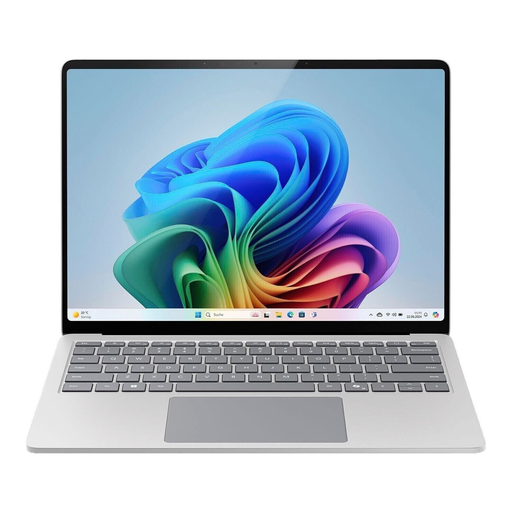
Microsoft Surface Laptop 7 Business 15-Inch EP2-21334
A Windows option for consumers who want a clear overview of newsletter layouts and longer passages of text on their device.
15-inch display with a 3:2 aspect ratio; Windows 11 Pro.
View at Joybuy
 No image available
Apple 13-Inch MacBook Air (M5, 2026), 16 GB, 512 GB SSD, Sky Blue
A macOS option if you often move between workspaces, provided it’s compatible with your editorial software and desk equipment.
10-core CPU, 8-core GPU, 16 GB RAM, 512-GB SSD and German QWERTZ keyboard; 13,6-inch display, 1,23 kg.
You’ll need a suitable dock or adapter for HDMI or USB-A devices. A power adapter isn’t included.
View at Joybuy
Frequently asked questions
How do I set up my laptop at a shared desk?
First, check that your monitor connection, dock and power supply are compatible with the ports on the specific laptop configuration. The German Federal Office for Information Security recommends using only software approved by your IT team and locking your device, even if you’re only stepping away briefly.
How do I protect a laptop that moves between workspaces?
Lock the device whenever you leave your desk, and don’t keep passwords somewhere visible on your screen. The German Federal Office for Information Security also advises against plugging in USB sticks from unknown sources.
Does a manufacturer’s service plan replace your statutory rights?
No. When a consumer buys from a retailer in the EU, the statutory guarantee against the seller lasts for at least two years from the date the goods are received. An additional manufacturer service plan or commercial guarantee doesn’t replace this entitlement.
Do you have a right to cancel an online purchase?
For consumer distance contracts, EU rules generally provide a 14-day cancellation period from the date the goods are delivered. Exceptions and the specific type of contract should be taken into account; a purchase made by an organisation isn’t necessarily a consumer purchase.
Do data protection rules apply when editing a newsletter mailing list?
Yes, if you process personal email addresses. The German Federal Commissioner for Data Protection and Freedom of Information classifies an individual’s email address as personal data. Check with the relevant team which legal basis and internal approvals apply to your editorial work; buying a laptop doesn’t replace this check.


