Who this laptop guide is for

Writers who spend a lot of time at a fixed desk

If you write and edit longer passages, you can set up the shared desk temporarily with an external monitor or keyboard. The DGUV describes positioning the screen separately from the keyboard as one way to create an ergonomic workstation.

Writers who move between workspaces

If you often need to clear the desk and continue writing elsewhere, consider weight and battery power when choosing a laptop. The Federal Institute for Occupational Safety and Health highlights the total weight of work equipment as a relevant factor when you frequently change locations.

Writers with confidential drafts

At a desk shared with others, you need a simple routine for locking your device and saving your work. Microsoft explains how to lock a device and notes that AutoSave in Microsoft 365 depends on where the file is stored.

What to look for when buying

What matters when buying What to check Who it matters most to
Typing comfort Try the keyboard layout and keys for yourself if possible; check the display size and finish, and the touchpad, on the exact model. If I type long chapters directly on my laptop, I want the keyboard and display to feel right for me. Around 40% of customers pay particular attention to comfort when writing and editing.
Moving between locations and battery power Check the dimensions and weight of the exact model, and compare its battery life with how long you need to write away from a power socket. If I regularly need to clear the desk or continue writing elsewhere, portability and being able to work without a power socket are essential. Around 30% of customers prioritise moving between locations and battery power.
Security and saving Set up and test the screen lock, file location and backup routine; check how automatic saving works with the application and file you use. If I leave a shared workspace, I want to protect my draft from prying eyes and be able to find it again later. Around 20% of customers place particular importance on protecting and saving their draft.
Features and additional costs Check the operating system and writing software, monitor and charging ports, and what’s included with the exact model. If I want to use my existing peripherals or avoid buying accessories, I check the ports and what’s included before I buy. Around 10% of customers pay particular attention to suitable features and potential additional costs.

Common buying and usage mistakes

  • Assuming the spec sheet tells you how a keyboard feels to type on

    A listed keyboard layout or backlight doesn’t tell you whether the keys will feel comfortable to use during longer writing sessions.

    If possible, try the exact keyboard and check the layout of the model on offer.

  • Assuming a USB-C port guarantees full compatibility

    The port type, charging capability and what’s included need to suit your monitor, accessories and charging needs. Dell’s documented configuration of the 14 Plus does not include a power adapter.

    Check the ports and included items on the full model configuration against the peripherals you already own.

    Depending on the ports available, you may need a compatible adapter, dock or charger.

  • Assuming files will save automatically without checking

    Microsoft AutoSave in Microsoft 365 doesn’t work with every local file or word-processing application. For Word for Microsoft 365, for example, the file needs to be stored on OneDrive or SharePoint.

    Before you start your first chapter, check where the file is saved and how to save and restore changes.

Laptop brands at a glance

Lenovo

The ThinkPad E14 Gen 7, part number 21SX000RGE, is a specific 14-inch Windows model for writing at a fixed desk.

  • Lenovo lists a matt 1920 × 1200 IPS display, a backlit German keyboard, 16 GB RAM and a 512 GB SSD for this model.
  • These details confirm the specification, but not how the keyboard will feel to you or how much noise it will make at a shared desk.

Apple

The 13-inch MacBook Air with M5 is worth considering if your writing software runs on macOS and you prefer a compact setup.

  • Apple lists two Thunderbolt 4 ports for the 13-inch model and up to 18 hours of battery life under its specified test conditions.
  • Check whether you can connect your existing USB-A devices and whether the quoted battery life suits your writing routine.

Dell

The Dell 14 Plus, model DB14250, is a specific 14-inch Windows configuration with a high-resolution display.

  • For the configuration in question, Dell lists 16 GB RAM, a 512 GB SSD and a 2560 × 1600 display.
  • Dell states that this configuration does not include a power adapter; other models may differ.

HP

The OmniBook 5 Flip 14-fp0750ng is worth considering if you’ll actually use a convertible touchscreen as well as typing.

  • For the BK2Y9EA#ABD model, HP lists a 360° hinge, a 14-inch touchscreen, 16 GB RAM and an included power adapter.
  • That doesn’t demonstrate any extra benefit for typing alone. These details apply to this specific configuration.

Laptops at Joybuy

This Joybuy selection includes compact laptops and models with larger displays, for writing at a shared desk or using connected peripherals.

Apple 13-inch MacBook Air with M5, 16 GB, 512 GB SSD, Silver and German QWERTZ layout

Apple 13-inch MacBook Air (M5, 2026), 16 GB, 512 GB SSD, Silver, German QWERTZ layout

A compact option if you write directly on the laptop keyboard and want to connect external displays when needed.

13.6-inch display; 10-core CPU and 8-core GPU; two Thunderbolt 4 ports; German QWERTZ layout with backlit keyboard. The product description states that the power adapter is not included.

Joybuy

Apple 14-inch MacBook Pro with M5 Pro, 24 GB, 2 TB SSD, Space Black and German QWERTZ layout

Apple 14-inch MacBook Pro (M5 Pro, 2026), 24 GB, 2 TB SSD, Space Black, German QWERTZ layout

A 14-inch option if you want to write and edit on the laptop and need a German QWERTZ layout.

18-core CPU and 20-core GPU; 24 GB memory and 2 TB SSD. The product description states that the power adapter is not included.

Joybuy

Apple 13-inch MacBook Neo with A18 Pro, 8 GB, 256 GB SSD, Silver and German QWERTZ layout

Apple 13-inch MacBook Neo (A18 Pro), 8 GB, 256 GB SSD, without Touch ID, Silver, German QWERTZ layout

A compact model for writers who prefer a smaller device with a German QWERTZ layout.

6-core CPU and 5-core GPU; 13-inch display and 1.23 kg, according to the product description. The power adapter is not included; the description states that charging requires a USB-C power source of at least 20 W.

Joybuy

Acer TravelMate TMP216-41-TCO with 16-inch WUXGA display, 16 GB RAM and 512 GB SSD

Acer TravelMate TMP216-41-TCO, 16-inch, Ryzen 3 PRO 7335U, 16 GB, 512 GB SSD

The larger display and listed ports may suit a permanent writing setup with external peripherals; first check that you have enough room at the shared desk.

16-inch WUXGA IPS display; Windows 11 Pro Education; USB4, USB-A, HDMI 2.1 and RJ-45 listed as ports.

Joybuy
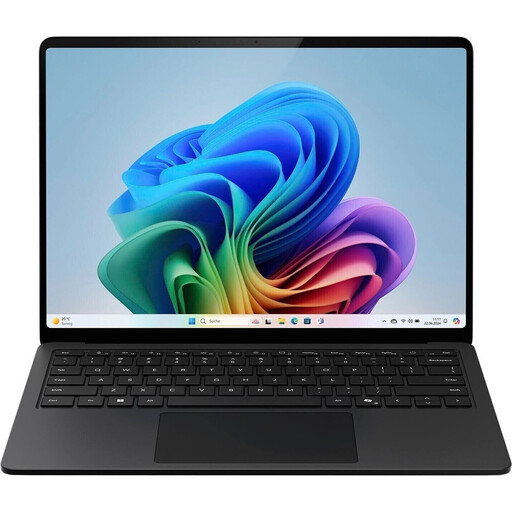
Microsoft Surface Laptop for Business, 7th Edition, 15-inch, 16 GB RAM and 512 GB SSD

Microsoft Surface Laptop for Business, 7th Edition, 15-inch, 16 GB, 512 GB SSD

A larger Windows model for writers who want to use a touchscreen and connect an external display; bear in mind the space needed for a 15-inch screen.

Intel Core Ultra 7 266V at 2.2 GHz; Windows 11 Pro; Thunderbolt 4 listed as a video output.

Joybuy

Frequently asked questions

Is a laptop on its own enough for longer writing sessions at a shared desk?

The built-in keyboard may be enough for occasional writing. If you regularly work for long periods at the same desk and have enough space, you could consider positioning a separate screen and keyboard; the DGUV describes the ergonomic benefits of this setup. Workplace health and safety rules do not automatically mean you have to buy anything for personal use.

How can I protect a draft when I leave the desk?

Lock your session, and check separately where your file is saved. Microsoft lists the Windows key and L as the shortcut for locking Windows; AutoSave in Word for Microsoft 365 requires, among other things, a file on OneDrive or SharePoint and an active subscription.

Does a laptop always come with a power adapter?

No, what’s included can vary between configurations. Dell explicitly states that its documented 14 Plus model does not include a power adapter, while HP lists one for the OmniBook model reviewed. Check what’s included and the charging requirements for the exact model before buying.

What warranty rights apply when buying a laptop in the EU?

When you buy as a consumer from a trader in the EU, you’re generally entitled to a legal guarantee of at least two years from the date you receive the goods, as explained by Your Europe, the European Union’s consumer portal. This guarantee applies to the seller and is separate from a voluntary manufacturer’s warranty; the same EU rules don’t apply in the same way to private sales.

Do laptops sold in the EU have to charge via USB-C?

The European Commission gives 28 April 2026 as the date when common charging requirements also begin to apply to laptops. Whether a particular model is covered depends on the applicable requirements and the specific product configuration. A USB-C data port alone doesn’t prove that you can charge the laptop through it.