If you mainly browse and organise photos, start by comparing the actual dimensions of the laptop, its ports and how much screen space you need. A large creative laptop won’t necessarily be a better fit for a small desk. For editing, you’ll also need to check the exact display variant, your software’s requirements and the available storage space. For irreplaceable originals, the Federal Office for Information Security recommends making regular, separate backups and checking that you can restore and read the files.
Who is a laptop for a photo gallery on a small desk suitable for?
Photo collectors with limited desk space
If you browse, select and bring photos together in a gallery, your laptop and input devices need to fit the space you have. Compare the dimensions of the specific configuration; Lenovo lists the dimensions and ports for its Yoga Slim 7 14ILL10 series.
Photo editors working in a compact space
If you also edit photos, check the specific display and your software’s requirements. Adobe recommends 16 GB RAM or more for the documented desktop version of Photoshop.
Photographers archiving lots of originals
If you import and keep a lot of photos, both local storage and a separate backup matter. The Federal Office for Information Security recommends checking backups regularly and making sure the stored data can still be read.
Which buying priorities should you focus on?
Compact traditional laptop
A good fit if: You mainly browse and organise photos at a small desk, with occasional editing. Compare the depth of the laptop, the display variant and the ports on the specific configuration.
The trade-off: A compact screen gives you less room to view images and tools side by side. Lenovo notes that the RAM in the Yoga Slim 7 14ILL10 series is soldered and cannot be upgraded.
Compact convertible
A good fit if: You’d like to show photos on the same device in stand or tablet mode, and have enough room to position it. HP describes these modes for the OmniBook X Flip 14.
The trade-off: The touchscreen and hinge need to suit the way you work. Specifications and display details apply only to the specific configuration.
Larger laptop for intensive photo editing
A good fit if: A larger built-in workspace matters more to your editing workflow than keeping as much desk space free as possible. Notebookcheck’s list of laptops for photo and video editing also includes 16-inch models.
The trade-off: Measure the space available and check whether your software and files justify a larger device.
| Priority |
What to look for when buying |
Who does it matter most to? |
| Desk space and screen space |
Compare the width and depth of the exact configuration, as well as the space it takes up when open. |
When I’m selecting photos at a small desk, I need room for my laptop and input devices without losing sight of the image space I want. Around 31% of consumers prioritise desk space. |
| Photo display |
Check the display technology and colour gamut coverage of the exact variant; consult independent measurements if accurate colour assessment is essential. |
When I’m editing colours, I want to know which display variant I’m actually buying, rather than relying on a label such as OLED alone. Around 25% of consumers place the highest priority on the display. |
| Editing workflow |
Check the software and version, RAM configuration and available SSD storage against the relevant requirements. |
When I’m editing large files, I need to know that my specific programme will run on the configuration I choose. Around 25% of consumers put editing performance first. |
| Importing, storage and backups |
Plan for the storage needs of your collection, a compatible card reader or adapter, and a separate backup device. |
When I’m importing and keeping lots of originals long term, I want a separate backup in addition to local storage. Around 19% of consumers give archiving the highest priority. |
Common buying mistakes when choosing a laptop for a photo gallery
-
Assuming a high ranking means it will fit on a small desk
Notebookcheck’s ranking for photo and video editing assesses factors including the display and application performance, not the dimensions of your workspace.
Measure the space available and compare it with the dimensions of the specific configuration before taking a ranking into account when making your decision.
-
Assuming “OLED” guarantees accurate colours
Manufacturers list different display variants within a series. A panel description is not a measurement of the colour accuracy of the individual device on offer.
Check the exact display variant and consult independent measurements if accurate colour assessment is essential.
-
Confusing the internal SSD with a photo backup
If the only copy of your photos is on your laptop, you could lose them if the device is lost too.
Make regular, separate backups and check that you can open the backed-up files.
-
Confusing what’s included and the warranty with your statutory rights
HP’s specifications for the OmniBook X Flip 14-kb0774ngx state that the power adapter is sold separately. The Verbraucherzentrale distinguishes statutory rights against the seller from a voluntary guarantee.
Check what’s included with the specific model. If there’s a fault, consider your statutory rights separately from the terms of any voluntary guarantee.
Brands to consider
Lenovo
The Yoga Slim 7 14ILL10 series is one example of a compact traditional laptop.
- Lenovo lists HDMI and a microSD card reader for the series.
- According to Lenovo, the RAM is soldered. Check the capacity and display for the specific configuration.
ASUS
The Zenbook 14 OLED UX3405 is a compact series where the display and available workspace should be considered together.
- ASUS lists several processor and display configurations for the series.
- The highlighted 3K OLED version is not included with every UX3405 model; check the exact variant.
Apple
The 13-inch MacBook Air with M5 is a compact macOS option; the MacBook Pro is a separate product line to consider on its own merits.
- For the documented 13-inch Air, Apple lists a 13.6-inch IPS display with P3 colour and configurable RAM.
- These manufacturer specifications do not confirm the colour accuracy of an individual device or mean that a MacBook Pro will take up the same amount of space.
HP
The OmniBook X Flip 14 is a convertible alternative if you want to show photos in different positions too.
- HP lists 24 GB RAM, a 1 TB SSD and a 14-inch OLED touchscreen for the 14-kb0774ngx model.
- According to HP, the power adapter is sold separately with this model; other X Flip configurations may differ.
Joybuy products for a compact photo workflow
This selection features compact 14-inch laptops for browsing, importing and editing photos. A convertible is also included if you’d like to show images on the same device in different positions.
 No image available
Lenovo Yoga Slim 7i Aura Edition, 14-inch, Core Ultra 7 355
This compact laptop could suit you if you want to browse and edit photos with limited desk space.
2.8K OLED display, 16 GB RAM, 1 TB SSD, HDMI and SDXC card reader. According to the product description, a power adapter is not included and must be purchased separately.
View at Joybuy
 No image available
HP OmniBook Ultra Flip 14-fh0670ng
This convertible suits a workflow where you browse photos in a small workspace and show them in different positions too.
14-inch, Intel Core Ultra 7 258V, 32 GB RAM, 1 TB SSD and 2.8K OLED touchscreen. The description lists a resolution of 2880 × 1800 pixels, 100% DCI-P3, two Thunderbolt 4 ports, dimensions of 313.7 × 216.2 mm and a weight of 1.34 kg.
View at Joybuy
 No image available
Apple MacBook Pro 14-inch (M5 Pro, 2026), 24 GB RAM, 1 TB SSD
This 14-inch model could suit you if you want to manage photos locally and edit them with limited desk space.
15-core CPU, 16-core GPU, SDXC card slot and HDMI. According to the product description, a power adapter is not included and must be purchased separately.
View at Joybuy
No image available
Apple MacBook Pro 14-inch (M5 Pro, 2026), 24 GB RAM, 2 TB SSD
This configuration could suit you if you want more local storage for your photo collection and are looking for a 14-inch laptop.
18-core CPU, 20-core GPU, SDXC card slot and HDMI. According to the product description, a power adapter is not included and must be purchased separately.
View at Joybuy
 No image available
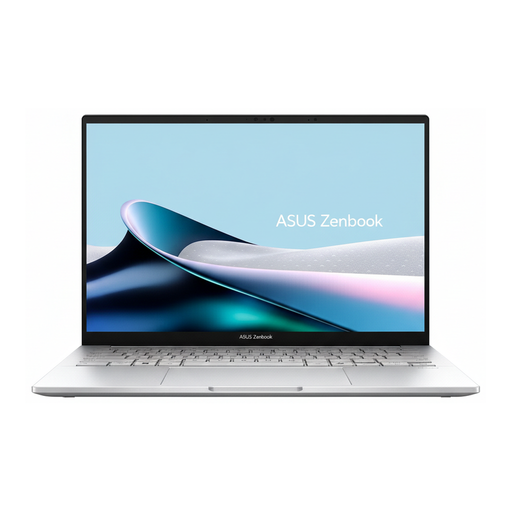
ASUS Zenbook 14 UX3405CA-PP416X
This 14-inch laptop could suit a photo gallery in a limited space; before buying, check that its specific configuration meets your editing needs.
The product title identifies it as a Zenbook 14.
View at Joybuy
Frequently asked questions
Do I need a large or particularly powerful laptop for a photo gallery?
No. If you mainly browse and organise photos, start by checking desk space, display quality and import options. Specific photo-editing programmes have their own requirements; for the documented desktop version of Photoshop, Adobe lists 8 GB RAM as the minimum and recommends 16 GB or more.
How should I set up my photo collection in a small workspace?
Check whether your memory card is compatible with the built-in reader or whether you’ll need an adapter. Plan a backup for your original photos that’s separate from your laptop, and check regularly that you can read the backed-up files. The Federal Office for Information Security recommends doing this too.
What should I check about accessories and faults?
Check what’s included with the specific model before planning for accessories: according to HP, the power adapter for the OmniBook X Flip 14-kb0774ngx is sold separately. If there’s a fault, distinguish your statutory rights against the seller from a voluntary guarantee, as explained by the Verbraucherzentrale.
Can I return a laptop bought online in Germany?
For online purchases, consumers generally have a 14-day right to cancel after receiving the goods. The Verbraucherzentrale notes that you must notify the other party to the contract that you wish to cancel; check the terms of your specific purchase.


