Which setup is right for you?

Colour and print matching

If you’re preparing photos for a particular print output, look for a suitable display and a consistent colour management workflow rather than relying on an OLED or P3 label alone. Adobe recommends a calibrated screen with a suitable monitor profile for colour-managed printing, as well as a profile for the printer and paper.

Working with limited desk space

With a small desk, the laptop’s dimensions and usable screen space need to work together: it should leave room on your desk while still making images and tools comfortable to view. Screen size alone doesn’t tell you how much extra space a mouse, external drives or printer will take up.

RAW files and ports

If you edit large photo libraries or often switch between your camera, storage and printing setup, compare the RAM in the specific configuration and check that it has the ports you need. Adobe recommends at least 16 GB of RAM for Photoshop 27.x; also check the requirements of your other software and how much storage you actually need.

What should you look for when buying?

What matters What to check before buying Who is it important to?
Screen and print preview Check the display option and colour gamut for the specific configuration; allow for a monitor profile, print profile and calibration. EIZO notes that calibration cannot compensate for a monitor with a limited colour gamut. If I want to assess colours for a particular print output, the whole colour management workflow matters to me. Around 33% of consumers put the screen and print preview first.
Desk space and screen size Compare the laptop’s dimensions with the available space, and allow room for a mouse, external drives or other devices. With a small desk, I want to keep enough room for my work essentials while still editing photos on the built-in display. Around 27% of consumers prioritise a suitable footprint.
Performance and storage Match the RAM, SSD capacity and requirements of the software you use to your file sizes and working style. When I work with large image files or extensive libraries, I want to allow for enough RAM and free SSD space. Around 20% of consumers put photo workflow specifications first.
Ports for photo and printing equipment Check your existing cables and devices against the ports on the exact laptop model; only consider a card reader if it supports your card format. For my camera, storage and printing setup, I want to know which devices I can connect directly and where I’ll need adapters. Around 20% of consumers prioritise having the right ports for their devices.

Common buying and setup mistakes

  • Assuming a colour gamut claim guarantees an accurate print preview

    A specification such as P3 or DCI-P3 doesn’t, on its own, tell you how accurately a particular display is set up or how colours will appear in the intended print output.

    Check the display option and, for colour-critical work, allow for calibration and suitable profiles for both the monitor and print output. Also follow your print provider’s requirements.

    Key brands at a glance

    Apple

    The MacBook Air with M5 is available with a 13.6-inch display and could suit a compact macOS workstation.

    • Apple lists an IPS display with P3, 16 GB of base memory, a 512 GB base SSD and two Thunderbolt 4 ports for this model.
    • A colour gamut claim alone doesn’t guarantee a calibrated print preview. Also check which adapters and storage options you’ll need.

    Lenovo

    The Yoga Pro 7 Gen 10 is available in a 14.5-inch Windows configuration, giving you more screen space than a compact 13-inch model.

    • For model number 83LX001UGE, Lenovo lists 32 GB of soldered RAM, a 1 TB SSD and an OLED display with a claimed 100% DCI-P3 coverage.
    • The specifications list a glossy display. Check the ports on the specific model, and bear in mind that a colour gamut claim is no substitute for calibration.

    ASUS

    The ASUS ProArt PX13 range is designed for creative work in a compact convertible format.

    • ASUS advertises a 13-inch 3K OLED touchscreen and switchable colour spaces for the range.
    • These are the manufacturer’s claims for the product range, not an independent measurement of every German configuration. Check the full model number and specifications before you buy.

    HP

    The OmniBook 5 range also includes 14-inch models for a space-conscious Windows workstation.

    • HP lists OLED options for selected 14-inch models, and HDMI and USB-C across the range.
    • That doesn’t mean every configuration has the same display or features. The exact model number matters.

Joybuy products for compact photo setups

This selection includes compact laptops for photo work at a small desk, with displays ranging from 13.6 to 14 inches. Display specifications such as OLED or a colour gamut claim are no substitute for suitable calibration and print profiles.

Lenovo Yoga Slim 7i Aura Edition, 14-inch, 2.8K OLED, Core Ultra 7 355, 16 GB RAM and 1 TB SSD

Lenovo Yoga Slim 7i Aura Edition, 14-inch, 2.8K OLED, Core Ultra 7 355, 16 GB/1 TB

A good option if you’re looking for a compact Windows laptop with an OLED display and local photo storage.

14-inch OLED display with 2.8K resolution and 120 Hz; 16 GB RAM, 1 TB SSD and Core Ultra 7 355. Listed ports include Thunderbolt 4, USB-A and HDMI.

View at Joybuy

HP OmniBook Ultra Flip 14-fh0670ng, 14-inch, 2.8K OLED, Core Ultra 7 258V, 32 GB RAM and 1 TB SSD

HP OmniBook Ultra Flip 14-fh0670ng, Core Ultra 7 258V, 32 GB/1 TB

Worth considering if you’re looking for a 14-inch convertible with an OLED touchscreen and more RAM for larger image files.

14-inch 2.8K OLED touchscreen, 32 GB RAM, 1 TB SSD and Core Ultra 7 258V. The product description cites DCI-P3 colour gamut coverage as a manufacturer claim; this doesn’t replace checking your colour management setup for print output.

View at Joybuy

Apple MacBook Air 13-inch with M5, 16 GB RAM, 512 GB SSD, Sky Blue and German QWERTZ layout

Apple MacBook Air 13-inch (M5, 2026), 16 GB/512 GB, Sky Blue, German QWERTZ layout

A good fit for a small workspace if you prefer a smaller MacBook for editing photos directly on your laptop.

13.6-inch display, 16 GB RAM, 512 GB SSD and two Thunderbolt 4 ports. The product description says that a power adapter is not included; check whether you need one.

View at Joybuy

ASUS Zenbook 14 UX3405CA-QD1303W, WUXGA OLED, Core U7 255H, 16 GB RAM and 1 TB SSD

ASUS Zenbook 14 UX3405CA-QD1303W, WUXGA OLED, Core U7 255H, 16 GB/1 TB

A good option if you’re looking for a compact Windows laptop with an OLED touchscreen and a card reader for your photo workflow.

14-inch WUXGA OLED touchscreen, 16 GB RAM and 1 TB SSD. Listed features also include Thunderbolt 4, USB-A, HDMI and a built-in SD card reader.

View at Joybuy
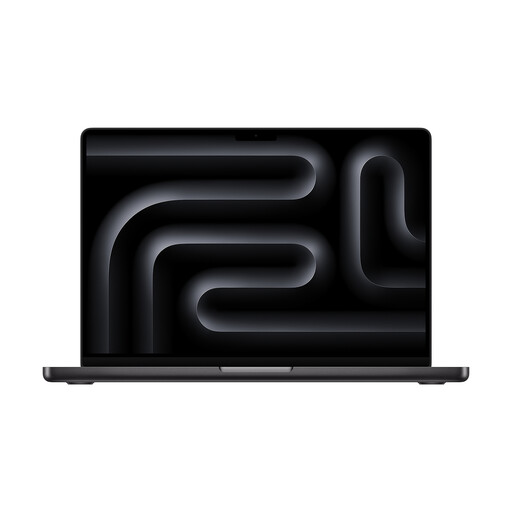
Apple MacBook Pro 14-inch with M5, 24 GB RAM, 1 TB SSD and Space Black

Apple MacBook Pro 14-inch (M5), 24 GB/1 TB, Space Black

Worth considering if you’re looking for a compact MacBook with more RAM and an SDXC card slot for transferring photos.

14-inch Liquid Retina XDR display, 24 GB RAM and 1 TB SSD. The description lists Thunderbolt ports, HDMI and an SDXC card slot. It also says that a power adapter is not included; check whether you need one.

View at Joybuy

Frequently asked questions

Is a claimed wide colour gamut enough for accurate photo prints?

No, not on its own. For a preview tailored to a particular output, Adobe recommends a calibrated screen with an accurate monitor profile. For printing with Photoshop managing the colours, it also recommends an ICC profile for the printer and paper. EIZO notes that calibration cannot compensate for a monitor with a limited colour gamut.

What should I bear in mind when setting up print colour management?

First decide whether Photoshop or the printer driver will handle colour conversion. For printing with Photoshop managing the profile, Adobe recommends using a suitable profile for the printer and paper, and turning off any competing colour management options in the printer driver. If you use a print service, follow its requirements.

How can I keep screen assessments reliable after buying?

For colour-critical work, plan for suitable calibration and regular checks. EIZO explains that settings and conditions in your workspace can affect how you judge colour; calibration can’t fix the panel’s fundamental limitations.

What are my return and faulty goods rights when shopping online in Germany?

For distance purchases from a business seller, you generally have a 14-day right to cancel, starting from delivery; exceptions and the rules on return costs apply. For faulty goods, you generally have a statutory guarantee against the seller for at least two years. A voluntary manufacturer’s guarantee is separate. If you buy through a marketplace, check who the seller is.