What should you look for when choosing a laptop?
First, make sure the operating system and browser suit your web design workflow. Then decide whether the built-in display is suitable for both design and previews, or whether you’d prefer to work with an external monitor at your permanent desk.
| What matters |
What to look for |
Who is this important to? |
| Web design workflow |
Check the operating system, supported browser and WebGL support for the version of Figma you use. Figma describes the graphics requirements for browser use as modest, so a dedicated GPU isn’t automatically necessary. |
If I mainly design layouts in a browser, the setup needs to suit my web design workflow. Around 36% of consumers prioritise having the right software and preview environment. |
| Image editing |
Adobe specifies at least 8 GB of RAM for Photoshop 27.x and recommends 16 GB or more. Also check how much SSD storage is actually free after the operating system and files are accounted for; these requirements don’t automatically apply to homepage design. |
If I also edit portfolio images, I want enough headroom for the specific application I use. Around 29% of consumers put image editing first. |
| Workspace and display |
Compare the display size and resolution of the specific configuration, but don’t assume these alone indicate colour accuracy. If you’re using a separate monitor and input devices, check the ports you’ll need; the BAuA describes separate equipment as one way to arrange a workspace. |
If I work at a permanent desk for long periods, I want my design and preview views to be easy to read. Around 21% of consumers prioritise how their home office is set up. |
| Complete configuration |
Compare the full model number, RAM and what’s included in the box. Dell marks the listed XPS 13 DX13260 configurations as not including a power adapter. |
If I’m putting together a laptop for my entire workspace, I want to know exactly what’s included. Around 14% of consumers focus first on choosing the right overall configuration. |
Which brands are worth comparing?
The examples below relate to specific model ranges and configurations, rather than making a blanket judgement about entire brands.
Apple
The MacBook Air M5 is a macOS option for design work and browser testing.
- For the listed 13-inch model, Apple specifies 16 GB of unified memory and a 512 GB SSD.
- Check the display size, ports and specifications of the specific configuration.
Dell
The XPS 13 range is a compact Windows option for a workspace planned around an external monitor.
- Dell lists a 13.4-inch QHD+ touchscreen for the DX13260 model.
- The variants differ in RAM and graphics; the listed configurations are marked as not including a power adapter.
ASUS
The Zenbook S16 is an option to consider if you’d like a larger built-in area for your designs.
- For certain UM5606GA variants, ASUS lists a 16-inch OLED touchscreen with a resolution of 2880 × 1800 pixels.
- Check the model number and specifications of the specific version you’re buying.
Lenovo
The Yoga Pro 7 Gen 10 is a Windows laptop range with a mid-sized built-in display.
- For the 14-inch AMD range, Lenovo lists a 3K OLED display and a selection of ports.
- Claims about colour accuracy and performance come from the manufacturer; check the specifications of the specific configuration.
HP
The OmniBook range includes different display sizes and memory configurations to compare against your workspace and software needs.
- For example, the HP shop lists the OmniBook 7 16-ay0775ng with a 16-inch OLED touchscreen and 32 GB of RAM.
- Shop details and displayed availability apply to the specific configuration and the information shown at that time.
Joybuy products for portfolio design at home
This selection of laptops includes models with larger built-in displays, as well as configurations to consider for image editing and a permanent home office workspace.
 No image available
ASUS Zenbook S16 UM5606GA-SS335W
For designing and previewing on a larger built-in display; check the specifications are also suitable for image editing.
16-inch WQXGA OLED; Ryzen AI 9 465; 32 GB RAM; 1 TB SSD; Windows 11.
Product title states that no power adapter is included. Adobe recommends at least 16 GB of RAM for Photoshop 27.x.
View at Joybuy
 No image available
Lenovo ThinkBook 16 Gen 9
A 16-inch option for a permanent workspace; check that the display configuration suits how you plan to use it.
Intel Core Ultra 5 325; 32 GB DDR5; 512 GB PCIe SSD; Windows 11 Pro.
Adobe recommends at least 16 GB of RAM for Photoshop 27.x.
View at Joybuy
 No image available
Ninkear A15 Pro
An option if you’d like to view designs and previews on a larger built-in display.
16-inch FHD; 16 GB DDR4; 1 TB SSD; Windows 11.
Adobe recommends at least 16 GB of RAM for Photoshop 27.x.
View at Joybuy
 No image available
HONOR Magicbook X16 AMD 2025
A 16-inch option for working at a permanent desk or designing and previewing without an external monitor.
AMD R5 6600H; 16 GB RAM; 512 GB SSD; German keyboard layout.
Adobe recommends at least 16 GB of RAM for Photoshop 27.x.
View at Joybuy
 No image available
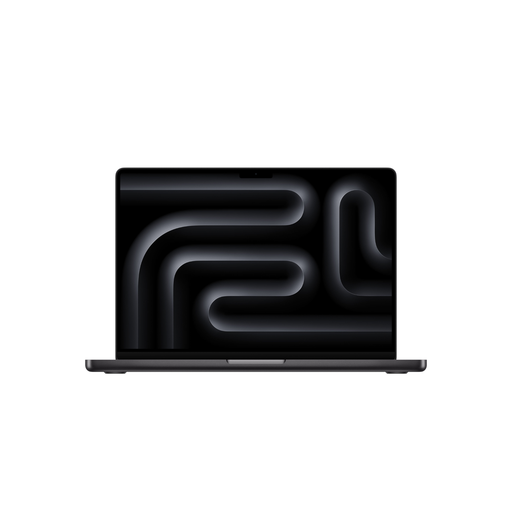
Apple 16-Inch MacBook Pro with M5 Pro
A macOS option with a large built-in display and a configuration worth considering for additional image editing.
M5 Pro; 18-core CPU and 20-core GPU; 24 GB unified memory; 1 TB SSD; German QWERTZ keyboard layout.
The product description states that the power adapter is sold separately. Adobe recommends at least 16 GB of RAM for Photoshop 27.x.
View at Joybuy
Frequently asked questions
Do I need a dedicated graphics card for Figma?
Not necessarily. Figma describes the graphics requirements for browser use as modest, and lists WebGL and a supported browser as relevant requirements. Check the requirements for the version you use and your complete workflow.
Is a responsive preview on my laptop enough to test websites on smartphones?
Not completely. Apple’s documentation describes preset viewport sizes as an approximation that doesn’t exactly reproduce how a real device looks and behaves. Also check important views and features on suitable target devices.
How should I set up my laptop for longer periods of working at home?
At a permanent desk, you can separate the screen and input devices by using an external keyboard, and raise your laptop. The BAuA describes this as an ergonomic way to arrange your workspace; check beforehand that your specific model has the ports you need.
What are my rights when buying online in Germany if I want to return an item or it’s faulty?
For a qualifying distance purchase from a trader, you generally have 14 days from delivery to cancel; exceptions and return costs may apply. According to Your Europe, your statutory rights if goods are faulty are separate from a manufacturer’s voluntary guarantee; new goods are generally covered for two years.
Does a new laptop sold in the EU have to support USB-C charging?
The European Commission gives 28 April 2026 as the start date for common charging requirements for laptops too. Even so, check the charging power supported by the specific configuration and whether a suitable power adapter is included; a USB-C port alone doesn’t tell you what comes in the box.


