For browser-based website design, first check that the operating system, browser and graphics environment work with your applications, and that the display is suitable for designing and previewing. If you also edit images in Photoshop, check the exact configuration against the requirements for your version. For a permanent desk setup, consider suitable ports and space for your input devices too. What matters is the specific configuration and what’s included, not just the model range name.
Which features suit different users?
Designers working in a browser
If you create layouts and responsive views mainly in a browser, check compatibility with your actual web design workflow. The Figma Help Centre describes Figma as an application that runs mainly in a browser and can be used on full desktop operating systems.
Students who edit images
If you also edit portfolio images in Photoshop, check the exact configuration against the requirements for your version of the software. Adobe recommends at least 16 GB of RAM for Photoshop 27.x.
Designers with a small desk
If you work in a student room, consider display size, ports and space for input devices together. The Federal Institute for Occupational Safety and Health explains how separate input devices can give you more flexibility when positioning a laptop.
What should you look for when buying?
| Criterion |
What to look for |
Who is it important for? |
| Browser and design workflow |
Check the operating system, browser version and WebGL support required by your applications. The Figma Help Centre lists these requirements explicitly. |
If I use a browser for designs and previews, compatibility matters more to me than a dedicated graphics card. Around 29% of consumers put a browser-based workflow first. |
| Screen and desk space |
Compare the display and dimensions of the laptop with your workspace, and check the ports if you plan to use an external monitor. |
At a small desk, I want to fit my design work, previews and input devices comfortably. Around 21% of consumers prioritise screen space and room to work. |
| Additional image editing |
Check the RAM, available storage, operating system and graphics against the version of Photoshop you use. Adobe recommends at least 16 GB of RAM for Photoshop 27.x. |
If I edit portfolio images locally, I want to choose a configuration suited to Photoshop, rather than just browser-based work. Around 21% of consumers put image editing first. |
| Configuration and what’s included |
Compare the exact model number, RAM, SSD and included accessories for the specific version. |
Before buying, I want to know whether the configuration I’ve chosen meets my needs and includes any accessories I require. Around 15% of consumers prioritise the cost of the configuration they actually need. |
| Taking it with you and working away from a socket |
Compare the weight, ports and battery test results for the same configuration. A manufacturer’s maximum battery life claim won’t necessarily reflect every type of use. |
If I regularly take my laptop to university, weight and how well it works away from my desk matter most. Around 14% of consumers put portability first. |
Buying decisions you can avoid
-
Assuming “web design” means you need a gaming GPU
The Figma Help Centre describes Figma’s graphics requirements as low for browser-based design. Other applications may have their own requirements.
First, decide which programmes you’ll actually use, then check the requirements for each one.
A more powerful configuration can stretch your budget without being necessary for a mainly browser-based workflow.
-
Comparing only the model range name
RAM and included accessories can vary within a model range. For the Dell XPS 13 J5NMC variant it tested, CHIP lists two USB-C ports; Dell also offers an 8 GB configuration.
Check the model number, RAM, display, ports and included accessories for the specific offer.
Depending on the configuration, you may need to buy additional charging or connection accessories.
-
Assuming battery life figures are measured in the same way
Manufacturer claims and independent test results may be based on different types of use and test conditions.
Only compare figures with a clearly stated test method, and consider how you’ll actually use the laptop.
Key brands to consider
Apple
The MacBook Air M5 is a macOS option for a compact or larger mobile workspace, provided its software and ports meet your needs.
- Apple lists a 13.6-inch IPS display, 16 GB of unified memory and two Thunderbolt 4 ports for the 13-inch model.
- The stated battery life depends on the types of use specified. Check the chip, storage and included accessories for the specific configuration.
ASUS
The Zenbook 14 OLED UX3405 is a Windows option if a 14-inch OLED display and ports for a permanent desk setup are important to you.
- The ASUS eShop Germany lists a UX3405MA configuration with 16 GB RAM, a 1 TB SSD, USB-A, Thunderbolt 4 and HDMI.
- These details apply to the configuration described; other UX3405 versions may differ.
Dell
The XPS 13 DX13260 is a compact Windows option if portability matters more to you than a wide range of built-in ports.
- CHIP praises the touchscreen on the J5NMC model it tested and lists 16 GB RAM.
- CHIP lists two USB-C ports and no charger included with this version. Dell’s configuration page also shows an 8 GB version; details for the tested device don’t automatically apply to every configuration.
HONOR
The MagicBook Pro 14 is a Windows option if you’re considering a laptop with a larger built-in display.
- HONOR lists a 14.6-inch OLED display and a 92 Wh battery for the MagicBook Pro 14.
- These are manufacturer specifications, not independent test results or guarantees of battery life. Check the exact configuration on offer.
Joybuy products for a student room workspace
This selection includes laptops for a permanent workspace in a student room, additional image editing, and those looking for a larger or more compact built-in display.
 No image available
Lenovo ThinkBook 16 G9 AHP 21UT
The 16-inch version is an option if you prefer a larger built-in workspace at your desk.
AMD Ryzen 5 220 at 3.2 GHz; Radeon 740M; 32 GB RAM; 1 TB NVMe SSD; Windows 11 Pro.
View at Joybuy
 No image available
HP ZBook 8 G1i 14 Ultra 9 285H
This 14-inch configuration is worth considering if you’re looking for a more compact device for image editing and a permanent desk setup.
64 GB RAM; 1 TB SSD.
Before buying, check the full configuration and the requirements of your image editing software.
View at Joybuy
 No image available
Lenovo ThinkBook 16 Gen 9 16″ Intel Core Ultra 5 325
The 16-inch format could suit you if you’d rather work on designs and previews on a larger built-in display.
32 GB DDR5 RAM; 512 GB PCIe SSD; Windows 11 Pro.
Check that the ports on your specific configuration will work with any external monitor you plan to use.
View at Joybuy
 No image available
HP OmniBook Ultra Flip 14-fh0670ng 14″ 2-in-1
This more compact 2-in-1 version is an option if you’re considering both screen size and the listed touchscreen feature.
14-inch OLED touchscreen with 2,880 × 1,800 pixels; Intel Core Ultra 7 258V; 32 GB RAM; 1 TB SSD; Windows 11 Home.
An adapter or Thunderbolt 4 is listed for connecting an external monitor.
View at Joybuy
 No image available
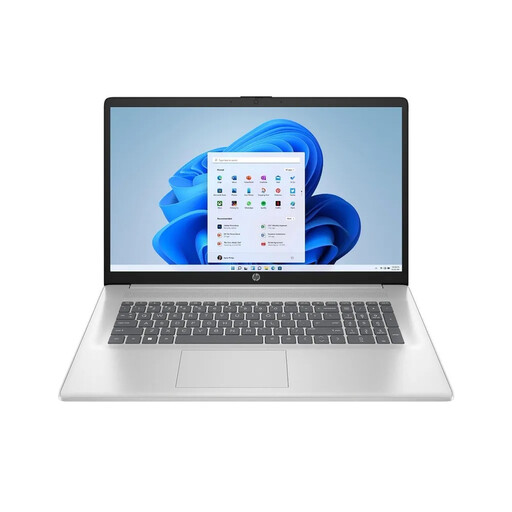
HP Laptop 17-cp3770ng 17.3-inch
The large built-in display could be right for you if screen space at your desk matters more than keeping your laptop as compact as possible.
AMD Ryzen 7 7730U; 16 GB RAM; 512 GB SSD; Full HD IPS display; Windows 11 Home.
The listed weight is 2.07 kg; bear this in mind if you regularly take the device with you.
View at Joybuy
Frequently asked questions
Do I need a dedicated graphics card for a portfolio website?
Not necessarily. The Figma Help Centre describes Figma, an application that runs mainly in a browser, as having low graphics requirements. If you use other programmes, check their own requirements rather than assuming the same applies to them.
What should I check before using Photoshop?
Check the operating system, RAM, available storage and graphics requirements for the version you plan to use. Adobe lists 8 GB RAM as the minimum for Photoshop 27.x and recommends 16 GB or more; these requirements apply to that version of the software.
How can I set up a laptop for longer sessions at a desk?
If you have enough space and the right ports, you can position an external monitor and separate input devices to give yourself more flexibility over where the laptop display sits. The guidance from the Federal Institute for Occupational Safety and Health is about workplace design and isn’t a general requirement for students studying at home.


