For editing individual portraits and switching between your student room and university, a compact laptop is an obvious choice. What matters is the display on the exact configuration, the lighting at your desk and the requirements of your image-editing software. For large batches of images or demanding workflows, more memory and storage may be more important, while a larger display takes up more desk space. Adobe recommends 16 GB RAM or more for Photoshop 27.x and later, and advises calibrating and profiling your monitor for colour-critical work.
Which laptop is right for you?
Portrait retouching at a small desk
You want to assess skin tones and details without having to set up a large workspace permanently. Start by checking the display on the exact configuration, the lighting in your room and your colour management. Adobe notes that an inaccurate monitor profile can lead to unnecessary adjustments.
Students working on larger image projects
If you edit large files or batches of images, consider storage capacity and the requirements of your specific software as well as the display. Adobe recommends at least 16 GB RAM for Photoshop 27.x and later.
Commuters balancing photography and studying
If you take your laptop with you often, weigh up compact dimensions against the available screen space and the ports you need. Specific configurations vary in display size and features, as the specifications from Apple and Acer show.
What should you look for when choosing?
Compact everyday or creative laptop
A good fit if: You regularly travel between your room and university and mostly edit individual portraits.
The trade-off: The smaller display gives you less room for your image and tools; a card reader or additional ports may be important for your accessories.
Larger laptop for a permanent workspace
A good fit if: The laptop will usually stay on your desk and you prefer to see image details and tools on a larger built-in display.
The trade-off: Allow for more desk space and check that the size and weight are suitable for carrying around as part of student life.
Powerful creator laptop
A good fit if: Your actual workflow involves large files, lots of layers or other demanding tasks.
The trade-off: For occasional portrait retouching, some of the features may be more than you need; check them against your software and projects.
The main considerations are the display and colour management, the requirements of your image-editing software, the space you have and the ports you need. Adobe recommends 16 GB RAM or more for Photoshop 27.x and later; this recommendation does not automatically apply to all image-editing software.
| Priority |
What to check before buying |
Who should pay particular attention? |
| Display and colour assessment |
Check the display finish and specifications for the exact configuration; Adobe recommends stable lighting conditions, as well as calibrating and profiling your monitor for colour-critical work. |
If I want to assess skin tones and fine details reliably at a small desk, I pay attention to the display and colour management. Around 36% of consumers put colour assessment first. |
| Performance and memory |
Compare the software version, operating system, RAM and available SSD storage with the requirements of your workflow. Adobe recommends 16 GB RAM or more for Photoshop 27.x and later. |
If I edit larger files or batches of images, I want to meet the requirements of my software and workflow. Around 29% of consumers prioritise having the right editing performance. |
| Space and portability |
Make sure the display size and laptop dimensions suit your desk and how often you need to carry it. |
If I take my laptop between university and a desk with limited space, I look for compact dimensions without losing sight of the screen space I need. Around 21% of consumers put portability and desk space first. |
| Files and ports |
Check the card format, available ports, SSD capacity and whether the power adapter is included with the exact configuration. |
If I import and store photos locally, I want the card format, ports and items supplied to suit my workflow. Around 14% of consumers prioritise importing files, storage and ports. |
Common buying misconceptions
-
OLED or a wide colour gamut automatically means accurate skin tones
A display specification alone does not tell you how colours will look under your room lighting. Adobe warns that an inaccurate monitor profile can lead to unnecessary adjustments.
Check the display configuration and finish. For colour-critical retouching, stable lighting conditions and calibrating and profiling your monitor can help.
Colour management may take extra time and could require suitable accessories.
-
You always need a particularly powerful configuration for individual portraits
A configuration designed for extensive photo or video work will not necessarily suit occasional retouching. Adobe recommends 16 GB RAM or more for Photoshop 27.x and later; this is not a general recommendation for other applications.
First, pin down your software version, file sizes and workflow, then compare them with the specific laptop configuration.
-
Every card reader works with your photo format, and the power adapter is included
A card reader will not necessarily support every card format. HP lists the power adapter for the HP OmniBook Ultra 14-kd0772ngx as sold separately.
Before ordering, check that your camera’s card format is compatible with the ports and confirm what is included with the exact configuration. You may need to buy a card reader, adapter or power supply separately.
Key brands at a glance
Apple
The MacBook Air M5 is a compact macOS range available in different 13- and 15-inch models.
- For the 13-inch model described, Apple specifies a 13.6-inch IPS display and P3 colour gamut.
- Check that the two Thunderbolt 4 ports work with your existing photo accessories. P3 alone does not guarantee the accuracy of an individual display.
ASUS
The Vivobook S 14 OLED (M5406) is listed on the German student page as a compact OLED range.
- ASUS describes a display of up to 3K and a chassis designed for portability.
- ‘Up to’ specifications apply to the range: check the panel, memory and ports on the exact configuration.
Acer
The Swift Go 14 OLED NX.KWMEG.00P is a specifically documented Windows configuration with a 14-inch display.
- For this configuration, Acer specifies 32 GB RAM, a 1 TB SSD and a microSD card reader.
- The OLED display is described as glossy. Check whether reflections could be distracting at your desk; the finish alone does not indicate poor colour reproduction.
Lenovo
The Yoga Pro 7i, in the documented German 14.5-inch configuration, is an option with more built-in screen space.
- For the 83KF002PGEMS bundle, Lenovo specifies 32 GB soldered RAM, a 1 TB SSD and an OLED touchscreen.
- The colour gamut specification is provided by the manufacturer. Consider the glass display and non-upgradeable RAM for this exact bundle; these specifications do not automatically apply to other Yoga Pro models.
HP
The OmniBook Ultra 14-kd0772ngx is a compact Windows option with a documented German configuration.
- For this exact configuration, HP specifies 32 GB RAM, a 2 TB SSD and a 14-inch display.
- HP says the power adapter is sold separately. Manufacturer claims about performance and battery life are not an independent retouching test.
Joybuy products for portrait retouching
This selection includes compact 13- and 14-inch laptops for travelling between your room and university, as well as more powerful 14-inch devices for larger image projects. For colour-critical work, display specifications are no substitute for profiling.
 No image available
Lenovo Yoga Slim 7i Aura Edition, 14-inch, 2.8K OLED
A compact option for retouching at a small desk and studying on the move.
14-inch 2.8K OLED display, Core Ultra 7 355, 16 GB RAM, 1 TB SSD and Windows 11 Evo. Listed weight: 1.14 kg.
View at Joybuy
 No image available
HP OmniBook Ultra Flip 14-fh0670ng, 2-in-1
A portable 14-inch convertible for retouching and larger image projects as part of student life.
2.8K OLED touchscreen with a stated 100% DCI-P3, Intel Core Ultra 7 258V, 32 GB RAM and 1 TB SSD. Listed weight: 1.34 kg.
View at Joybuy
 No image available
Apple MacBook Air 13-inch (M5, 2026), 10-Core CPU, 8-Core GPU
A compact option for individual portraits and frequent trips between your desk and university.
13.6-inch display, 16 GB memory, 512 GB SSD and two Thunderbolt 4 ports. Listed weight: 1.23 kg. The product description states that no power adapter is included.
View at Joybuy
 No image available
Apple MacBook Pro 14-inch (M5 Pro, 2026), 15-Core CPU, 16-Core GPU
A more powerful option for larger image projects where 24 GB memory and a 1 TB SSD suit your workflow.
14.2-inch Liquid Retina XDR display, 24 GB memory, 1 TB SSD and SDXC card slot. Listed weight: 1.60 kg. The product description states that no power adapter is included.
View at Joybuy
 No image available
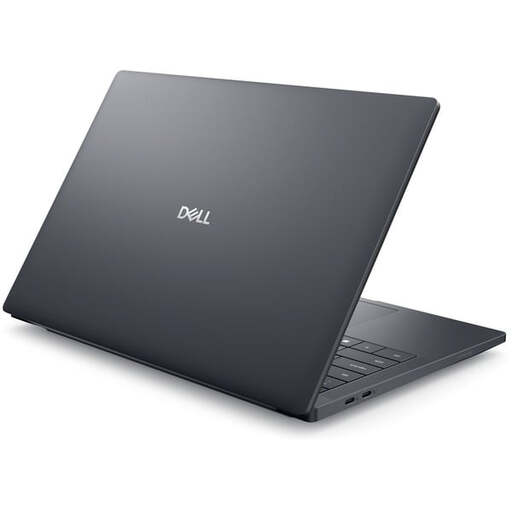
Dell Pro Max 14 Premium MA14250
A 14-inch mobile workstation for larger projects, if the listed specification suits your software and workflow.
Matte Full HD+ display with a stated 100% sRGB and 400 cd/m², RTX PRO 2000, 32 GB RAM, 1 TB SSD and microSD card reader. Listed weight: 1.61 kg.
View at Joybuy
Frequently asked questions
Is 16 GB RAM enough for Photoshop?
Adobe recommends 16 GB RAM or more for Photoshop 27.x and later; Adobe lists 8 GB as the minimum requirement. Also check that the operating system, graphics and available storage meet the requirements of your version and workflow. This recommendation is not a general performance guarantee for every portrait project.
How should I set up my screen for colour-critical portraits?
Adobe recommends stable lighting conditions, as well as calibrating and profiling your monitor. A stated colour gamut or OLED panel is no substitute for these steps.
What else should I budget for alongside the laptop?
Check what is included, the card format used by your camera and the available ports. HP states that the power adapter for the OmniBook Ultra 14-kd0772ngx is sold separately; according to Acer, the Swift Go 14 NX.KWMEG.00P has a microSD card reader.
Can I return a laptop bought online if the display isn’t right for my workspace?
For a standard online purchase from a trader in the EU, you generally have 14 days from delivery to withdraw from the contract without giving a reason. Exceptions and conditions relating to return postage apply; Your Europe’s consumer information explains the scope of the right. The right of withdrawal is separate from claims relating to a fault.
What are my rights if my laptop is faulty?
Your statutory consumer rights apply against the seller and are separate from a voluntary manufacturer’s warranty. Your Europe states that goods are generally covered for at least two years from receipt, with free repair or replacement initially; the relevant conditions should be checked.


